Question

Tomcat 7 won't start after Java update

  • June 6, 2012
  • 14 replies
  • 50 views

Forum|alt.badge.img+3

I am running Casper 8.52 on a Windows Server 2008 R2 OS. A Java update was accidently pushed to the server and the machine has Java 7 update 4 installed. As a result Tomcat 7 will not start and the JSS Web application is inaccessible from a web browser. I tried uninstalling Java 7 update 4 but I am still unable to start the Apache Tomcat7 service. I get a vendor error code 0 when I attempt to start the service. Any ideas of a fix so that I can start the TomCat 7 service? Thank you for any assistance that you can provide.

14 replies

Forum|alt.badge.img+24
  • Valued Contributor
  • June 6, 2012

Yank out Java completely and install the original version you setup the JSS with. Then go walk over to someones desk and smack them on the knuckles.


Forum|alt.badge.img+3
  • Author
  • New Contributor
  • June 6, 2012

Jared,

Thanks for your response. I uninstalled Java 7 update 4. Java 6 update 30 is only Java installed on the Windows Server 2008 R2 machine. Apache TomCat 7 will still not start. Is there an alternate way to try to start the Apache Tomcat 7 service? Without that service started we cannot access the JSS Web App Utility via web browser.


Forum|alt.badge.img+24
  • Valued Contributor
  • June 6, 2012

How are you (re)starting it? From services.msc?


Forum|alt.badge.img+3
  • Author
  • New Contributor
  • June 6, 2012

Yes. I also tried it from the command line with no luck.


Forum|alt.badge.img+24
  • Valued Contributor
  • June 6, 2012

What's the system logs?


Forum|alt.badge.img+8
  • Contributor
  • February 1, 2013

Make sure you copy JCE local_policy.jar and US_export_policy.jar to the c:Program FilesJavaJre7libsecurity directory.


Forum|alt.badge.img+4
  • Contributor
  • April 25, 2016

Old thread but might as well post as this was the entry that appeard when "googling".

I too uninstalled the old Java and updated to the newest, the Apache service didn't start.

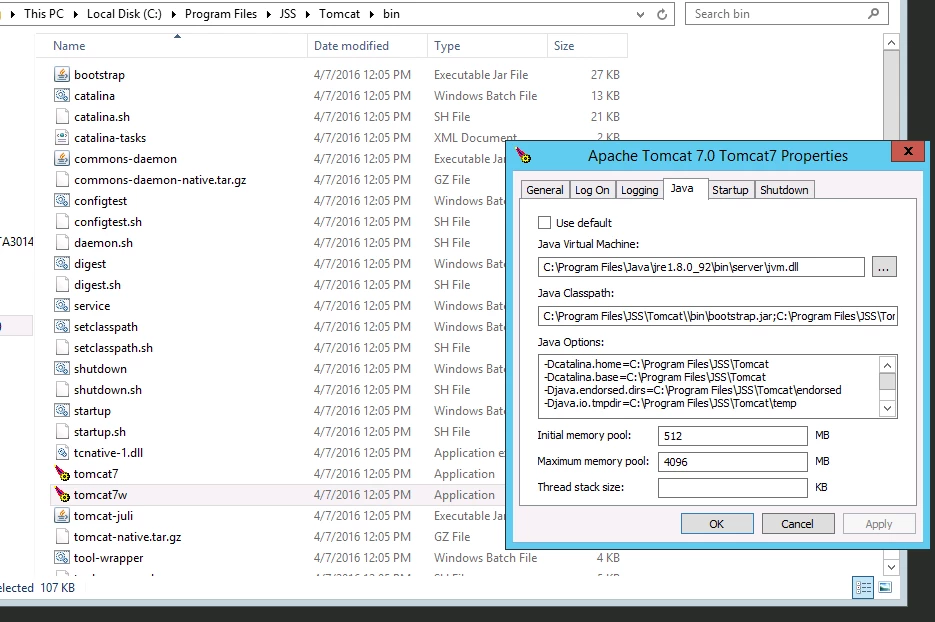
What I did was to open the tomcat settings application and change the "Java Virtual Machine" path to the updated version and now it works again, with new Java.


Forum|alt.badge.img+7

@rskolden, can you elaborate a bit more on the "Tomcat Settings Application"? I am running into this issue as well and looking to change the Java VM path


Forum|alt.badge.img+14
  • Valued Contributor
  • April 25, 2016

See if this post helps:
https://jamfnation.jamfsoftware.com/discussion.html?id=17199

The posts on 10/4 from talkingmoose and Aziz helped me figure this out once upon a time....


Forum|alt.badge.img+4
  • Contributor
  • April 28, 2016

Forum|alt.badge.img
  • New Contributor
  • August 9, 2016

@rskolden Thanks for posting this fix. Just upgraded my JSS to 9.93 and ran into this problem. Worked like a charm.


Forum|alt.badge.img+4
  • Contributor
  • July 14, 2017

This also worked for me, thanks! On JSS 9.99 and the Tomcat 8 service would not start after a JRE update to 8u131. I updated the JRE_Home Environment variable and replaced the JCE Policy files... but also needed to fix the Tomcat 8 Java Virtual Machine path as indicated above. Cheers @rskolden !


Forum|alt.badge.img+7
  • Contributor
  • January 22, 2018

Confirmed needed to update this on my JSS as well after removing existing older versions of Java and updating to Latest. Great tip!


Forum|alt.badge.img+14
  • Contributor
  • June 7, 2018

Just ran into this issue as well with version 10.4.1, once I updated the path for the Java virtual machine, it worked like a charm. Thanks @rskolden