Solved

TrendMicro Worry-Free Security Services WFBS Package Creation

  • April 16, 2019
  • 58 replies
  • 374 views

Show first post

58 replies

Forum|alt.badge.img+8
  • Contributor
  • April 22, 2019

@CorpIT_eB Sorry man.. Lets get this thing figured out. Yes, permissions are all root/admin for mines. Give that a try.


Forum|alt.badge.img+8
  • Author
  • Valued Contributor
  • April 23, 2019

@mack525 I got it to work, i revisited the script and was missing syntax, Once I fixed that it worked like a charm.

Thank You so much for all your help my friend truly a pleasure working with you and all the JAMF Nation on this.


Forum|alt.badge.img+8
  • Contributor
  • April 23, 2019

@CorpIT_eB What did you miss? Which script?


Forum|alt.badge.img+8
  • Author
  • Valued Contributor
  • April 23, 2019

@mack525 I had forgot to re-activate the variable for the IDENTIFIER so essentially what was happening was that the installer would run try to find Trends ID and then error out. It was not evident to me till I relived the script and caught the syntax error.

Now on to the next adventure Parallels!! lol


Forum|alt.badge.img+8
  • Contributor
  • April 23, 2019

Glad it worked out! Nice catch! @CorpIT_eB


Forum|alt.badge.img+5

Where exactly was the syntax error. I think I am running into the same issue. The plist file comes down to the var_temp folder, then nothing happens.


Forum|alt.badge.img+8
  • Author
  • Valued Contributor
  • May 31, 2019

@achristoforatos in my case it was at the string the variable was off. Went from

#!/bin/sh
<string>$youridentifierhere</string>

to the proper string and variable of:

#!/bin/sh
<string>$IDENTIFIER</string>

And I only caught it because, this was a piece of a much larger script.


Forum|alt.badge.img+5

So at the top of the script where IDENTIFIER="" I should place my identifier there then place $IDENTIFIER where you've placed it?


Forum|alt.badge.img+8
  • Author
  • Valued Contributor
  • May 31, 2019

@achristoforatos That is correct. Essentially the ID comes from TrendMicro. you copy and paste that in between the "" so it will look something like:

#!/bin/sh
IDENTIFER="oiwdhcwjnbephrw12w34iodshfphpodhpdncpoe"

So when you call it in the string $IDENTIFER it just grabs the ID.


Forum|alt.badge.img+5

Do you have a correct copy of the script with placings for where the ID string should go?


Forum|alt.badge.img+5

Thanks for your help!


Forum|alt.badge.img+8
  • Author
  • Valued Contributor
  • May 31, 2019
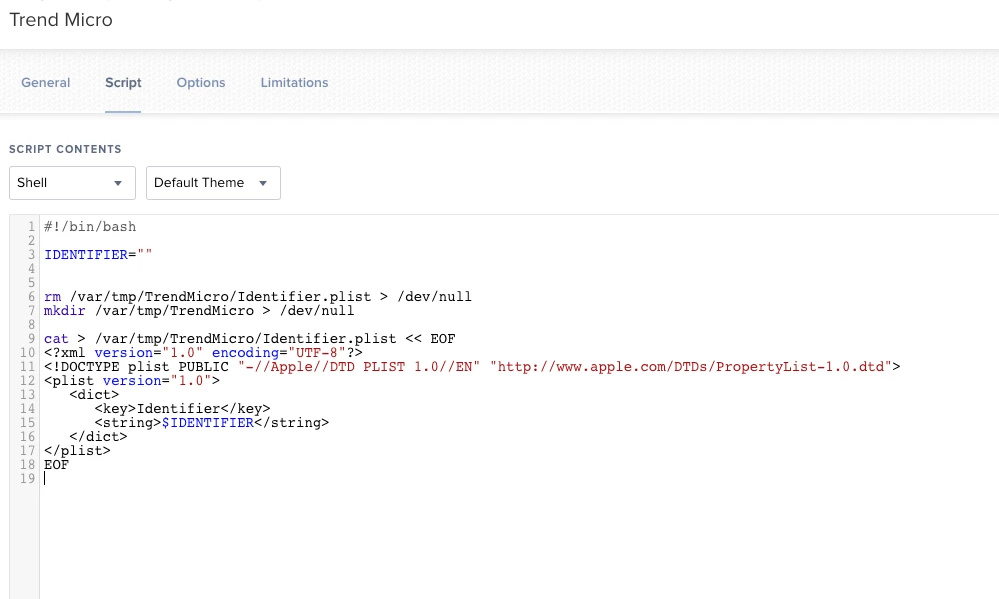
#!/bin/sh
IDENTIFIER="TrendMicroIDgoeshere"

rm /var/tmp/TrendMicro/Identifier.plist > /dev/null
mkdir /var/tmp/TrendMicro > /dev/null

cat > /var/tmp/TrendMicro/Identifier.plist << EOF
<?xml version="1.0" encoding="UTF-8"?>
<!DOCTYPE plist PUBLIC "-//Apple//DTD PLIST 1.0//EN" "http://www.apple.com/DTDs/PropertyList-1.0.dtd">
<plist version="1.0">
   <dict>
      <key>Identifier</key>
      <string>$IDENTIFIER</string>
   </dict>
</plist>
EOF

Forum|alt.badge.img+5

OH! I see what I'm doing wrong! Thanks so much for everyones help! And especially you helping me see what I was doing wrong.


Forum|alt.badge.img+5

@mack525 @CorpIT_eB Thank you for all the help!


Forum|alt.badge.img+8
  • Contributor
  • June 3, 2019

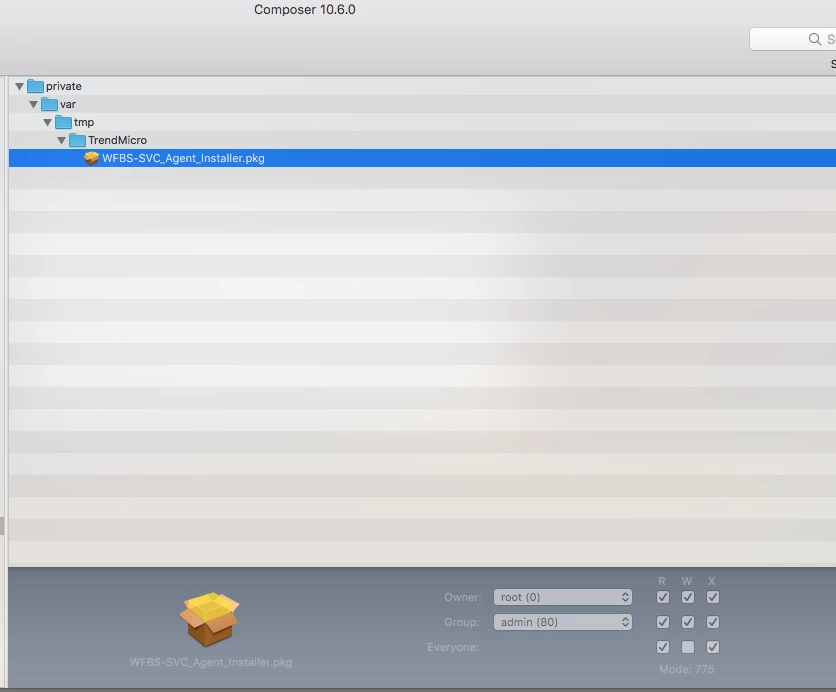
@CorpIT_eB @achristoforatos Unfortunately, None of these steps are documented by Trend. Could've saved all of us a lot of head pounding. Glad its working for you.. If you ever noticed that its not running.. you may need to update/repackage the installer agent thats dropped in the /var/tmp that may fix your issue.


Forum|alt.badge.img+8
  • Author
  • Valued Contributor
  • June 21, 2019

@mack525 I hate to bring back an old post man but have you had any issues with your TrendMicro installation?

After having this install successfully on more than a dozen times with out issue, I am now getting errors at the package lvl. The only thing I have changed has been the categories in JAMF Pro in order to keep our instance clean. Categories should not have any influence on packages correct?

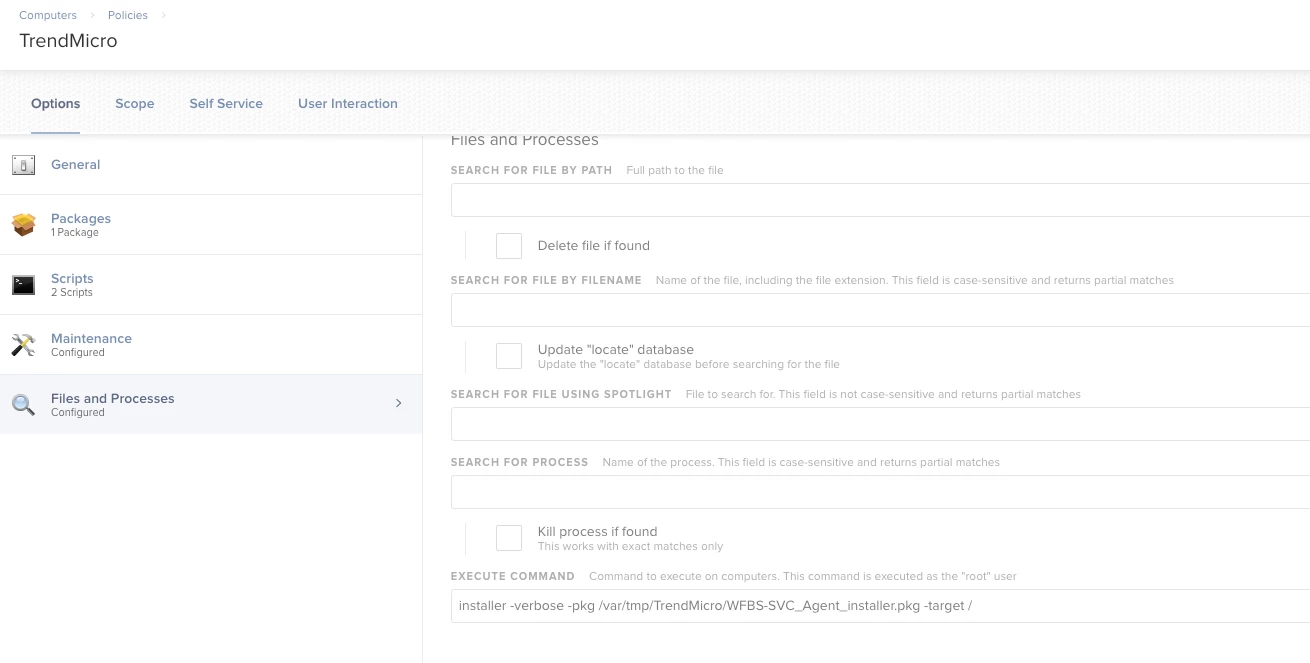
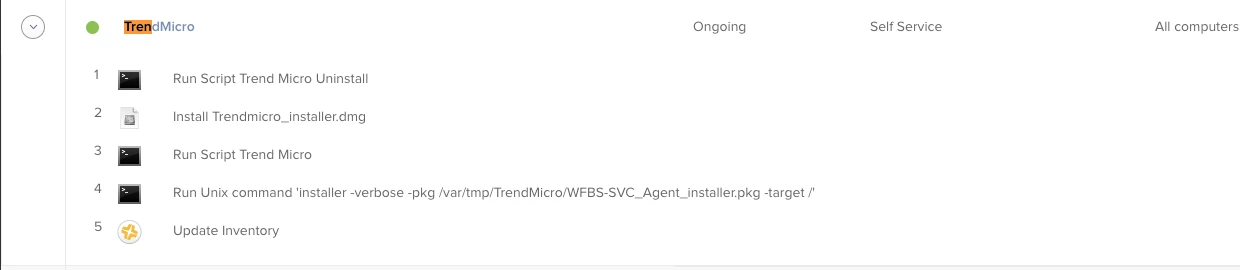
Executing Policy WFBS TrenMicro Installation Downloading https://server.services.jamfcloud.com//download/19727f945eb74fb797d9d257fa52498e/TrendMicro.dmg?token=mytokengoeshere Verifying DMG... Error: Could not verify the downloaded package. 1 Error: TrendMicro.dmg is corrupt. Running script TrendMicro Installation... Script exit code: 0 Script result: mkdir: /var/tmp/TrendMicro: File exists Running command installer -pkg /var/tmp/TrendMicro/WFBS-SVC_Agent_installer.pkg -target /... Result of command: installer: Error - the package path specified was invalid: '/var/tmp/TrendMicro/WFBS-SVC_Agent_installer.pkg'. Relaunching dock(s)... Running Recon... Retrieving inventory preferences from https://mycompanyname.jamfcloud.com/... Locating accounts... Locating package receipts... Searching path: /Applications Locating software updates... Locating printers... Locating hardware information (Mac OS X 10.14.5)... Gathering application usage information... Blessing i386 macOS System on /... Creating Reboot Script...

I have not changed or modified anything on the package since we compiled for creation.


Forum|alt.badge.img+8
  • Contributor
  • June 21, 2019

@CorpIT_eB Have you tried re-packaging the installer app?


Forum|alt.badge.img+8
  • Author
  • Valued Contributor
  • June 21, 2019

@mack525 No, man I have not didn't want to mess with it since it was working so well. I will try and repackage it again next week and get back to you.

Just for self knowledge though Changing categories for policies and certain things in JAMF should not break any of your configurations correct?


Forum|alt.badge.img+8
  • Contributor
  • June 24, 2019

@CorpIT_eB Changing policy categories should have no effect to this issue.


Forum|alt.badge.img+7
  • New Contributor
  • June 24, 2019

May want to check with the Vendor. I ran into a similar issue with Avast, reached out to them let them know I was looking to have Jamf push out the package and they made a special package.


Forum|alt.badge.img+8
  • Author
  • Valued Contributor
  • June 24, 2019

@derrad Thanks it looks like it was just that sole machine that was added recently to the DEP as I created a new user today and it worked fine. But I have reached out to trend on multiple events for such an a reason, and was sent the link for mass deployment like x3 times.

They where not very helpful at all.


Forum|alt.badge.img+7
  • New Contributor
  • June 24, 2019

Glad to hear you got it resolved. Sorry to hear they were not very helpful :(


Forum|alt.badge.img+12
  • Valued Contributor
  • October 14, 2019

NOTE: This is officially broken on Catalina as it turns out that the "Security Agent" install is a x32 Bit installer. Therefore no longer working on Catalina Macs I have reached out to trend support on the matter.

TrendSupport:

Hi, Not to sure about what the equivalent version and build would be for the Mac variants as that information is decided by our back-end team. But as for now, the software in general is not compatible with the latest MacOS update. Best Regards, Timothy | Systems Engineer Global Support Services Trend Micro, Inc. "Securing Your Journey to the Cloud"

ETA on a new client, is being said to be sometime next month.


Forum|alt.badge.img+12
  • Valued Contributor
  • November 19, 2019

@mack525

Hey Mac I was trying to update and the package and redeploy this again and I am ow getting the following error any ideas:

Executing Policy WFBS TrenMicro Installation
Downloading TrendMicro.pkg...
Downloading https://use1-jcds.services.jamfcloud.com//download/19727f945eb74fb797d9d257fa52498e/TrendMicro.pkg?token=mytokenID
Verifying package integrity...
Installation failed. The package could not be verified.
Running script TrendMicro Installation...
Script exit code: 0
Script result: rm: /var/tmp/TrendMicro/Identifier.plist: No such file or directory
Running command installer -pkg /var/tmp/TrendMicro/WFBS-SVC_Agent_installer.pkg -target /...
Result of command:
installer: Error - the package path specified was invalid: '/var/tmp/TrendMicro/WFBS-SVC_Agent_installer.pkg'.
Relaunching dock(s)...
Running Recon...
Retrieving inventory preferences from https://mycloud.jamfcloud.com/...
Locating accounts...
Locating package receipts...
Searching path: /System/Applications
Locating software updates...
Locating printers...
Locating hardware information (Mac OS X 10.15.1)...
Gathering application usage information...
Searching path: /Applications
Blessing i386 macOS System on /...
Creating Reboot Script...

Forum|alt.badge.img+8
  • Contributor
  • November 19, 2019

10.15.1 has not been verified by Trend. It may be throwing this error @JarvisUno