
Question

Trying to Restrict Firefox

  • March 16, 2015
  • 5 replies
  • 25 views

Forum|alt.badge.img+3

Hi All,
We have a filtering policy at school & student can take laptops home. Firefox is not installed on the computer,as it can be set to bypass system proxy settings. The Restrict Application works fine but.... if the app is copied to the users home and the Name Changed, it gets by the restriction, even though the process running in Activity Monitor still shows as Firefox.

Anyone got an idea how to make this work?

Thanks
5 replies

Forum|alt.badge.img+10
  • Contributor
  • March 16, 2015

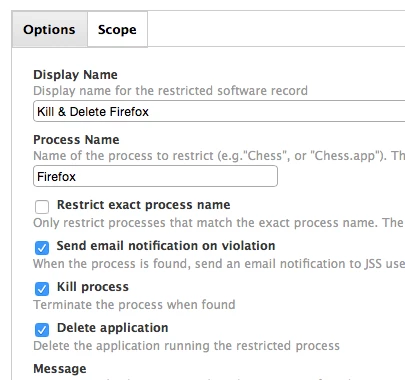
It's strange that it's not working. I have just tested it and it works fine on and off the network.

Changed the name of Firefox, placed it on the desktop and ran it. Process was killed.

These are my settings...


davidacland
Forum|alt.badge.img+18
  • Valued Contributor
  • March 16, 2015

Hi @ssorrentino, do you have the "Restrict exact process name" option selected? Using that option forces the restricted software feature to use the process name (which can't be changed) rather than the app name.


Forum|alt.badge.img+3
  • Author
  • New Contributor
  • March 16, 2015

I have the restrict exact process name checked.. These two posts seem to differ on the results. I will try without that checked


Forum|alt.badge.img+3
  • Author
  • New Contributor
  • March 16, 2015

SUccess: !!! The restrict Exact Name has to be UNCHECKED

Thanks for these quick replies


Forum|alt.badge.img+10
  • Contributor
  • March 16, 2015

Glad it worked @ssorrentino :)
