Is there a way to turn OFF parental controls using a command line.
The target client is on Yosemite. I need to be able to find a way to disable that checkmark under SYstemPreferences -> Accounts -> user 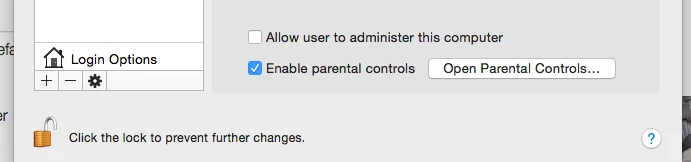

 +6
+6Is there a way to turn OFF parental controls using a command line.
The target client is on Yosemite. I need to be able to find a way to disable that checkmark under SYstemPreferences -> Accounts -> user
Best answer by philcebutv
@jhbush1973 We wanted actually to turn it OFF as we don't know what implications it may cause later. Although, the settings enabled are only the limited printing ability and some disabling of dictation, we wanted to ensure that all our user account are clean and no other settings turned ON..
anyways the command below seems to turn it OFF
sudo dscl . -mcxdelete /Users/username
sudo rm -rf /Library/Managed Preferences/usernameEnter your E-mail address. We'll send you an e-mail with instructions to reset your password.



