Question

(Tutorial) FortiClient 6.4.x Deploy with config

  • March 11, 2021
  • 30 replies
  • 397 views

Show first post

30 replies

Forum|alt.badge.img
  • New Contributor
  • December 9, 2022

Just a quick update and info share for our free implementation of FortiClient 7.0.3.  Thanks to Mickl for providing the bulk of this process! 

  • Deploy FortiClient 7.0.3.mpkg (pulled from DMG) via Composer pkg to custom folder on endpoint
  • Deploy custom vpn.plist via composer to /Library/Application Support/Fortinet/FortiClient/conf/ to endpoint
  • If upgrade, run a site acceptable variation of the following script


#!/bin/bash #Stops all running FortiClient processes killall FortiClientAgent killall FortiClient #Initiates silent uninstall of current Forticlient /Applications/FortiClientUninstaller.app/Contents/Library/LaunchServices/com.fortinet.forticlient.uninstall_helper #Run FortiClient 7.0.3 Installer installer -verboseR -pkg "/private/tmp/FortiClient_7.0.3_Source_Files/FortiClient 7.0.3.mpkg" -target / #Copy vpn.plist from tmp to FortiClient config folder cp /private/tmp/FortiClient_7.0.3_Source_Files/vpn.plist "/Library/Application Support/Fortinet/FortiClient/conf/"


  • If fresh install, create another policy to push FortiClient 7.0.3.mpkg to endpoint, then install vpn.plist, and add a maintenance item to update inventory
  • Create a smart group "FortiClient Installed" with criteria "Application Title Is FortiClient.App"
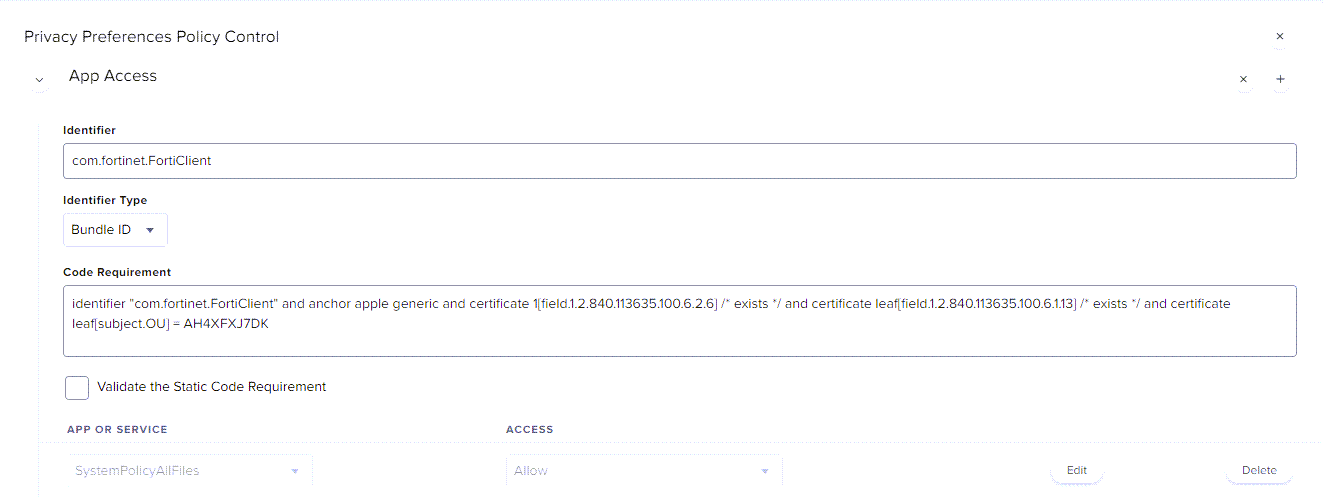
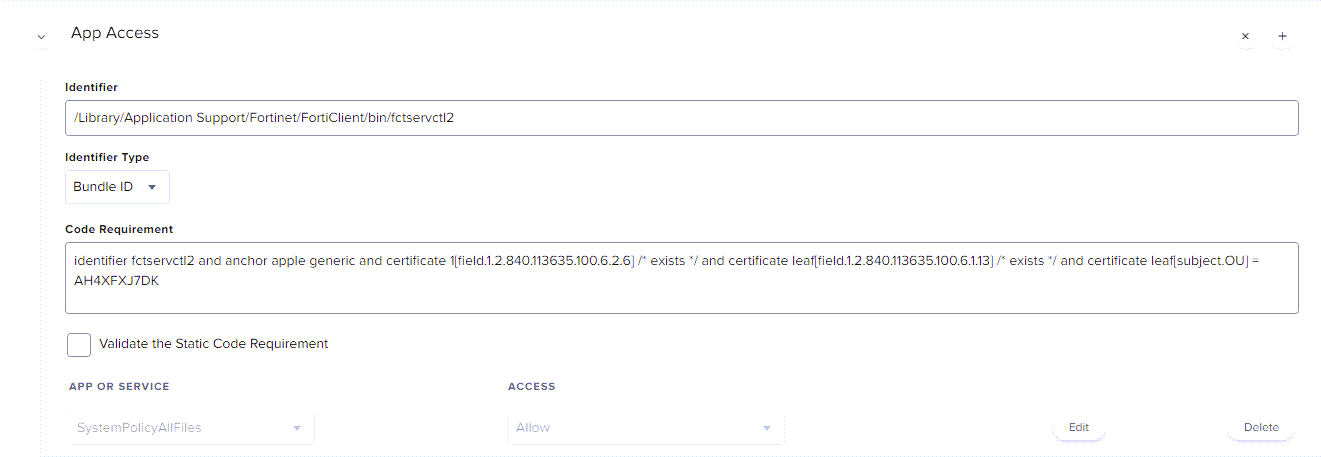
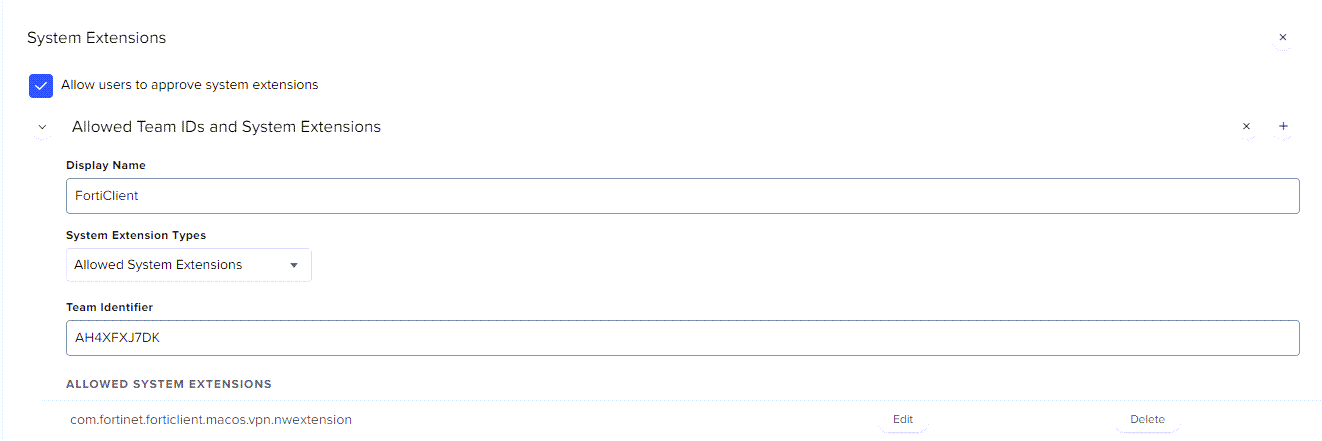
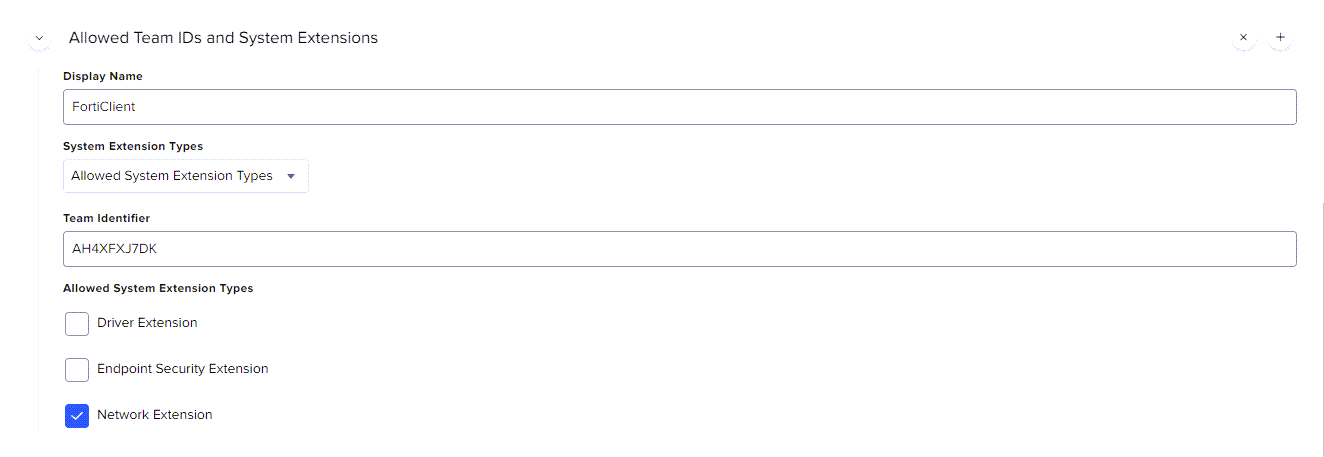
  • To hide client-side pop-ups (FortiTray popup untested at this time) create a configuration profile with both PPPCs and System Extensions as below, and scope it to "FortiClient Installed": 

Where might a fella find the mpkg? When I get the installer from the internet, it is an online installer.


Forum|alt.badge.img+3
  • New Contributor
  • September 19, 2023

Hi. 


how to charge the configure and parameters? I need help


Forum|alt.badge.img
  • New Contributor
  • February 15, 2024

Create a new directory wherever you want it to reside using composer. Take the .dmg installer and convert it into a source and rebuild it as a package. 


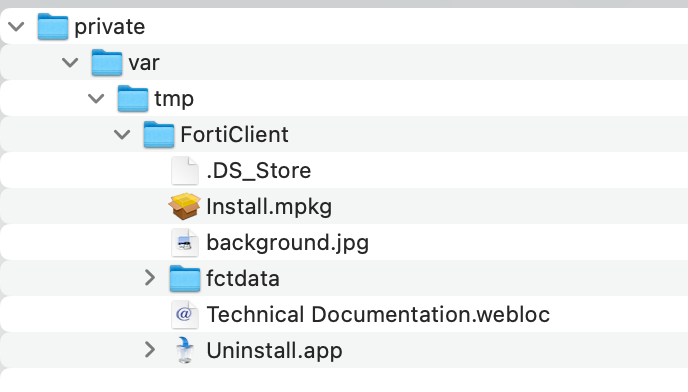
In mickl089's example, 'private/var/tmp/FortiClient' and dump the contents of the .dmg in that directory.


Have your post-install script invoke the install. Just make sure you have it in the same directory. 

installer -allowUntrusted -pkg /private/var/tmp/FortiClient/Install.mpkg -target /Applications/


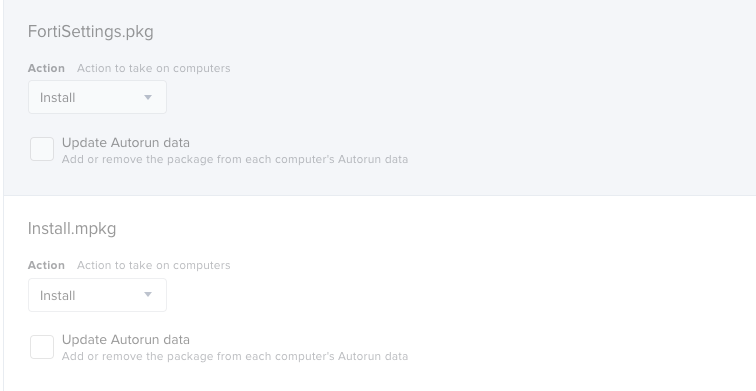
This screenshot helped me a lot! I was able to install the file and then run "installer -pkg /private/tmp/FortiClient_7.2.0/Install.mpkg -target /" afterward


Forum|alt.badge.img+4

Just a quick update and info share for our free implementation of FortiClient 7.0.3.  Thanks to Mickl for providing the bulk of this process! 

  • Deploy FortiClient 7.0.3.mpkg (pulled from DMG) via Composer pkg to custom folder on endpoint
  • Deploy custom vpn.plist via composer to /Library/Application Support/Fortinet/FortiClient/conf/ to endpoint
  • If upgrade, run a site acceptable variation of the following script


#!/bin/bash #Stops all running FortiClient processes killall FortiClientAgent killall FortiClient #Initiates silent uninstall of current Forticlient /Applications/FortiClientUninstaller.app/Contents/Library/LaunchServices/com.fortinet.forticlient.uninstall_helper #Run FortiClient 7.0.3 Installer installer -verboseR -pkg "/private/tmp/FortiClient_7.0.3_Source_Files/FortiClient 7.0.3.mpkg" -target / #Copy vpn.plist from tmp to FortiClient config folder cp /private/tmp/FortiClient_7.0.3_Source_Files/vpn.plist "/Library/Application Support/Fortinet/FortiClient/conf/"


  • If fresh install, create another policy to push FortiClient 7.0.3.mpkg to endpoint, then install vpn.plist, and add a maintenance item to update inventory
  • Create a smart group "FortiClient Installed" with criteria "Application Title Is FortiClient.App"
  • To hide client-side pop-ups (FortiTray popup untested at this time) create a configuration profile with both PPPCs and System Extensions as below, and scope it to "FortiClient Installed": 

Hi :)


sadly we are having problems with the deployment of Forti...unfortunately for me is a unknown world so i think i'm making more mistakes that i want, because i cannot follow everything you wrte :( sorry!


we get the failed Policy with the error:

 Installation failed. The installer reported: installer: Package name is FortiClient
installer: Upgrading at base path / installer: The upgrade failed. (The Installer encountered an error that caused the installation to fail. Contact the software manufacturer for assistance. An error occurred while running scripts from the package “FortiClientVPNSetup_7.4.0.1645.pkg”.)


my questions:

1. what do you mean by: 

  • Deploy custom vpn.plist via composer to /Library/Application Support/Fortinet/FortiClient/conf/ to endpoint?
  • we are deploying a config Profile same as you said -> should be ok but i cannot test that far.
  • I cannot understand what are you trying to do with his bash line:
#Copy vpn.plist from tmp to FortiClient config folder
cp /private/tmp/FortiClient_7.0.3_Source_Files/vpn.plist "/Library/Application Support/Fortinet/FortiClient/conf/"


thanks a lot to everyone that can help me :)


Forum|alt.badge.img+4

Hi :)


sadly we are having problems with the deployment of Forti...unfortunately for me is a unknown world so i think i'm making more mistakes that i want, because i cannot follow everything you wrte :( sorry!


we get the failed Policy with the error:

 Installation failed. The installer reported: installer: Package name is FortiClient
installer: Upgrading at base path / installer: The upgrade failed. (The Installer encountered an error that caused the installation to fail. Contact the software manufacturer for assistance. An error occurred while running scripts from the package “FortiClientVPNSetup_7.4.0.1645.pkg”.)


my questions:

1. what do you mean by: 

  • Deploy custom vpn.plist via composer to /Library/Application Support/Fortinet/FortiClient/conf/ to endpoint?
  • we are deploying a config Profile same as you said -> should be ok but i cannot test that far.
  • I cannot understand what are you trying to do with his bash line:
#Copy vpn.plist from tmp to FortiClient config folder
cp /private/tmp/FortiClient_7.0.3_Source_Files/vpn.plist "/Library/Application Support/Fortinet/FortiClient/conf/"


thanks a lot to everyone that can help me :)


it works! thanks a lot @Baravis  now just trying to deploy the VPN Config