

I am trying to push ARD down to a user's machine but it does not seem to work. I have done this successfully in the past by taking these steps:
- added an additional license via VPP
- in JAMF, I go to Mac Store applications, select ARD and assign the license to the machine+user under Scope
- had user force a check in via running sudo jamf policy command in terminal to run the enable and configure ARD scripts
Once the user completes this, they had ARD installed on their machine.
Following the same steps I get an error under the pending commands tab for their machine:
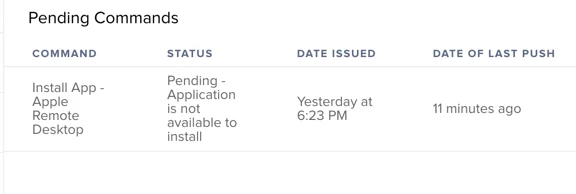
The are 3 changes to the environment that I can think of since the last time I successfully ran this:
- we've renewed our VPP Token
- we have upgraded JSS
- ARD has been updated in the Mac store
My guess is one or both of the ARD scripts might need to be updated to account for these changes but I'm not sure because I haven't run into this issue before.
Edit:
Some additional info. When adding users into the Scope of ARD under Mac Applications, I add BOTH the user and the machine itself. Is this redundant? Is it essentially taking up two licenses per user. If so, then that answers my original question as I've exhausted all my licenses because I've double-assigned them.
