Solved

Uncheck Share Printer

  • October 20, 2015
  • 5 replies
  • 21 views

Forum|alt.badge.img+2

Hi All,

I need assistance with deploying a printer with the Uncheck Share Printer. I have done some of the suggestions mention on other posts such as:

https://jamfnation.jamfsoftware.com/featureRequest.html?id=1846

https://jamfnation.jamfsoftware.com/discussion.html?id=4174

https://jamfnation.jamfsoftware.com/discussion.html?id=11050

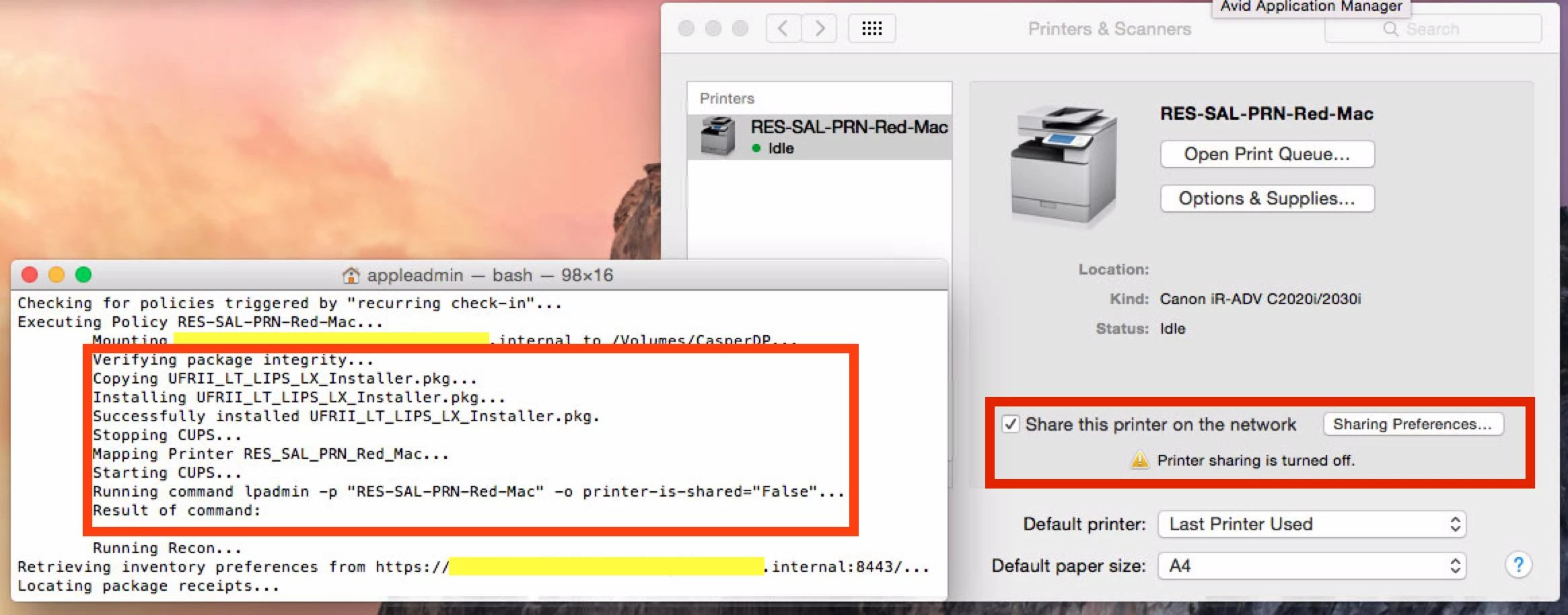
But not had any luck with the terminal commands. I have attached a screen shot of the policy I created. I would appreciate it if someone has input I can try.

Thanks in advance

Best answer by thoule

This script will disable printer sharing for all installed printers. Not exactly on deployment as you are asking, but you can run it after.

#!/bin/bash

osxVer=`/usr/bin/sw_vers | grep ProductVersion | cut -d: -f2`
minVer=`echo $osxVer | cut -d. -f2`

# start cupsd for os x 10.9+
if (( $minVer >= 9 )); then

    /usr/sbin/cupsd

fi

# Disable print sharing 
for i in `/usr/bin/find /etc/cups/ppd -type f -maxdepth 1 -name *.ppd | awk -F "/" '{print $5}' | cut -d "." -f1`; do

    echo "Disabling Sharing on printer: ${i}"

    /usr/sbin/lpadmin -p ${i} -P /private/etc/cups/ppd/${i}.ppd -o printer-is-shared=false

done

exit 0

5 replies

Forum|alt.badge.img+15
  • Contributor
  • Answer
  • October 20, 2015

This script will disable printer sharing for all installed printers. Not exactly on deployment as you are asking, but you can run it after.

#!/bin/bash

osxVer=`/usr/bin/sw_vers | grep ProductVersion | cut -d: -f2`
minVer=`echo $osxVer | cut -d. -f2`

# start cupsd for os x 10.9+
if (( $minVer >= 9 )); then

    /usr/sbin/cupsd

fi

# Disable print sharing 
for i in `/usr/bin/find /etc/cups/ppd -type f -maxdepth 1 -name *.ppd | awk -F "/" '{print $5}' | cut -d "." -f1`; do

    echo "Disabling Sharing on printer: ${i}"

    /usr/sbin/lpadmin -p ${i} -P /private/etc/cups/ppd/${i}.ppd -o printer-is-shared=false

done

exit 0

Forum|alt.badge.img+21
  • Employee
  • October 20, 2015

You may want to vote up this feature request: .

I generally use the following script in conjunction with my printer deployments so that I can disable printer sharing when the printer is deployed. NOTE: Many of my users do share a home printer so constantly disabling all of printer sharing doesn't work for me.

#!/bin/sh

/usr/sbin/lpadmin -p "$4" -o printer-is-shared="False"

I name parameter 4 in the script settings Printer Queue Name. Be sure that you are passing the script the printer device name either from CUPS (http://localhost:631) or from the Settings > General dialog box of the printer application.


Forum|alt.badge.img+21
  • Employee
  • October 20, 2015

Your screenshot shows that you are disabling printer sharing on the print queue "RES-SAL-PRN-Red-Mac", but you are installing the print queue "RES_SAL_PRN_Red_Mac". If you update the script with the correct queue name, I think the command you are running will work just fine.


Forum|alt.badge.img+33
  • Hall of Fame
  • October 20, 2015

I've got a script to disable printer sharing (similar to @nkoval's script) available from here:

https://github.com/rtrouton/rtrouton_scripts/tree/master/rtrouton_scripts/Casper_Scripts/disable_printer_sharing


Forum|alt.badge.img+2
  • Author
  • New Contributor
  • October 20, 2015

I can confirmed that running Todd Houles script has worked first time. Thank you very much.