Solved

Uploading pkg and appears as pkg.zip

  • April 22, 2014
  • 10 replies
  • 75 views

Forum|alt.badge.img+4

Hi,

Is there any relevance when you transfer a .pkg to Casper Admin and it appears as .pkg.zip?

Best answer by admin13

Hey all,

This is normal, expected behavior if you've migrated your packages and scripts.

https://jamfnation.jamfsoftware.com/article.html?id=327 has a bit more detail on it, but the relevant part:

After the migration, newly added scripts are stored in the jamfsoftware database, and any newly added non-flat PKGs are compressed.

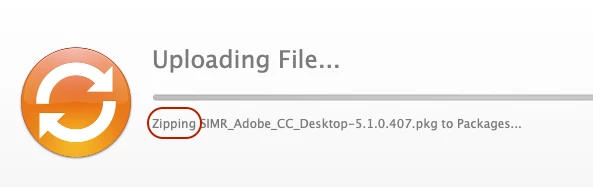
^ That's where the .pkg.zip comes from. It's compressed automatically by Admin when you upload a .pkg. If you watch very, very closely (or have an exceptionally large pkg) you can catch the part during the upload in which the status tells you it's compressing the package.

I should add that, on my JSSes that have had the Migrate button hit, it will compress flat and non-flat PKG files to .pkg.zip (or, at least, non-flat PKG files created in Composer) as well.
No worries though, the software knows how to handle them and they should install just fine.

As @daz_dar mentioned, it's to help the JDS (WebDAV) and HTTP/HTTPS distribution points better deal with .pkg files as they tend to want to view them as directories instead of packages, which can cause installation failures.

Thanks!

Amanda Wulff
JAMF Software Support

10 replies

daz_wallace
Forum|alt.badge.img+13
  • Contributor
  • April 22, 2014

Hi Sinergi,

Others can likely confirm, but I believe that if the uploaded package file isn't a flat package then Casper Admin will zip it as it adds it to the Distribution Point. I image this is to help with HTTP/HTTPS downloads as Munki does the same thing.

At the end of the day, as long as your package still works then its all good!

Hope that helps

Darren


donmontalvo
Forum|alt.badge.img+36
  • Hall of Fame
  • April 22, 2014

Wow, we're preparing to move to 9.3, if this is a feature it's a most welcome one.

@stevewood Just pinged me to say v9 brought that feature...can't wait for CMA/CCA in May. :)

Don


Forum|alt.badge.img+4
  • Author
  • Contributor
  • April 22, 2014

Thanks daz_dar, I can confirm that the package does in fact work as .pkg.zip. However, after renaming the package within Casper Admin to .pkg did not work.


Forum|alt.badge.img+17
  • Contributor
  • Answer
  • April 22, 2014

Hey all,

This is normal, expected behavior if you've migrated your packages and scripts.

https://jamfnation.jamfsoftware.com/article.html?id=327 has a bit more detail on it, but the relevant part:

After the migration, newly added scripts are stored in the jamfsoftware database, and any newly added non-flat PKGs are compressed.

^ That's where the .pkg.zip comes from. It's compressed automatically by Admin when you upload a .pkg. If you watch very, very closely (or have an exceptionally large pkg) you can catch the part during the upload in which the status tells you it's compressing the package.

I should add that, on my JSSes that have had the Migrate button hit, it will compress flat and non-flat PKG files to .pkg.zip (or, at least, non-flat PKG files created in Composer) as well.
No worries though, the software knows how to handle them and they should install just fine.

As @daz_dar mentioned, it's to help the JDS (WebDAV) and HTTP/HTTPS distribution points better deal with .pkg files as they tend to want to view them as directories instead of packages, which can cause installation failures.

Thanks!

Amanda Wulff
JAMF Software Support


Forum|alt.badge.img+8
  • Contributor
  • January 12, 2016

What if when you upload a pkg, that's say 5GB, to admin and it's IMMEDIATELY available. Our network isn't that strong, so I'm wondering if there's a problem somewhere


dstranathan
Forum|alt.badge.img+19
  • Valued Contributor
  • June 4, 2020

Never managed Adobe CC in Jamf until recently. Saw the on-the-fly compression behavior today. Thought I'd post a screenie...


awjohnso
Forum|alt.badge.img+6
  • Contributor
  • June 17, 2020

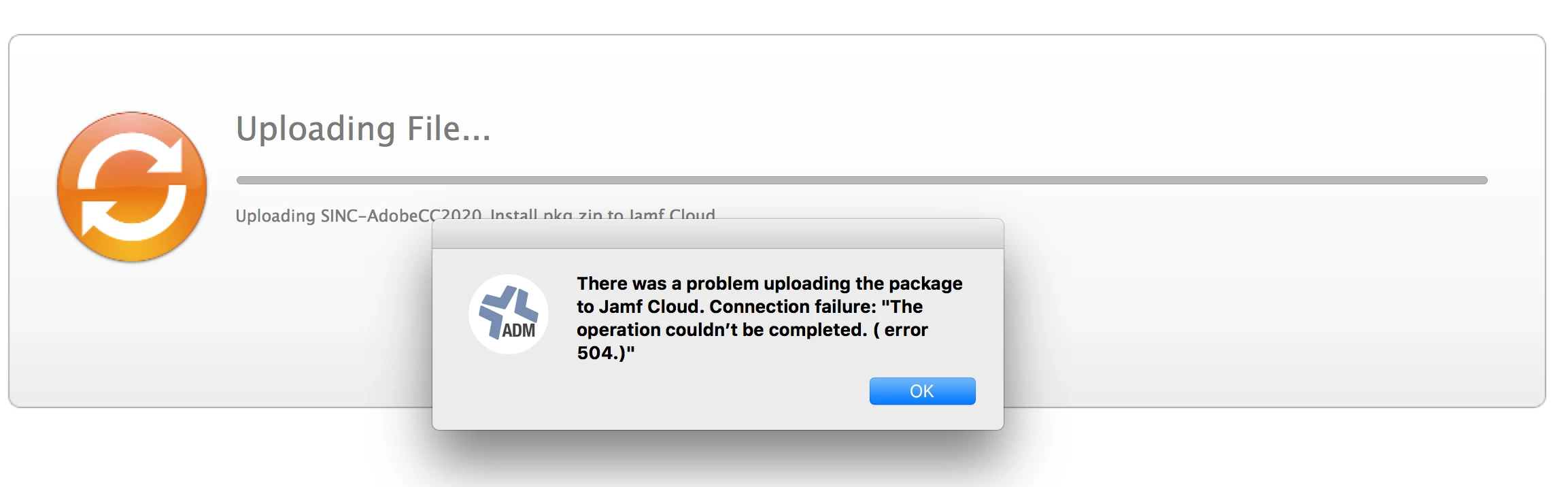
We are in the midst of transitioning to a Jamf Cloud instance from Munki/AirWatch. So far the process has been going okay. Yesterday afternoon while trying to upload the Adobe CC 2020 full pkg (18gigs+) I have been meet with failure with Jamf Admin and the Web interface. The pkg gets zipped up, and most of the upload happens, and just before it ends I get an error. We only have a cloud instance with no local repositories and I don't have the time now to create one.

Any suggestions? I figured I'd post here before reaching out to support to see if there is a solution floating around. Worst case scenario I can package each Adobe CC application in it's own package, but I am trying to avoid that if I can.

Thanks.


Forum|alt.badge.img
  • New Contributor
  • August 7, 2020

@awjohnso I have nothing helpful to add unfortunately other than that I had exactly the same issue as you with the same setup. I ran out of time in the end and just had to package each app individually.


sdagley
Forum|alt.badge.img+25
  • Jamf Heroes
  • August 7, 2020

@mkessel @awjohnso You should take a look at pkgChunker. From the description:

pkgChunker was developed to address an limitation of the Jamf Cloud Distribution Service (JCDS) where packages larger than 20GB are not able to be distributed to clients. However with this utility, you can easily chunk the parent package into smaller child flat packages that can be uploaded directly into Jamf Pro and distributed via a single policy. All the logic is included in the child packages to reassemble once all pieces are present and complete the install of the parent package.

awjohnso
Forum|alt.badge.img+6
  • Contributor
  • August 7, 2020

Interesting regarding the pkgChunker. My issues ended up being the Cloud storage was broken, which lasted almost 2 plus weeks. After they got it fixed, we discovered other limitations, as in when we re-installed and moved 65 computes over to JAMF and they all pulled down packages etc around the same time, we killed our border, and subnet firewalls... So we are now architecting local distribution points around our campus...