Solved

User Shared Drive Script - necessity of random mount point suffixes?

  • April 19, 2016
  • 10 replies
  • 25 views

Forum|alt.badge.img+12

I've got a script and launch agent for mounting users' home share drives and group shared drives that's been passed down the generations of mac admins. We use this script whether it's a one or multi-user computer. The launch agent runs every 5 minutes to make sure the drives reconnect if a user ejects them, or needs to reconnect (provided the computer is connected to our network). It also appends a randomly generated numeric suffix to the folder it creates as the mount point in /tmp. So the first time it runs the mount point might be "/private/tmp/fs01-user-61245" and the next it's "/private/tmp/fs01-user-421576."

Related to that, I'm having an issue where our users' home shares aren't showing any contents when you go to the Finder sidebar under "Shared"—it's just blank. If you access their home share from "Computer" in the "Go" menu, everything shows up. It's not the script causing that problem—when I manually connect, I have the same issue.

"No problem!" I think, as I can use mysides to add the mount point to their sidebar's favorites. Except, those random suffixes when the script sets the mount point... It's always changing.

I think I've worked out a solution for my sidebar-adding-script that checks which folder is currently the mount point, but the real question that's bugging me is: are the randomly generated suffixes in the drive mounting script actually necessary anymore?

Best answer by davidacland

We got around that issue by switching to osascript/applescript for the drive mount. It creates the mount point for you (using the same method used by connect to server).

Here's a copy of our scripts:

Mount shared network drives: https://github.com/amsysuk/public_scripts/blob/master/shareConnect/shareConnect_Casper.sh

Mount the SMBHome attribute from AD: https://github.com/amsysuk/public_scripts/blob/master/mount_SMBHome/mounthome.sh

The main part mounting the drive is:

# Mount the drive
    mount_script=`/usr/bin/osascript > /dev/null << EOT
    tell application "Finder" 
    activate
    mount volume "$protocol://${serverName}/${shareName}"
    end tell
EOT`

10 replies

davidacland
Forum|alt.badge.img+18
  • Valued Contributor
  • Answer
  • April 19, 2016

We got around that issue by switching to osascript/applescript for the drive mount. It creates the mount point for you (using the same method used by connect to server).

Here's a copy of our scripts:

Mount shared network drives: https://github.com/amsysuk/public_scripts/blob/master/shareConnect/shareConnect_Casper.sh

Mount the SMBHome attribute from AD: https://github.com/amsysuk/public_scripts/blob/master/mount_SMBHome/mounthome.sh

The main part mounting the drive is:

# Mount the drive
    mount_script=`/usr/bin/osascript > /dev/null << EOT
    tell application "Finder" 
    activate
    mount volume "$protocol://${serverName}/${shareName}"
    end tell
EOT`

Forum|alt.badge.img+12
  • Contributor
  • April 19, 2016

Depending on what/how you are mounting you could maybe use the automounter. Just clicking on the folder will mount the directory so it won't matter if it isn't mounted, wildcards can be useful too.

Apple autofs


Forum|alt.badge.img+12
  • Author
  • Valued Contributor
  • April 19, 2016

My gut was telling me I should switch over to using osascript, but it didn't click that I wouldn't have to change much to get it working until I saw that script snippet. Thanks!


Forum|alt.badge.img+5
  • Contributor
  • April 20, 2016

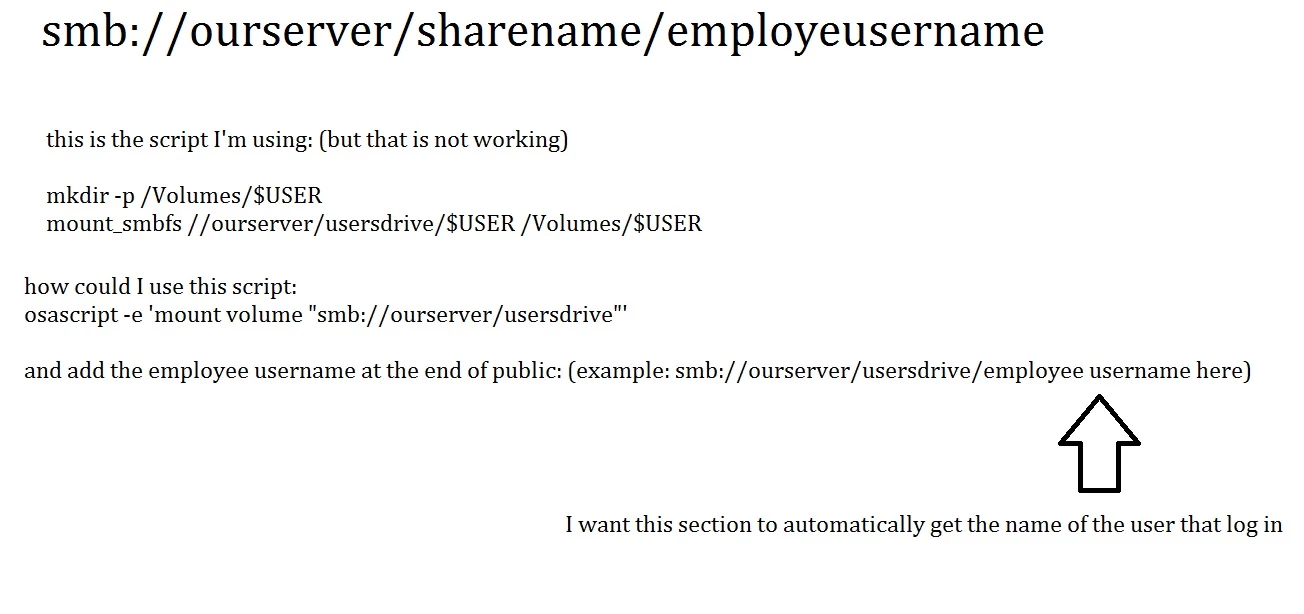
David Acland I need your help please I'm new to shell script.
In my company I would like to map the employees personal drive using a shell script.
I was taking a look at your script (but like I said Im new to shell script).


Forum|alt.badge.img+5
  • Contributor
  • April 20, 2016

sorry I meant add the employee username at the end of "usersdrive" example: smb://ourserver/usersdrive/employee username here


Forum|alt.badge.img+5
  • Contributor
  • April 20, 2016

I was reading your other script :
https://github.com/amsysuk/public_scripts/blob/master/mount_SMBHome/mounthome.sh
and that's exactly what I need, could you please let me know where I could put my information (smb://ourserver/usersdrive/username)
thank you.


davidacland
Forum|alt.badge.img+18
  • Valued Contributor
  • April 20, 2016

Hi,

The main change you'll want is:

username=$(code to read username)

# Mount the drive
    mount_script=`/usr/bin/osascript > /dev/null << EOT
    tell application "Finder" 
    activate
    mount volume "smb://ourserver/usersdrive/${username}"
    end tell
EOT`

You can get the username a few ways:

  • If it is the same as the users logon name, and you are running this at login, you can just use $3
  • You can use /bin/ls -l /dev/console | /usr/bin/awk '{ print $3 }'
  • A more "Apple Approved" way that gets the same details is python -c 'from SystemConfiguration import SCDynamicStoreCopyConsoleUser; import sys; username = (SCDynamicStoreCopyConsoleUser(None, None, None) or [None])[0]; username = [username,""][username in [u"loginwindow", None, u""]]; sys.stdout.write(username + " ");'

As a full example:

username=$(python -c 'from SystemConfiguration import SCDynamicStoreCopyConsoleUser; import sys; username = (SCDynamicStoreCopyConsoleUser(None, None, None) or [None])[0]; username = [username,""][username in [u"loginwindow", None, u""]]; sys.stdout.write(username + "
");')

# Mount the drive
    mount_script=`/usr/bin/osascript > /dev/null << EOT
    tell application "Finder" 
    activate
    mount volume "smb://ourserver/usersdrive/${username}"
    end tell
EOT`

Forum|alt.badge.img+5
  • Contributor
  • April 20, 2016

Thank you sooooo much! =)

(ps: could you give me some reference on where to learn about shell script)


davidacland
Forum|alt.badge.img+18
  • Valued Contributor
  • April 20, 2016

Forum|alt.badge.img+5
  • Contributor
  • April 20, 2016

you made my day!!! thank you.