
Solved

Viewing/Editing Casper .mobileconfig files

  • March 23, 2015
  • 11 replies
  • 222 views

Forum|alt.badge.img+5

I'm working on a new .mobileconfig file to distribute 802.1x settings.

I can make this work in a file built by ProfileManager, but when I build what appears to be the same thing on my JSS and load it on a test box, I'm getting "Acquired: cannot prompt for missing user name" from eapolclient in console.app.

I want to compare the two mobileconfig files, so I converted the PM file with plutil:

>>plutil -convert xml1 PMFile.mobileconfig

When I try to convert the JSS-generated file:

>>plutil -convert xml1 JSSFile.mobileconfig 
JSSFile.mobileconfig: Property List error: Unexpected character 0 at line 1 / JSON error: JSON text did not start with array or object and option to allow fragments not set.

Is there a way to get a standard Property List file from the JSS? (I can't convert to JSON either).
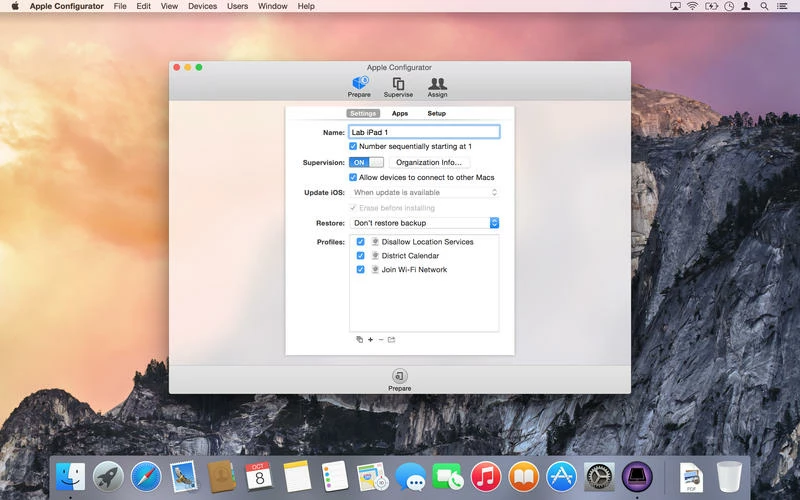
Best answer by matt4836

Configurator, IPCU is no longer supported.

Drag the mobile config to Profiles Pane in the screen shot. Then highlight it and click right button (Arrow coming out of a square). If it is still there uncheck "Sign Configuration Profile".

11 replies

Forum|alt.badge.img+18
  • Honored Contributor
  • March 24, 2015

When you import it into casper, are you passing the username as $USERNAME. I don't believe it'll pass happily trough a blank username field.


Forum|alt.badge.img+5
  • Author
  • New Contributor
  • March 24, 2015

That's a good thought, but in this case, we have "Use Directory Authentication" checked, so we have only the "Outer Identity" field, where I'm using %AD_ComputerID% , which we've used on our previous configuration profiles successfully -- we usually see something like "eapolclient: System Mode using OD account 'CONTOSOMacADName$' ."


Forum|alt.badge.img+5
  • Author
  • New Contributor
  • March 24, 2015

JAMF Support was able to explain this -- the configuration profile is signed with the JSS profile, which is why it won't convert and can't be directly read.

You can import the profile into iPhone Configuration Utility, remove the code signing, and export to view all or most of the settings. I say "all or most" because some properties aren't supported by iPCU, which tells me it's going to remove them. I haven't confirmed that it does this yet.


Forum|alt.badge.img+10
  • Contributor
  • March 25, 2015

You can import and export from configurator. This will strip the code signing.


Forum|alt.badge.img+5
  • Author
  • New Contributor
  • March 26, 2015

Configurator or the iPhone Configuration Utility? I've heard Configurator from two sources now, but I don't see a way to import/export when I'm in there. Note also this is an OS X configuration profile, so iPhone Configuration Utility, at least, strips non-iOS content.


Forum|alt.badge.img+10
  • Contributor
  • Answer
  • March 26, 2015

Configurator, IPCU is no longer supported.

Drag the mobile config to Profiles Pane in the screen shot. Then highlight it and click right button (Arrow coming out of a square). If it is still there uncheck "Sign Configuration Profile".


Forum|alt.badge.img+5
  • Author
  • New Contributor
  • March 26, 2015

Thanks!

The piece I was missing is that Supervision has to be "On" for that pane to show, so the screenshot really helped.


Forum|alt.badge.img+10
  • Valued Contributor
  • August 19, 2015

In case anyone is interested in a way to simply convert the mobileconfig file to xml, i've been using the following command thanks to @timsutton :

security cms -D -i name_of_config_file.mobileconfig

Forum|alt.badge.img+7
  • Valued Contributor
  • May 24, 2017

I found this on macmule: the same as the one above but including the output file for noobs like me ;)

/usr/bin/security cmd -D -i signed_profile_path -o unsigned_profile_path

bradtchapman
Forum|alt.badge.img+20
  • Valued Contributor
  • January 22, 2018

This is a minor update to an old topic, addressing a typo in @dpratl 's command and piping the output through xmllint to "prettify" it for easier human readability. This dumps an .xml file in the same path as the original .mobileconfig:

security cms -D -i MyProfile.mobileconfig | xmllint --pretty 1 - > MyProfile.xml

Forum|alt.badge.img+6
  • Contributor
  • October 3, 2024

This is a minor update to an old topic, addressing a typo in @dpratl 's command and piping the output through xmllint to "prettify" it for easier human readability. This dumps an .xml file in the same path as the original .mobileconfig:

security cms -D -i MyProfile.mobileconfig | xmllint --pretty 1 - > MyProfile.xml

Thank you for this!
I recently found that an older configuration profile retained some unwanted login window keys that shouldn't have been there, completely breaking our existing Jamf Connect configuration after Jamf Connect received an updated config profile.

This code allows me to inspect existing config profiles from Jamf Pro to rule out those artifact keys. The more you know!
