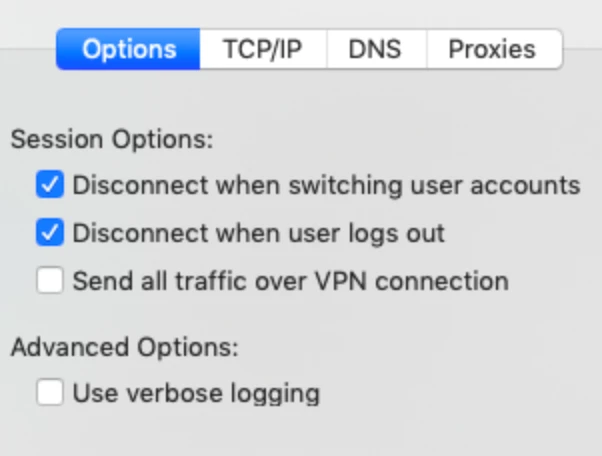
We are testing the viability of replacing our current VPN with a L2TP VPN handled through the network settings of the Mac, dropping the need for a software client. Everything is up and running and works wonderfully, deploying the VPN setup via a configuration profile. However, I am having trouble figuring out how to change two settings (short of doing it through the GUI) -
System Preferences->Network->Select VPN, Advanced Settings->Options Tab, Session Options
I would like to uncheck the "Disconnect when switching user accounts" and "Disconnect when user logs out" settings. I do not see anything in the configuration profile to accomplish this. I found the settings in /Library/Preferences/com.apple.networkextension.plist, but cannot figure out how to change them there either.
Additionally, it might be nice for users to be able to toggle "Send all traffic over VPN connection" depending on where they are - but users cannot access this advanced menu - so if it might be cool to change that setting in a script and add that to Self Service
Any suggestions?
Best answer by jnknight
This should uncheck those two checkboxes and enable DisconnectOnSleep -
#!/bin/bash
#Get a list of all Network Service GUIDs
networkServices=`cat /Library/Preferences/SystemConfiguration/preferences.plist | grep "NetworkServices" | cut -d""" -f2,2 | xargs -I{} echo "{}," | grep string | cut -c26-61`

#Get the number of NetworkServices
numberOfNetworkServices=`echo "$networkServices" | wc -l`

#Loop through each network services looking for PPP in the configuration
i="1"
while [ $i -le $numberOfNetworkServices ]; do
  currentService=`echo $networkServices | awk '{ print $'$i' }'`
  serviceConfig=`/usr/libexec/PlistBuddy -c "Print :NetworkServices:$currentService" /Library/Preferences/SystemConfiguration/preferences.plist`
  if [[ "$serviceConfig" == *"PPP"* ]]; then  #I suggest placing some additional checks here in case multiple VPN services are being used
    #Found the correct network service
    echo `timestamp`" INFO    Correct Service is $currentService"
    #Set new values
    /usr/libexec/PlistBuddy -c "Set :NetworkServices:$currentService:PPP:DisconnectOnSleep 1" /Library/Preferences/SystemConfiguration/preferences.plist
    /usr/libexec/PlistBuddy -c "Set :NetworkServices:$currentService:PPP:DisconnectOnFastUserSwitch 0" /Library/Preferences/SystemConfiguration/preferences.plist
    /usr/libexec/PlistBuddy -c "Set :NetworkServices:$currentService:PPP:DisconnectOnLogout 0" /Library/Preferences/SystemConfiguration/preferences.plist
    break
  fi
  i=$[$i+1]
done
This should uncheck those two checkboxes and enable DisconnectOnSleep -
#!/bin/bash
#Get a list of all Network Service GUIDs
networkServices=`cat /Library/Preferences/SystemConfiguration/preferences.plist | grep "NetworkServices" | cut -d""" -f2,2 | xargs -I{} echo "{}," | grep string | cut -c26-61`

#Get the number of NetworkServices
numberOfNetworkServices=`echo "$networkServices" | wc -l`

#Loop through each network services looking for PPP in the configuration
i="1"
while [ $i -le $numberOfNetworkServices ]; do
  currentService=`echo $networkServices | awk '{ print $'$i' }'`
  serviceConfig=`/usr/libexec/PlistBuddy -c "Print :NetworkServices:$currentService" /Library/Preferences/SystemConfiguration/preferences.plist`
  if [[ "$serviceConfig" == *"PPP"* ]]; then  #I suggest placing some additional checks here in case multiple VPN services are being used
    #Found the correct network service
    echo `timestamp`" INFO    Correct Service is $currentService"
    #Set new values
    /usr/libexec/PlistBuddy -c "Set :NetworkServices:$currentService:PPP:DisconnectOnSleep 1" /Library/Preferences/SystemConfiguration/preferences.plist
    /usr/libexec/PlistBuddy -c "Set :NetworkServices:$currentService:PPP:DisconnectOnFastUserSwitch 0" /Library/Preferences/SystemConfiguration/preferences.plist
    /usr/libexec/PlistBuddy -c "Set :NetworkServices:$currentService:PPP:DisconnectOnLogout 0" /Library/Preferences/SystemConfiguration/preferences.plist
    break
  fi
  i=$[$i+1]
done
This should uncheck those two checkboxes and enable DisconnectOnSleep -
#!/bin/bash
#Get a list of all Network Service GUIDs
networkServices=`cat /Library/Preferences/SystemConfiguration/preferences.plist | grep "NetworkServices" | cut -d""" -f2,2 | xargs -I{} echo "{}," | grep string | cut -c26-61`

#Get the number of NetworkServices
numberOfNetworkServices=`echo "$networkServices" | wc -l`

#Loop through each network services looking for PPP in the configuration
i="1"
while [ $i -le $numberOfNetworkServices ]; do
  currentService=`echo $networkServices | awk '{ print $'$i' }'`
  serviceConfig=`/usr/libexec/PlistBuddy -c "Print :NetworkServices:$currentService" /Library/Preferences/SystemConfiguration/preferences.plist`
  if [[ "$serviceConfig" == *"PPP"* ]]; then  #I suggest placing some additional checks here in case multiple VPN services are being used
    #Found the correct network service
    echo `timestamp`" INFO    Correct Service is $currentService"
    #Set new values
    /usr/libexec/PlistBuddy -c "Set :NetworkServices:$currentService:PPP:DisconnectOnSleep 1" /Library/Preferences/SystemConfiguration/preferences.plist
    /usr/libexec/PlistBuddy -c "Set :NetworkServices:$currentService:PPP:DisconnectOnFastUserSwitch 0" /Library/Preferences/SystemConfiguration/preferences.plist
    /usr/libexec/PlistBuddy -c "Set :NetworkServices:$currentService:PPP:DisconnectOnLogout 0" /Library/Preferences/SystemConfiguration/preferences.plist
    break
  fi
  i=$[$i+1]
done
I tried this script and it doesn't seem to be working. I tried running it on Big Sur. Does anyone know if there are any other ways to uncheck all 3 options?