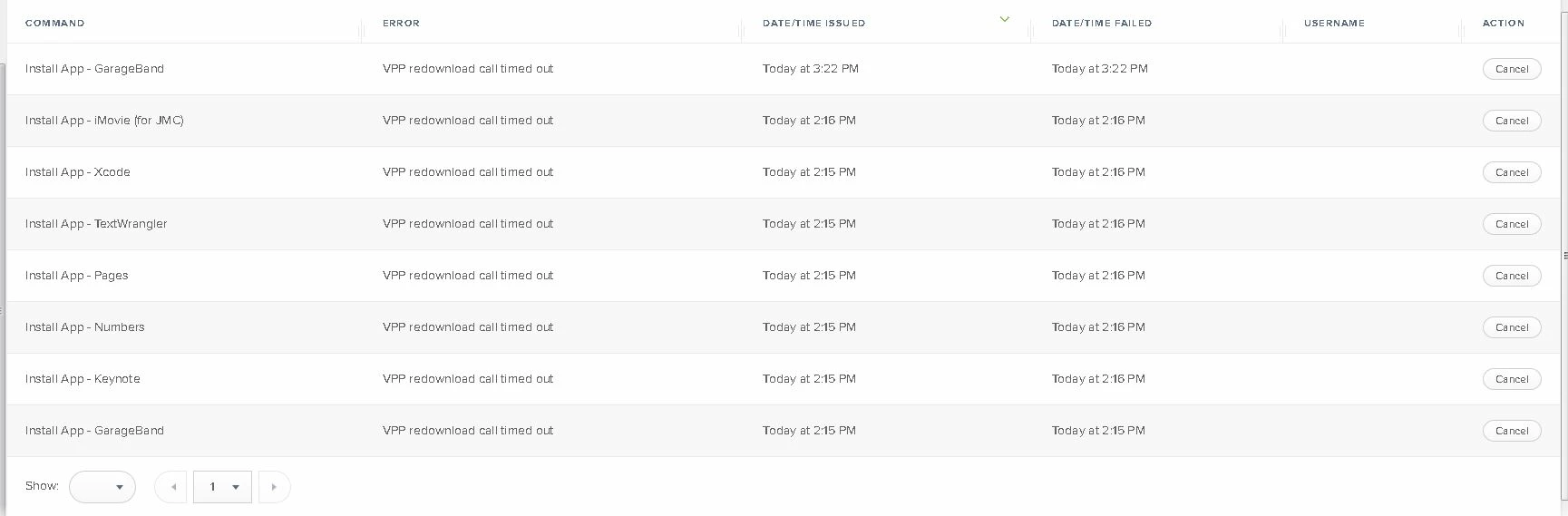
I am seeing a lot of our systems having the "vpp redownload call timed out <mdmclienterror:72>" error when cliets try to install VPP apps via Self Service on MacOS (most clients are 10.14.2).
I have tried clearing the failed commands, reconning, re-enrolling etc with no luck.
I am hesitant to revoke all apps as I have seen suggested because I am concerned about the number of people who will experience iTunes notifications about apps not being assigned (the staff at this school are fragile...).
Any advice would be appreciated.
Best answer by pbowden
@mjames@whitebeer The issue with storedownloadd crashing during MAS installs is fixed in 10.14.4 Beta 4 (18E205e). This is RADAR 47685116. Let me know if you still see problems after the update. For clarity, typical symptoms of this bug: - Larger MAS apps like Xcode and Office fail to install and leave behind an .appdownload stub - Needing to run multiple jamf recon commands to coerce apps to install - MDMClientError:72 failed command seen in JSS
I've updated https://macadmins.software/mas with the latest info. The largest outstanding issue that I'm still tracking is the inability to update MAS apps through MDM when the user has the app perpetually open.
I've got the exact same problem with the VPP apps - especially with larger apps like XCode and Microsoft Office. For me a 'recon' pushed the download a step further but only some apps ended on the client, the others were still downloadstubs 🙄 I've tested with our corporate network (proxy+firewall in place), our hotspot (only firewall) and my private WLAN - but none of them was working. Most of our Macs are 10.14.3.
@mjames@whitebeer check your crash logs (Console > System Reports) and see if storedownloadd is crashing during app install. See https://macadmins.software/mas for more info and the RADAR that’s tracking this issue.
Ive seen this as well. The issue we saw was is apple changed the app store communication protocol and we have to upgrade our proxy to resolve. once systems went outside of the proxy network the VPP apps worked as designed.
Thanks for the tip - we are seeing errors in the download in the console - but not the same one in the link
default 09:10:30.379644 +0800 storedownloadd sending status (Xcode): 76.559287% (835.138401) default 09:10:31.964963 +0800 storedownloadd sending status (Xcode): 76.928800% (833.639385) default 09:10:33.558941 +0800 storedownloadd sending status (Xcode): 77.360559% (831.393047) default 09:10:35.159762 +0800 storedownloadd sending status (Xcode): 77.795357% (828.850088) default 09:10:36.753070 +0800 storedownloadd sending status (Xcode): 78.261495% (826.747507) default 09:10:38.343536 +0800 storedownloadd sending status (Xcode): 78.714579% (824.785034) default 09:10:39.944908 +0800 storedownloadd sending status (Xcode): 79.147202% (822.968359) default 09:10:41.527408 +0800 storedownloadd sending status (Xcode): 79.578090% (821.198435) default 09:10:43.127732 +0800 storedownloadd sending status (Xcode): 79.999822% (819.534362) default 09:10:44.727223 +0800 storedownloadd sending status (Xcode): 80.447251% (817.769275) default 09:10:45.518932 +0800 storedownloadd Task <A6246E20-48A1-4666-AD63-1F483C9C76CD>.<0> response ended default 09:10:45.519214 +0800 storedownloadd Task <A6246E20-48A1-4666-AD63-1F483C9C76CD>.<0> done using Connection 1 default 09:10:45.625997 +0800 powerd Process storedownloadd.18112 Released PreventUserIdleSystemSleep "URLConnection in progress" age:00:05:50 id:4295009410 [System: PrevIdle DeclUser kDisp] default 09:10:45.626675 +0800 storedownloadd sending status (Xcode): 80.645162% (817.000000) default 09:10:45.628294 +0800 storedownloadd sending status (Xcode): 80.645162% (817.000000) error 09:10:45.634849 +0800 storedownloadd NSURLConnection finished with error - code -1100 error 09:10:46.773129 +0800 storedownloadd NSURLConnection finished with error - code -1100 default 09:10:46.838382 +0800 storedownloadd setPrimaryAppPath "(null)" forProductIdentifier "com.apple.dt.Xcode" default 09:10:47.170217 +0800 kernel process storedownloadd[18112] crossed memory high watermark (30 MB); EXC_RESOURCE supressed due to audio playback. default 09:10:47.170233 +0800 kernel EXC_RESOURCE -> storedownloadd[18112] exceeded mem limit: ActiveSoft 30 MB (non-fatal)
I've done a little looking about but haven't found anything much about "NSURLConnection finished with error - code -1100" - it looks like it is related to App Transport Security - I am wondering if it has anything to do with our network filtering/monitoring software now.
EDIT After a few minutes - the logs reported this.
default 09:13:35.775064 +0800 storedownloadd estimatedTimeRemaining 1408.4295 default 09:13:35.775224 +0800 storedownloadd sending status (Xcode): 81.290323% (1411.429500) default 09:13:36.273213 +0800 storedownloadd installClient:currentState:package:progress 4.979308682338265:timeRemaining 1408.4295:state 3 default 09:13:36.273383 +0800 storedownloadd estimatedTimeRemaining 1408.4295 default 09:13:36.273592 +0800 storedownloadd sending status (Xcode): 81.290323% (1411.429500) default 09:13:36.285357 +0800 com.apple.CommerceKit.TransactionService ISServiceProxy: Connection to com.apple.storedownloadd.daemon was interrupted - removing connection from pool default 09:13:36.286628 +0800 com.apple.CommerceKit.TransactionService ISServiceProxy: Error from com.apple.storedownloadd.daemon - Error Domain=NSCocoaErrorDomain Code=4097 "connection to service named com.apple.storedownloadd.daemon" UserInfo={NSDebugDescription=connection to service named com.apple.storedownloadd.daemon} default 09:13:36.300127 +0800 loginwindow -[PersistentAppsSupport applicationQuit:] | for app:storedownloadd, _appTrackingState = 2 default 09:13:59.927878 +0800 ReportCrash Saved crash report for storedownloadd[18112] version 1.0 (1) to storedownloadd_2019-02-19-091359_SCT16324.crash
@mjames good info. That very last line indicates that storedownloadd crashed. Take a look at the crash report in Console > System Reports to see if it’s the same as what I reported.
@mjames@whitebeer The issue with storedownloadd crashing during MAS installs is fixed in 10.14.4 Beta 4 (18E205e). This is RADAR 47685116. Let me know if you still see problems after the update. For clarity, typical symptoms of this bug: - Larger MAS apps like Xcode and Office fail to install and leave behind an .appdownload stub - Needing to run multiple jamf recon commands to coerce apps to install - MDMClientError:72 failed command seen in JSS
I've updated https://macadmins.software/mas with the latest info. The largest outstanding issue that I'm still tracking is the inability to update MAS apps through MDM when the user has the app perpetually open.
EDIT: It looks like it's because I'm trying to download an app that's had a newer version released as a separate app, no longer offering the older one. Confirmed I cannot download the older version on any computer, so it seems like this is the true issue.
I'm still seeing this issue on one of our computers. It's fully updated (currently 10.14.4). It doesn't seem like it's everyone, though it could be this one app. All in all, wanted to add to the conversation that I'm still seeing this issue.
My next thought is to change the download parameters, and make it download automatically to see if the issue persists.
I'm also seeing this on 14.4-14.6. What I've found is if I go under the management tab on the device in question, cancel the failed command and then send a blank push, it seems to start the download. I know its far from ideal, but if you need it done, this seems to be working for me.
@jbosma - Yeah we do this already and it works only once we recon again on the device. I hate this workaround since we are a DEP house and most computers are setup at random times, in different time zones, by users who can't flush it all out of Jamf.
No idea where to even start. We are reopening our Apple ticket, since obviously this was not resolved with the 10.14.4 update.
If within your computer provisioning a script is used, you can use the jamf api to clear the failed commands and then run a Jamf recon. This article was helpful for me (https://aporlebeke.wordpress.com/2019/01/04/auto-clearing-failed-mdm-commands-for-macos-in-jamf-pro/).
Hi all, just opened a case about this. Seeing this one both High Sierra and Mojave, where roughly half the environment recieves the updated app and the other half gets the VPP redownload call timed out error (visible from the Computer Record). Any resolutions to this yet?