Question

Warning: Your new push certificate has a new topic

  • July 6, 2017
  • 8 replies
  • 101 views

Forum|alt.badge.img+3

Good Day,

I am attempting to new our MDM push certificate for our JSS. I go online and successfully get a new certificate, but I am getting this error "Warning: Your new push certificate has a new topic."
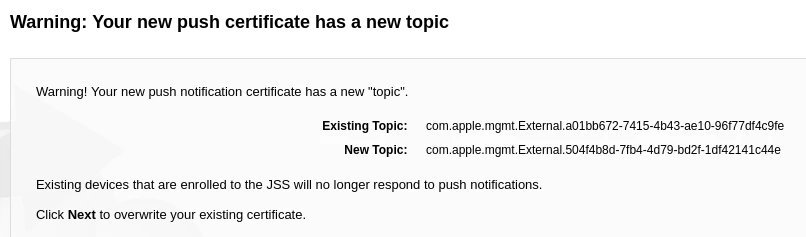
I see there's another discussion about this here:

https://www.jamf.com/jamf-nation/discussions/23783/warning-your-new-push-certificate-has-a-new-topic

This discussion suggest that I'm using the wrong Apple ID, but I can see the certificate that I'm renewing when I log in. I have pulled up the info and verified that the "topics" match.
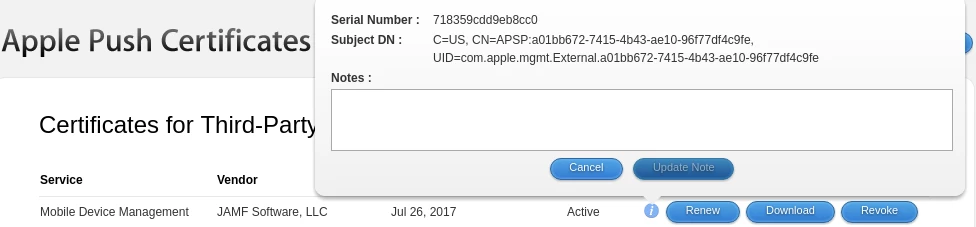
Any thoughts? I obviously don't want me 100 enrolled devices to stop ignoring push requests from my JSS.

Thanks
-Matt

8 replies

Forum|alt.badge.img+4
  • Contributor
  • July 14, 2017

Nothing to add, but I'm experiencing the same thing. There is only one Apple ID involved and the Apple notification was sent to it, not sure what else to do.


Forum|alt.badge.img+1
  • New Contributor
  • July 18, 2017

We're experiencing the same thing. We are using the Apple ID that was used for the previous MDM push certificate (I can see the prior certificate at https://identity.apple.com/pushcert/ ).


Forum|alt.badge.img+1
  • New Contributor
  • July 18, 2017

We're experiencing the same thing. We are using the Apple ID that was used for the previous MDM push certificate (I can see the prior certificate at https://identity.apple.com/pushcert/ ).


Forum|alt.badge.img+1
  • New Contributor
  • July 18, 2017

I found the mistake I made, so I'm posting in case this helps others.

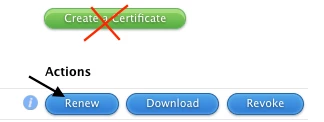
I was using the "Create Certificate" option; I should have used the "Renew" option instead.

Once I used the "Renew" option, I was able to renew the certificate in JSS without the "new topic" warning.

This video was helpful in finding the missing step: https://www.youtube.com/watch?v=Mda5UxavXdo

Hope this helps someone else!


Forum|alt.badge.img+3
  • Author
  • New Contributor
  • July 18, 2017

Well, now I feel stupid. That was what I was doing Will. Thanks.


Forum|alt.badge.img+1
  • New Contributor
  • December 6, 2018

Is there any way to find out the account that was originally used to download the push certificate, if it was not saved in the history. I have uploaded the wrong one evidently and now Push notifications are broken. Although i see no errors on Jamf.. it is not allowing ipad to be updated.


Forum|alt.badge.img+3
  • New Contributor
  • May 21, 2020

Our Problem was that we changed the company Apple id.
We have two accounts in Apple push certificate portal, if we want to use the new Appleid we'll need to re-enroll devices. Untill we're ready to do that I'm renewing with the old Appleid.


PorkChopExpress
Forum|alt.badge.img+2

If you have an old Jamf Pro Summary, the Push Certificate is typically listed on it. You'd want to look for the Topic ID & Serial Number - that is what you would want to match in the Apple Push Certificate Portal. In the Apple Push Certificate Portal, click the little blue i, and a pop-up window appears and there should be UID that matches the Topic ID in Jamf, under Pus Certificates &/or Jamf Pro Summary --- UID=com.apple.mgmt.External.xxxxxxxx-xxxx-xxxx-xxxx-xxxxxxxxxxxx optional image ALT text