Question

What's the best way to put "Cisco WebEx Add-On" on Self Service?

  • August 18, 2015
  • 13 replies
  • 70 views

Forum|alt.badge.img+9

It has a ".app" installer.

I'm thinking of using Snapshot in Composer. Has anyone successfully gotten WebEx plugin to work properly if using this method?

13 replies

mm2270
Forum|alt.badge.img+24
  • Legendary Contributor
  • August 18, 2015

Why not deploy the full WebEx Productivity Tools installer? Its in .pkg format and I believe installs the WebEx Add-On for the browser as well.


Forum|alt.badge.img+3
  • New Contributor
  • August 18, 2015

You can do the composer snapshot, i've used it in my environment and it works quite well. :)


Forum|alt.badge.img+10
  • Contributor
  • August 18, 2015

the WebEx add-on package runs as the user and installs into ~/Library/Application Support, and since it doesn't require admin privileges, and they don't really communicate when they update the plug-in, I stopped fighting with it.


mhasman
Forum|alt.badge.img+22
  • Valued Contributor
  • November 2, 2018

What s your best practice to scope the distribution without script looking at ~/Library⁩/⁨Application Support⁩/⁨WebEx Folder⁩/⁨Add-ons⁩ if file exists already? Some extensión attribute?

Cisco Webex Start is listed as "application", but it is not in Applications in Mac's inventory


mhasman
Forum|alt.badge.img+22
  • Valued Contributor
  • November 2, 2018

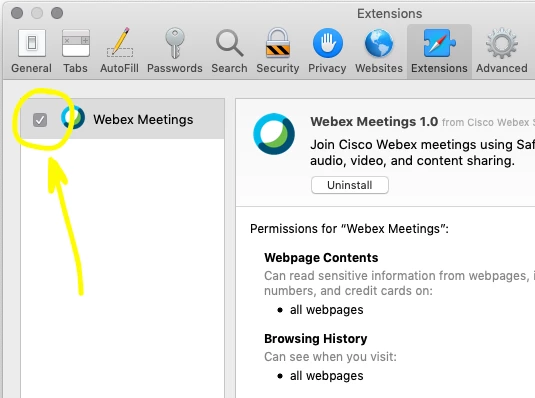
Another question - is there any way to make Webex Meetings extention active in Safari, make the checkbox pre-checked?


Forum|alt.badge.img+2

I have the same issue Mark @mhasman and we also have the fun where the users still have to enter the url each time.


Forum|alt.badge.img+10
  • Valued Contributor
  • January 11, 2019

@mhasman Were you ever able to figure out how to pre-enable the Webex extension?

As far as your previous question about inventorying Webex Start, you'd have to include ~/Library⁩/⁨Application Support⁩/⁨WebEx Folder⁩/⁨Add-ons⁩ as a custom search path in Jamf Pro Settings > Computer Management > Inventory Collection. Just in case you hadn't figured that out already and were still wondering. :)


mhasman
Forum|alt.badge.img+22
  • Valued Contributor
  • January 14, 2019

@isaacnelson No, unfortunately we still did't find the solution adding it to managed settings anyhow. Looked around for .plists, could not find where extensions enabling settings hiding


Forum|alt.badge.img+10
  • Valued Contributor
  • January 15, 2019

Bummer. I guess it's probably just not possible. I suppose it isn't a huge deal to just let users do it, but it would be nice to be able to automate it all. Oh well.


mhasman
Forum|alt.badge.img+22
  • Valued Contributor
  • January 15, 2019

It is not an issue to let users doing that simple configuration. But there are always executives for whom things should be just working, always. When CEO is not able to join some his level WebEx meeting just because extension is not checked in Safari - so simple, right? :) - we can only imagine how many people are involved and in trouble and how much does actually it cost for enterprise... Sometime Failure Is The Only Option, so... automation-automation-automation :)


Forum|alt.badge.img+10
  • Valued Contributor
  • January 15, 2019

Yep, exactly. It makes life so much better for those of us on the IT end.


Forum|alt.badge.img+11
  • Contributor
  • January 16, 2019

@mhasman .. Take a look at this.. See if it puts you on the right path


mhasman
Forum|alt.badge.img+22
  • Valued Contributor
  • January 16, 2019

@JustDeWon Thank you DeWon!