
Question

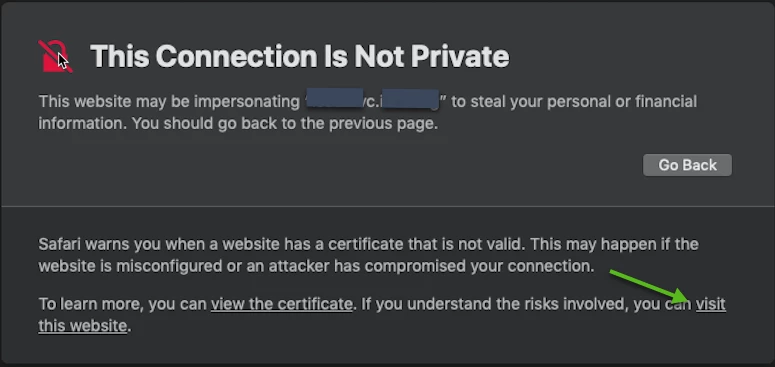
When there is a certificate error Safari shows "This Connection Is Not Private" but will allow users to click "visit this website" to proceed to the website anyways. I'm looking for a way to disable this option.
  • July 15, 2019
  • 5 replies
  • 50 views

Forum|alt.badge.img+3

When there is a certificate error Safari shows "This Connection Is Not Private" but will allow users to click "visit this website" to proceed to the website anyways. I'm looking for a way to disable this option.


Anyone know how I can do this? I've had no luck browsing the forums or using profile creator.

Edit:
I want to prevent users from accessing these untrusted websites completely. I'm not trying to add the cert as trusted. I don't want to allow users to visit any website with an untrusted certificate. I've been able to do this in Firefox and Chrome, but can't find out how to do it in Safari.

5 replies

donmontalvo
Forum|alt.badge.img+36
  • Hall of Fame
  • July 15, 2019

Get the server owner to install a proper SSL cert?

¯_(ツ)_/¯


Forum|alt.badge.img+4

security add-trusted-cert -d -r trustAsRoot -k /Library/Keychains/System.keychain /HostCertFile.cer


Forum|alt.badge.img+3
  • Author
  • New Contributor
  • July 16, 2019

I want to prevent users from accessing these untrusted websites completely. I'm not trying to add the cert as trusted. I don't want to allow users to visit any website with an untrusted certificate. I've been able to do this in Firefox and Chrome, but can't find out how to do it in Safari.


Forum|alt.badge.img+15

If the users don't have admin rights, they won't be able to get there... just sayin'.


Forum|alt.badge.img+3
  • Author
  • New Contributor
  • July 17, 2019

None of our users have admin rights- this is without admin rights.