

Dear all.
I have created this script, in order to prompt user for his password and use this to add three internet passwords to his/her login keychain:
#!/bin/sh
## postinstall

pathToScript=$0
pathToPackage=$1
targetLocation=$2
targetVolume=$3

# Your company's logo, in ICNS format. (For use in AppleScript messages.)
# Use standard UNIX path format:  /path/to/file.icns
logoIcns="/usr/local/jamf/bin/templafy.icns"

# The title of the message that will be displayed to the user.
# Not too long, or it'll get clipped.
promptTitle="Templafy Setup"

# Convert POSIX path of logo icon to Mac path for AppleScript
logoIcns="$(osascript -e 'tell application "System Events" to return POSIX file "'"$logoIcns"'" as text')"

userName=$(stat -f%Su /dev/console)

# Check the OS version.
osMajor=$(sw_vers -productVersion | awk -F . '{print $1}')
osMinor=$(sw_vers -productVersion | awk -F . '{print $2}')
if [[ "$osMajor" -ne 10 || "$osMinor" -lt 9 ]]; then
    echo "[ERROR] OS version not 10.9+ or OS version unrecognized."
    sw_vers -productVersion
    BAIL=true
fi

# Get information necessary to display messages in the current user's context.
userId=$(id -u "$userName")
if [[ "$osMajor" -eq 10 && "$osMinor" -le 9 ]]; then
    lId=$(pgrep -x -u "$userId" loginwindow)
    lMethod="bsexec"
elif [[ "$osMajor" -eq 10 && "$osMinor" -gt 9 ]]; then
    lId=$userId
    lMethod="asuser"
fi

sleep 10

userPassword="$(launchctl "$lMethod" "$lId" osascript -e 'display dialog "Templafy needs your user password for adding necessary entries to your login keychain. Please enter your user password:" default answer "" with title "'"${promptTitle//"/\\"}"'" giving up after 86400 with text buttons {"OK"} default button 1 with hidden answer with icon file "'"${logoIcns//"/\\"}"'"' -e 'return text returned of result')"

security unlock-keychain -p $userPassword /Users/$userName/Library/Keychains/login.keychain

security add-internet-password -l collaboration.wirecard.lan -a $userName -w $userPassword -r "htps" -s collaboration.wirecard.lan -A
security add-internet-password -l collaboration.wirecard.lan -a $userName -w $userPassword -r "http" -s collaboration.wirecard.lan -A
security add-internet-password -l processes.wirecard.lan -a $userName -w $userPassword -r "htps" -s processes.wirecard.lan -A

exit 0      ## Success
exit 1      ## Failure
However, it gives me this additional system prompt, which I find surprising:
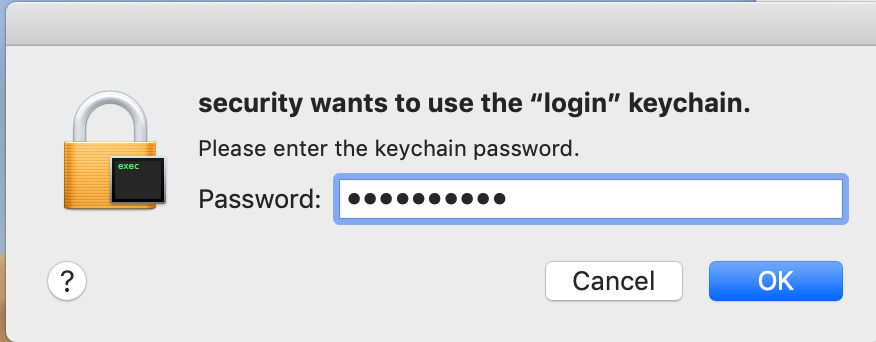
Does anyone of you have an idea which bit might be missing? :-)
Thank you and best regards
Christian