

Hello,
I'm trying to setup automatic enrollment for my Windows machines. I've setup a scheduled task in group policy for checking in, this works great.
However, upon Quickadd creation I was getting some strange errors, here is a screenshot.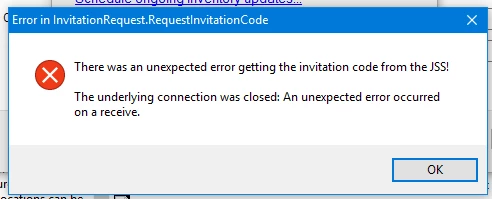
I went on to investigate command line enrollment for my clients. Here is the (same) result:
C:WindowsTempjamf.exe enroll -overrideJSS https://jss.psd401.net:8443 -username imaging -password * -allowInvalidCertificate -ssl true
JSS enrollment process started...
Overriding JSS Url. Url to be used -> https://jss.psd401.net:8443
Overriding AllowInvalidCertificate -> True
Enrolling to 'https://jss.psd401.net:8443/'...
The SSL certificate was successfully save as: 'Peninsula School District JSS Built-in Certificate Authority'
Starting invitation request...
There was an unexpected error executing the command 'jamf.Commands.CommandEnroll'!
System.NullReferenceException: Object reference not set to an instance of an object.
at jamf.JAMFCoreComm.JssRequest.ProcessInvitationRequest(WebRequest request)
at jamf.JAMFCoreComm.EnrollmentComm.InvitationRequest.JssInvitationRequest()
at jamf.Commands.CommandEnroll.RequestInvitation()
at jamf.Commands.CommandEnroll.Execute()
at jamf.Program.Main(String[] args)
The error occurs on multiple computers.
Thanks for the help, I'm hoping anybody finding this finds a resolution.
