Answer

Wrong info in Username and Full Name fields

  • August 30, 2016
  • 4 replies
  • 35 views

Forum|alt.badge.img+4

Hello all,

I'm seeing an odd thing in our inventory in JSS (v9.9.2) where some Macs will show root as the current User and a completely random name in the Full Name field. The name will show up for all the Macs that are showing with the User root. I can't seem to make heads or tails of why some Macs start reporting this. Today there are 22 Macs showing up this way (image attached).
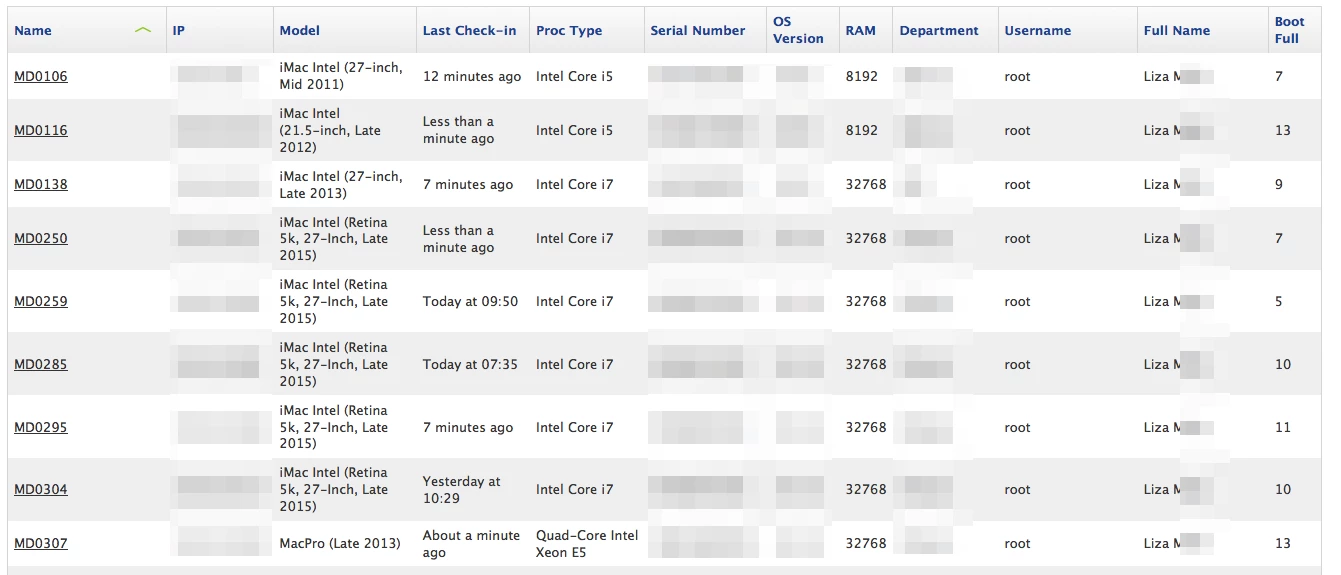
We do have a Last User extension attribute enabled:

#!/bin/sh
lastUser=`defaults read /Library/Preferences/com.apple.loginwindow lastUserName`

if [ $lastUser == "" ]; then
    echo "<result>No logins</result>"
else
    echo "<result>$lastUser</result>"
fi

As well (and I suspect this is where it's going a bit wrong), we are auto-populating the Full Name field by pulling the current user. Here's the script from JAMF Nation we are using:

#!/bin/sh

sleep 5

loggedInUser=$( ls -la /dev/console | cut -d " " -f 4 )

/usr/local/bin/jamf recon -endUsername $loggedInUser

exit 0

I've seen some other discussions where having multiple users logged in via Fast User Switching can cause issues, but we have that disabled on most Macs.

Thanks for any suggestions!

Best answer by thoule

I suspect that your script that runs recon is running when no user is logged in so root is being returned. You could wrap that recon line in an 'if' to exclude root....

if [ $loggedInUser != "root" ];   then
    /usr/local/bin/jamf recon -endUsername $loggedInUser
fi

4 replies

Forum|alt.badge.img+15
  • Contributor
  • Answer
  • August 30, 2016

I suspect that your script that runs recon is running when no user is logged in so root is being returned. You could wrap that recon line in an 'if' to exclude root....

if [ $loggedInUser != "root" ];   then
    /usr/local/bin/jamf recon -endUsername $loggedInUser
fi

Forum|alt.badge.img+4
  • Author
  • Contributor
  • August 31, 2016

Thanks! Have made those changes and will see how it goes - certainly makes sense :D


karthikeyan_mac
Forum|alt.badge.img+18

Even we have the same issue in our environment. We don't run any script for reporting there username. We can see around 80 Macs with same "Full Name" and others details but the Username is different. We are running JSS 9.81.

Anybody else came across this issue?


Forum|alt.badge.img+4
  • Author
  • Contributor
  • September 7, 2016

Just wanted to report back that thoule's solution worked a treat. I also added our local admin account to the exception as well. Thanks!