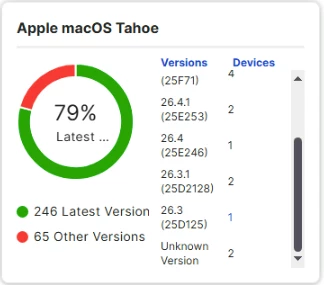
We are facing an issue with Jamf Pro Patch Management and would appreciate any guidance or recommendations.
Issue Description
In the Patch Management Dashboard, the macOS version is displayed as "Unknown" for certain devices.
Current Status
- End-user Mac devices are successfully updated to the latest macOS version.
- Device inventory updates are completing successfully.
- The actual macOS version is correctly reflected on the endpoint.
- Inventory records appear to be updated in Jamf Pro.
- However, the Patch Management Dashboard still shows the macOS version as "Unknown".
Troubleshooting Performed
- Verified that the device is running the latest macOS version.
- Executed Update Inventory policy successfully.
- Confirmed device check-in and inventory submission are working.
- Waited for inventory synchronization, but the issue persists.
Questions
- Has anyone encountered a similar issue where Patch Management shows "Unknown" macOS versions despite successful inventory updates?
- Are there any known causes related to:
- Inventory collection settings
- Patch Management definitions
- Smart group criteria
- Beta/Developer macOS versions
- Jamf Pro version compatibility
- Are there any database refresh or re-indexing steps recommended to resolve this issue?
Any suggestions or troubleshooting steps would be greatly appreciated.
Thank you in advance for your support.