Question

Jamf Connect in a lab environment

  • June 9, 2026
  • 4 replies
  • 27 views

We are using Jamf Pro and Jamf Connect with Google IdP for students to use in lab environments. Ideally they'll use their district Gmail to log in. We've run into a couple problems I was hoping y’all can help with.

  1. When the computers sleep and open back to the login screen, only the last user is able to login. The only way to get the Google login window to show is to hover over the user icon until it expands to include Guest user, which takes it back to the Google login screen, but that doesn’t always work. (Fast user switching is enabled in the Login Window config profile scoped to these computers) 
  2. Since people aren't aware of the above point, they have been restarting the computers to get back to that Google login screen. However, computers are losing network access upon restart, making it impossible for users to login with their network accounts. (Should note here that FileVault is NOT enabled on student computers.) 

I feel like we are missing components Any insight you can provide would be greatly appreciated.


Thanks!

4 replies

Forum|alt.badge.img
  • New Contributor
  • June 9, 2026

My understanding is that Jamf Connect just gets you into the account and not much else (this is all I use it for regarding my district). If the device gets locked, that tells me 1 of 2 low hanging fruits: Either educate users to sign out when done with the device, or adjust the power settings to a more reasonable inactivity timer. 

Regarding your second point, Jamf Connect needs network access in order to work so what would be preventing the device from getting network access after a restart? Pushing a wifi profile could help with this. 


TraceyJoyce
Forum|alt.badge.img+11
  • Employee
  • June 9, 2026

Issue 1: After Sleep, Only the Last User Can Log In

This is expected behavior in Jamf Connect, and it's a known limitation with how macOS handles the login window post-sleep.

When a Mac wakes from sleep, macOS presents a resume/credential screen for the last logged-in user — this is macOS-native behavior, not Jamf Connect behavior per se. The Jamf Connect IdP login window only fully presents on a cold boot or logout. The workaround you described (hovering to reveal Guest, then clicking back) is the documented informal workaround, but it's finicky.

Things to check/do:

  • Confirm DisableScreenSaverLogin behavior in your Login Window config profile. If the profile is configured to show the list of users rather than username/password fields, this may be compounding the issue.
  • In lab environments, the better long-term design pattern is to configure the machines so students log out rather than letting them sleep with an active session. A logout leaves the machine back at the full Jamf Connect IdP login window cleanly.
  • Consider a login window profile key showInputFields (name/password fields vs. user list) — if you’re showing a user list, where "last user" lock-in is more pronounced.

There is no clean "always show Google IdP login on wake" setting documented so I think your best bet is to rethink the session workflow (logout instead of sleep).


For the second issue, what macOS version and Jamf Connect version are these labs running, and are these MacBook Neo/M4 devices or Intel/earlier Apple Silicon?


Corey-Ribble
Forum|alt.badge.img+3
  • Contributor
  • June 11, 2026

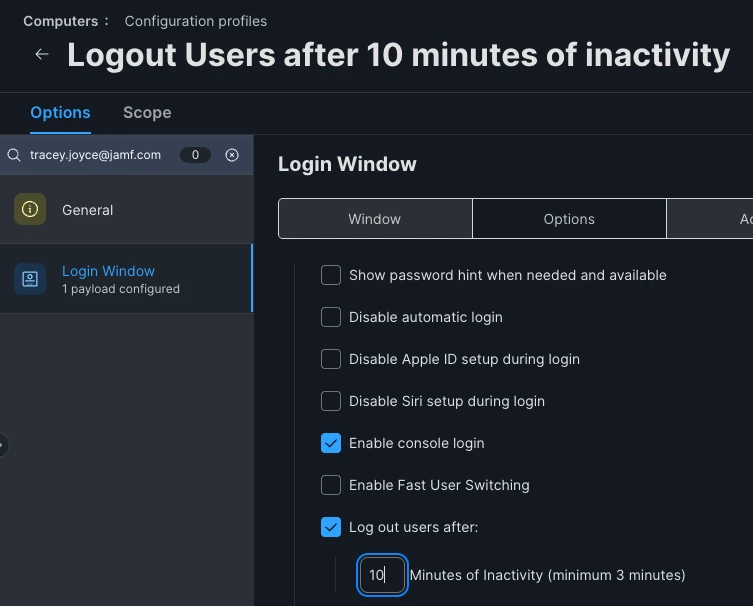
So you might be able to deploy a profile from Jamf Pro to those macs that signs users out after a certain period of inactivity. In Jamf School i see the options Under “Login Window” when creating a profile. I would also set the mac to not sleep unless you need it to so that way its still connecting back to Jamf and getting profile updates and such. 


You can also set the machines to auto restart as well. You can find this in a profile under “Energy Saver”. I have our mac mini lab set to restart every morning around 6am so they are ready to go and on the Google Login page. 


TraceyJoyce
Forum|alt.badge.img+11
  • Employee
  • June 11, 2026