Question

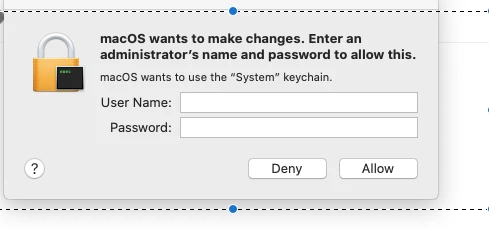
MacOS want to make access "System" keychain

  • April 10, 2020
  • 4 replies
  • 40 views

Forum|alt.badge.img+4

Users all across the domain are receiving this error and I cannot seem to understand why this is suddenly happening. Users range from Mojave to Catalina users 10.14.1 to 10.15.4 has anyone seen anything like this before?

4 replies

Forum|alt.badge.img+6
  • New Contributor
  • April 11, 2020

I too have seen this in our environment, While connecting to Pulse Secure .. But yet to find the Root cause.


Forum|alt.badge.img+4
  • Author
  • New Contributor
  • April 11, 2020

Noted this was due to Durva inSync version 6.5.1 which seems to have Catalina incompatibility. Once we updated the machines to version 6.6.2 the current revision it seems to have corrected the issue.


Forum|alt.badge.img+6
  • Contributor
  • April 28, 2020

We've begun experiencing this too. We upgraded Druva inSync to the latest version 6.6.3 and it did not resolve it but caused it to pop-up more often. After the upgrade it popped up twice in a row then we did a reboot which caused two more pop-ups. Our users who are experiencing the most frequent pop-ups are running 10.14.*.


Forum|alt.badge.img+1
  • New Contributor
  • August 11, 2021

We've begun experiencing this too. We upgraded Druva inSync to the latest version 6.6.3 and it did not resolve it but caused it to pop-up more often. After the upgrade it popped up twice in a row then we did a reboot which caused two more pop-ups. Our users who are experiencing the most frequent pop-ups are running 10.14.*.


I found that enabling Druva in location services fixed this issue.