Question

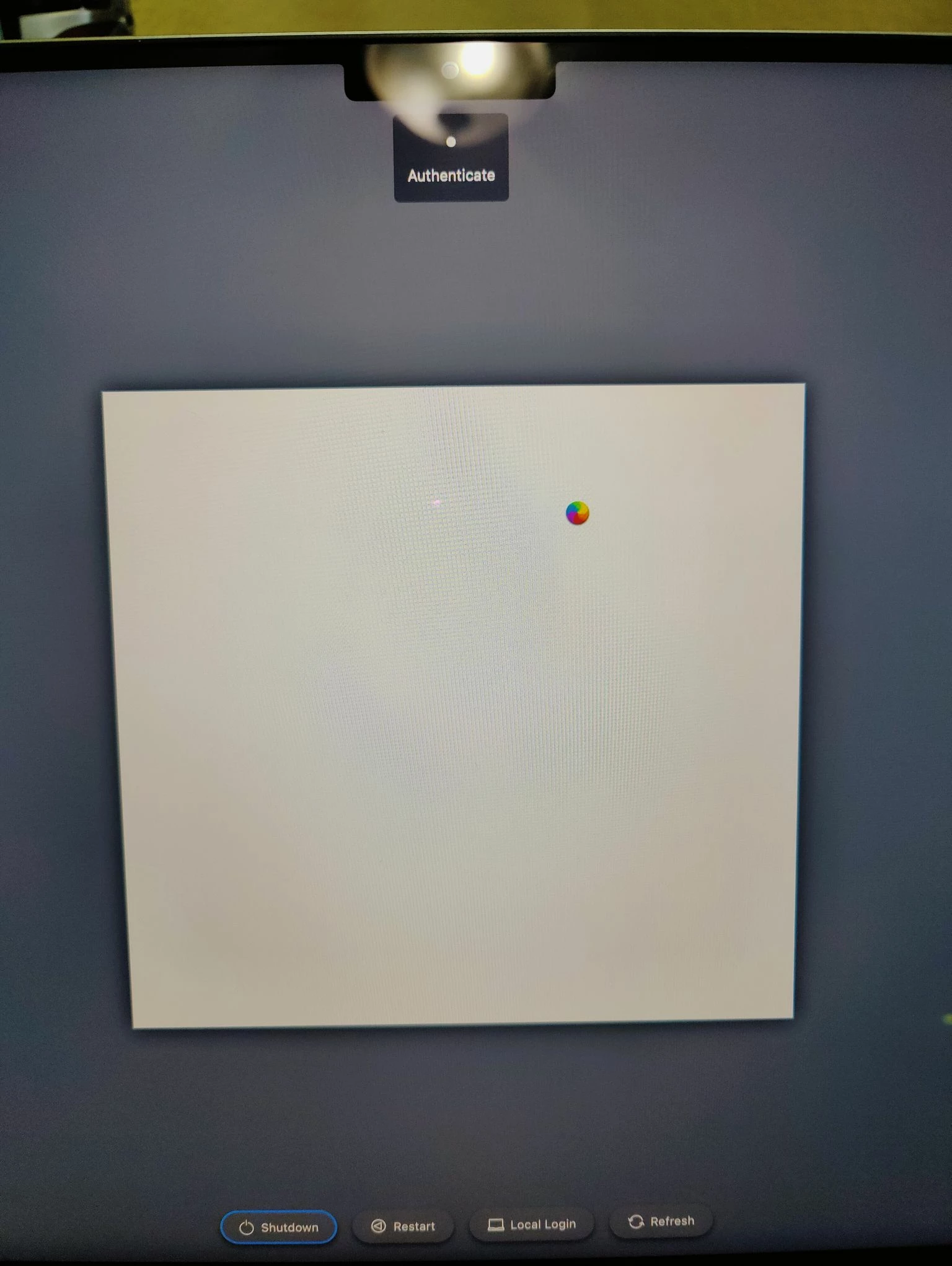
DUO MFA no longer working after Azure AD login when upgraded to Monterey 12.3 . Shows blank window

  • March 17, 2022
  • 23 replies
  • 89 views

Forum|alt.badge.img+4

When the Mac is upgraded to 12.3 the Jamf connect gets stuck at DUO MFA login screen post AAD login at login window

Rolling back to 12.2.1 and it works fine

Any compatibility issue with 12.3 and Jamf Connect 2.10?


screenshot of post AAD login
23 replies

Forum|alt.badge.img+18
  • Valued Contributor
  • March 17, 2022

Yes! Several of us are having the same issue and have opened Apple enterprise support cases (it’s not a Jamf Connect issue). I’d recommend you do the same. Our case numbers are:

101648671325
101656217821
101648652725


Forum|alt.badge.img+6
  • New Contributor
  • March 17, 2022

This is an issue with 10.5.7 in our environment as well and only with factory reset Macs, not with already provisioned Macs. I'll look further into this issue and update this post.


Forum|alt.badge.img+6
  • New Contributor
  • March 17, 2022

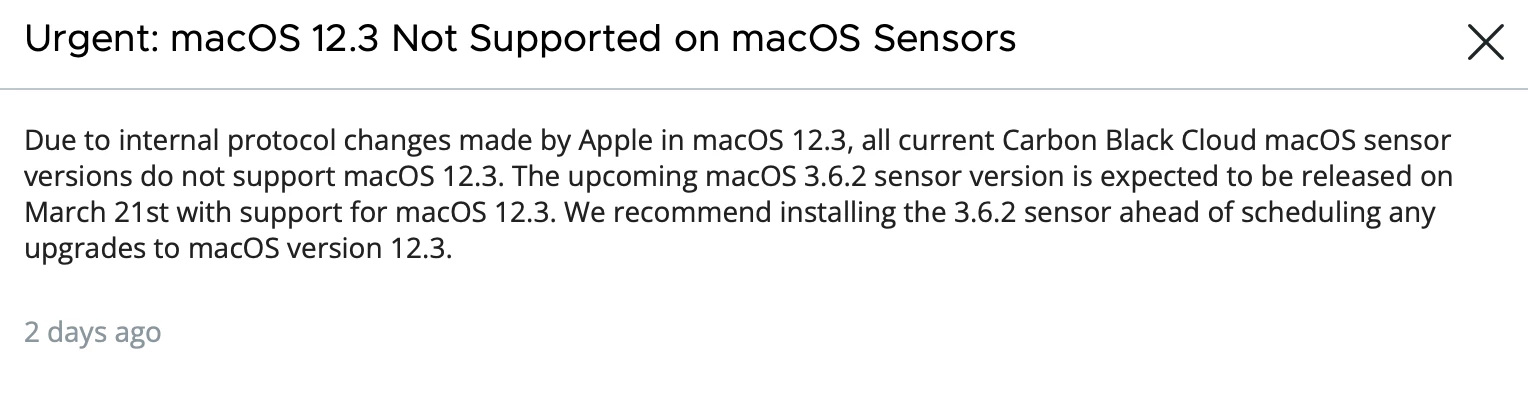
In our environment, VMware Carbon Cloud also broke. We noticed a few deprecations including python 2.7 which might had been important for these applications to work.


https://developer.apple.com/documentation/macos-release-notes/macos-12_3-release-notes


Forum|alt.badge.img+4

We have the same Problem, but we have it directly in Prestage, we got the Window to logIN with our AD Accounts and then we receive an blank Window, does someone have a workaround ? 

We have the Problem since 1 Month, but only with new Members, if they get onboarded, i  tried with my Credentials and it works...its really wired


Forum|alt.badge.img+1
  • New Contributor
  • March 18, 2022

The login screen replacement seems to be completely removed after the 12.3 upgrade on our systems.  We were using Onelogin.


Forum|alt.badge.img+1
  • New Contributor
  • March 18, 2022

The login screen replacement seems to be completely removed after the 12.3 upgrade on our systems.  We were using Onelogin.


Actually, I can now confirm the same behavior as OP for our Jamf Connect 2.10.0 install with OneLogin.  Blank box in center of login screen.


Forum|alt.badge.img+4
  • Author
  • New Contributor
  • March 18, 2022

haven't been able to find a workaround/solution yet. I have a case logged with jamf support.

I did notice SecurityAgentHelper-arm64 process crash report logged in console same time when jamf login attempt is made at login screen

it could be something with com.apple.secureagenthelper.arm64 in 12.3 causing this


Forum|alt.badge.img+6
  • New Contributor
  • March 19, 2022

haven't been able to find a workaround/solution yet. I have a case logged with jamf support.

I did notice SecurityAgentHelper-arm64 process crash report logged in console same time when jamf login attempt is made at login screen

it could be something with com.apple.secureagenthelper.arm64 in 12.3 causing this


Going to look into this, but it's sad that Apple decided to do these major changes on a minor update instead of a major release that would allow administrator to test deeply. 

This update does not feel like a minor update at all.


Forum|alt.badge.img+4
  • Author
  • New Contributor
  • March 21, 2022

Going to look into this, but it's sad that Apple decided to do these major changes on a minor update instead of a major release that would allow administrator to test deeply. 

This update does not feel like a minor update at all.


agree, lot of app vendors are having issues with 12.3 and informing customers not to upgrade to 12.3 yet


Forum|alt.badge.img+4

We still have the Problem with BigSur OS.....


rpayne
Forum|alt.badge.img+12
  • Contributor
  • March 28, 2022

All of our vendors (DUO, jamf, VMWare), are pointing the finger at pointing the finger at Apple. There doesn't seem to be much movement from Apple on a supposed 12.3.1 to fix these issues (no betas available). I suspect that with the announcement of their "Business Essentials" service announcement, they won't move quickly.


Forum|alt.badge.img+4
  • Contributor
  • April 1, 2022

All of our vendors (DUO, jamf, VMWare), are pointing the finger at pointing the finger at Apple. There doesn't seem to be much movement from Apple on a supposed 12.3.1 to fix these issues (no betas available). I suspect that with the announcement of their "Business Essentials" service announcement, they won't move quickly.


12.3.1 is out. Not seeing anything encouraging about this particular issue here:


Forum|alt.badge.img+4
  • Author
  • New Contributor
  • April 1, 2022

This is not fixed in 12.3.1

I just tested by updating to 12.3.1, the issue remains

Jamf support mentioned this will be fixed in 12.4


Forum|alt.badge.img+10
  • Contributor
  • April 5, 2022

PingFederate is also impacted. Our PingFederate instance does not interact with or leverage DUO from what IT Sec advised.


rpayne
Forum|alt.badge.img+12
  • Contributor
  • April 6, 2022

I can confirm, the issue is resolved in 12.4 beta. So now we wait.....


Manny_TBCS
Forum|alt.badge.img+2
  • New Contributor
  • May 6, 2022

I can confirm, the issue is resolved in 12.4 beta. So now we wait.....


I can also confirm, 12.4 Beta 4 and Jamf Connect works properly now that I've installed it. It did not work on 12.3.


cwangerud
Forum|alt.badge.img+2
  • New Contributor
  • May 19, 2022

This is not fixed in 12.3.1

I just tested by updating to 12.3.1, the issue remains

Jamf support mentioned this will be fixed in 12.4


Just updated to 12.4, not knowing it was an issue and our NoMAD login is now gone.  NoMAD is still there, but the branded login we had is no longer coming up and Shutdown, Restart and Sleep are now showing a the regular Mac login instead. Sleep we do have normally either.


rpayne
Forum|alt.badge.img+12
  • Contributor
  • May 19, 2022

Just updated to 12.4, not knowing it was an issue and our NoMAD login is now gone.  NoMAD is still there, but the branded login we had is no longer coming up and Shutdown, Restart and Sleep are now showing a the regular Mac login instead. Sleep we do have normally either.


12.4 has fixed all our issues. Sounds like maybe your authchanger got reset to the Mac login. Try running:

authchanger -JamfConnect


cwangerud
Forum|alt.badge.img+2
  • New Contributor
  • May 19, 2022

12.4 has fixed all our issues. Sounds like maybe your authchanger got reset to the Mac login. Try running:

authchanger -JamfConnect


We are JAMF Pro on premise. No JamfConnect


Manny_TBCS
Forum|alt.badge.img+2
  • New Contributor
  • May 19, 2022

We are JAMF Pro on premise. No JamfConnect


I believe for NoMAD the command is: authchanger -reset -AD


Manny_TBCS
Forum|alt.badge.img+2
  • New Contributor
  • May 19, 2022

12.4 has fixed all our issues. Sounds like maybe your authchanger got reset to the Mac login. Try running:

authchanger -JamfConnect


I can confirm, I updated to 12.4 on my work MacBook a couple days ago and without having to make any other changes the Jamf Connect login window started working again.


cwangerud
Forum|alt.badge.img+2
  • New Contributor
  • May 19, 2022

I believe for NoMAD the command is: authchanger -reset -AD


@Manny_TBCS wrote:

I believe for NoMAD the command is: authchanger -reset -AD


Thank you, that worked PERFECT!!!!!!!


Manny_TBCS
Forum|alt.badge.img+2
  • New Contributor
  • May 19, 2022

@Manny_TBCS wrote:

I believe for NoMAD the command is: authchanger -reset -AD


Thank you, that worked PERFECT!!!!!!!


No problem, glad it worked 😊