

Updated 14SEPT2022 - I moved the GitHub link over to the official Jamf Github - https://github.com/jamf/jamfconnect/tree/main/azure_conditional_access will have the latest until the official Jamf Connect docs get updated.
Updated 14JUL2022 - The github link below has been updated with some steps removed for version 2.13 or greater of Jamf Connect, details about custom ROPG scopes in the menu bar, notes on how the login may still show a failure after doing this but that's fine. https://www.jamf.com/blog/how-to-azure-conditional-access-and-jamf-connect/ will supersede instructions currently on the Jamf Blog.
Updated 14JAN2022 - The github link below has been updated to simplify the setup of the application registrations in Azure and allows for full testing in Jamf Connect Configuration before deploying to a test machine.
https://www.jamf.com/blog/how-to-azure-conditional-access-and-jamf-connect/ - Updated instructions posted to Jamf Blog.
UPDATED: 10 December 2021 - Includes information on how to create a custom scope for Microsoft Azure Conditional Access policies.
- Administrators finding "failed" login attempts in Azure sign-in logs when using Jamf Connect
- How the ROPG workflow and Jamf Connect communicate
- How to make an App Registration in Microsoft Azure Active Directory that allows for Conditional Access policies
- How to make Conditional Access policies NOT apply to the ROPG workflow
Problem:
What is happening:
openid profile email
The Open ID Connect 2.0 specification uses these default scopes to obtain an access or identity token for a client application. Consequently, in its default configuration, Jamf Connect login uses the "openid profile email" scope in its authentication requests, and the only way to apply a CA policy in this default behavior is to apply the policy to "All cloud apps" with NO exceptions applied or the CA policy will break.
- Simplest, but most impact on user logins: Set hard requirements for MFA via the older method of Azure Multi-Factor Authentication which applies an MFA requirement to ALL logins to ANY service for a specific user. Ignore failed logins in the sign-in logs for ROPG checks of the password. (Additional information on how to determine if a failed login is due to Jamf Connect menu bar agent doing an ROPG request is below.)
- Simple, but may affect other services: Apply a Conditional Access policy applied to "All cloud apps" requiring Multi-factor Authentication for login. Do NOT use an exception to the policy as that appears to break functionality of the CA rule as of testing done 10DEC2021. Ignore failed logins in the sign-in logs for ROPG checks of the password.
- Complex, but exacting: Follow the instructions from https://github.com/jamf/jamfconnect/tree/main/azure_conditional_access to create a custom scope for Jamf Connect applications. Verify that no policies are created that apply to "All cloud apps" as to not affect the ROPG workflow. CA policy will be applied as expected to the Jamf Connect login application and ROPG check will appear as a successful login in sign-in logs.
Azure Multi-factor Authentication vs. Conditional Access
- Multi-factor Authentication which is reachable via the “All services” list in the Azure portal
- Conditional Access which is reachable via Azure Active Directory under Security
Resource Owner Password Grant workflow
- Success, no MFA requirements: An access, refresh, and ID token encoded in HS256
- Success, MFA required through a policy: An error response like
AADSTS50076: Due to a configuration change made by your administrator, or because you moved to a new location, you must use multi-factor authentication to access [application UUID]
- Failure, bad password or user name: An error response like
AADSTS50126: Error validating credentials due to invalid username or password.
Diagnosing MFA vs. failed password in Azure logs
Navigate to Azure Active Directory → Enterprise Applications and select the name of your Jamf Connect application in Azure. Navigate to Activity → Sign-ins to open user usage logs.
Shown above are two logins which appear to be failures. Under the “Authentication required” column, the first login says “Multi-factor authentication”. Clicking on the row will pull up additional details about the login attempt.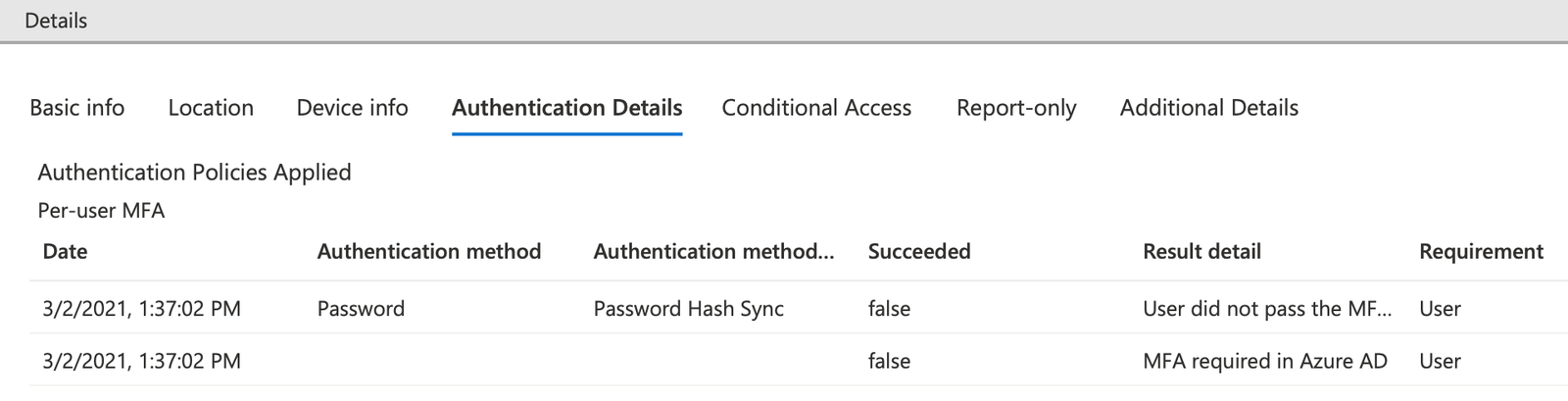
Under Authentication Details, the “Result detail” will let an administrator determine if the login was successful or a failure. In this example, the login was a success - the Result detail shows that the “User did not pass the MFA challenge (non interactive).” This login can be interpreted in that the user was required to use MFA by either a Conditional Access policy or through Azure Multi-factor authentication.
In the second example, a user with MFA required failed to enter their correct password:
The Authentication required column shows “Single-factor authentication” and the Authentication Details show “Invalid username or password or Invalid on-premise username or password.” While the user is required to use Multi-factor authentication, the user failed the first, single factor and thus was never prompted for MFA.
Creating a custom scope for Jamf Connect
To eliminate the inaccurate "failed responses" for ROPG, admins must remove any "All cloud apps" scoped requirements for multi-factor authentication and create a custom scope for Jamf Connect login.
Follow the guide in Azure_Conditional_Access_and_Jamf_Connect.pdf (source: GitHub) for step by step instructions.
Conditional Access Policy Considerations
Several Conditional Access Grant policies can create unacceptable behavior to access a client device:
- Require device to be marked as compliant
- Require Hybrid Azure AD joined device
In the above cases, a user would be unable to log into a client machine to fix the issue of being out of compliance by running a Jamf Pro policy to get the device back into compliance.
- Require approved client app
- Require app protection policy
In the above cases, the Jamf Connect software is not of the Microsoft apps accessing a specific service (for example, Microsoft Outlook accessing O365 mail), and all access would be blocked.
Administrators are recommended to carefully read conditional access polices and conditions applied to avoid locking users out of client devices inadvertently.