Does anyone have any experience utilizing Jamf Connect login LAPS functionality? https://travellingtechguy.blog/jamf-connect-and-laps/ Following this link there is specific plist config info called out for LAPS control built into Jamf Connect, our intended use case would be finding something that can manage our local admin passwords without being AD bound and securely using the FV2 escrow key seems like an interesting idea. Any thoughts on best practice?

Solved
Mac OS LAPS
 +12
+12Best answer by rossmclaren
Here is the script we use:
#!/bin/sh
####################################################################################################
#
#   MIT License
#
#   Copyright (c) 2016 University of Nebraska–Lincoln
#
#	Permission is hereby granted, free of charge, to any person obtaining a copy
#   of this software and associated documentation files (the "Software"), to deal
#   in the Software without restriction, including without limitation the rights
#   to use, copy, modify, merge, publish, distribute, sublicense, and/or sell
#   copies of the Software, and to permit persons to whom the Software is
#   furnished to do so, subject to the following conditions:
#
#   The above copyright notice and this permission notice shall be included in all
#   copies or substantial portions of the Software.
#
#   THE SOFTWARE IS PROVIDED "AS IS", WITHOUT WARRANTY OF ANY KIND, EXPRESS OR
#   IMPLIED, INCLUDING BUT NOT LIMITED TO THE WARRANTIES OF MERCHANTABILITY,
#   FITNESS FOR A PARTICULAR PURPOSE AND NONINFRINGEMENT. IN NO EVENT SHALL THE
#   AUTHORS OR COPYRIGHT HOLDERS BE LIABLE FOR ANY CLAIM, DAMAGES OR OTHER
#   LIABILITY, WHETHER IN AN ACTION OF CONTRACT, TORT OR OTHERWISE, ARISING FROM,
#   OUT OF OR IN CONNECTION WITH THE SOFTWARE OR THE USE OR OTHER DEALINGS IN THE
#   SOFTWARE.
#
####################################################################################################
#
# HISTORY
#
#	Version: 1.4
#
#	- 04/29/2016 Created by Phil Redfern
#   - 05/01/2016 Updated by Phil Redfern, added upload verification and local Logging.
#   - 05/02/2016 Updated by Phil Redfern and John Ross, added keychain update and fixed a bug where no stored LAPS password would cause the process to hang.
#   - 05/06/2016 Updated by Phil Redfern, improved local logging and increased random passcode length.
#   - 05/11/2016 Updated by Phil Redfern, removed ambiguous characters from the password generator.
#
#   - This script will randomize the password of the specified user account and post the password to the LAPS Extention Attribute in Jamf.
#  Version 1.5
#   - 8 Sep 2020 Mark Lamont  Removed reliance on API user thus closing security hole. Now uses standard inventory function to update.
#   - Password does remain on the device though but is obscured and only available to root user.
#   - Not written to work with FileVault enabled admin users because of all the issues with secure token
#
####################################################################################################
#
# DEFINE VARIABLES & READ IN PARAMETERS
#
####################################################################################################

resetUser=""
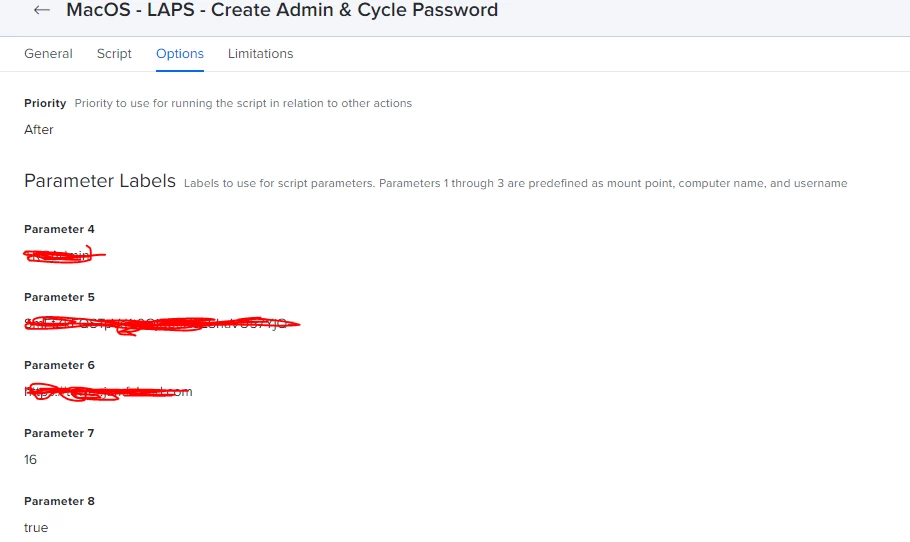
basePassword=""
# CHECK TO SEE IF A VALUE WAS PASSED IN PARAMETER 4 AND, IF SO, ASSIGN TO "resetUser"
if [ "$4" != "" ] && [ "$resetUser" == "" ];then
resetUser=$4
fi

# CHECK TO SEE IF A VALUE WAS PASSED IN PARAMETER 5 AND, IF SO, ASSIGN TO "initialPassword"
if [ "$5" != "" ] && [ "$basePassword" == "" ];then
basePassword=$5
fi

udid=$(/usr/sbin/ioreg -rd1 -c IOPlatformExpertDevice | awk '/IOPlatformUUID/ { split($0, line, "\\""); printf("%s\\n", line[4]); }')

LogLocation="/Library/Logs/Jamf_LAPS.log"
LAPSFileLocation="/usr/local/jamf/$udid/"
if [ ! -d "$LAPSFileLocation" ]; then
mkdir -p $LAPSFileLocation
chmod 600 $LAPSFileLocation
fi

LAPSFile="$LAPSFileLocation.$udid"

newPass=$(openssl rand -base64 10 | tr -d OoIi1lLS | head -c12;echo)
####################################################################
#
#            ┌─── openssl is used to create
#            │	a random Base64 string
#            │                    ┌── remove ambiguous characters
#            │                    │
# ┌──────────┴──────────┐	  ┌───┴────────┐
# openssl rand -base64 10 | tr -d OoIi1lLS | head -c12;echo
#                                            └──────┬─────┘
#                                                   │
#             prints the first 12 characters  ──────┘
#             of the randomly generated string
#
####################################################################################################
#
# SCRIPT CONTENTS - DO NOT MODIFY BELOW THIS LINE
#
####################################################################################################

# jamf binary path
jamf_binary="/usr/local/jamf/bin/jamf"
# Logging Function for reporting actions
ScriptLogging(){

DATE=$(date +%Y-%m-%d\\ %H:%M:%S)
LOG="$LogLocation"

echo "$DATE" " $1" >> $LOG
}

ScriptLogging "======== Starting LAPS Update ========"
ScriptLogging "Checking parameters."

if [ "$resetUser" == "" ];then
    ScriptLogging "Error:  The parameter 'User to Reset' is blank.  Please specify a user to reset."
    echo "Error:  The parameter 'User to Reset' is blank.  Please specify a user to reset."
    ScriptLogging "======== Aborting LAPS Update ========"
    exit 1
fi

# Verify resetUser is a local user on the computer
checkUser=$(dseditgroup -o checkmember -m $resetUser localaccounts | awk '{ print $1 }')

if [[ "$checkUser" = "yes" ]];then
    echo "$resetUser is a local user on the Computer"
else
    echo "Error: $checkUser is not a local user on the Computer!"
    ScriptLogging "======== Aborting LAPS Update ========"
    exit 1
fi

ScriptLogging "Parameters Verified."

# Update the User Password
RunLAPS (){
ScriptLogging "Running LAPS..."

if [[ "$secureTokenStatus" = "DISABLED" ]]; then

    ScriptLogging "Updating password for $resetUser."
    echo "Updating password."
    $jamf_binary resetPassword -username $resetUser -password $newPass
else
    ScriptLogging "*** Secure Token Enabled! ***"
    sysadminctl -resetPasswordFor "$resetUser" -newPassword "$newPass" -adminUser "$resetUser" -adminPassword "$basePassword"


fi

}

# Verify the new User Password
CheckNewPassword (){
ScriptLogging "Verifying new password for $resetUser."
passwdB=`dscl /Local/Default -authonly $resetUser $newPass`

if [ "$passwdB" == "" ];then
    ScriptLogging "New password for $resetUser is verified."
    echo "New password for $resetUser is verified."
else
    ScriptLogging "Error: Password reset for $resetUser was not successful!"
    echo "Error: Password reset for $resetUser was not successful!"
    ScriptLogging "======== Aborting LAPS Update ========"
    exit 1
fi
}

# Update the LAPS Extention Attribute
UpdateJamf (){
ScriptLogging "Recording new password for $resetUser into LAPS."
# debug
# ScriptLogging "*** new pass is $newPass ***"
touch $LAPSFile

#echo "$resetUser|$newPass" > $LAPSFile
echo "$newPass" > $LAPSFile

# EA must be in Jamf to record the value
jamf recon

}

checkSecureTokenStatus () {

secureTokenStatus=$(sysadminctl -secureTokenStatus $resetUser 2>&1 | awk '{ print $7 }' | sed s'/ //g')

ScriptLogging "secure token for $resetUser is $secureTokenStatus"

}

checkIfRunBefore () {

if [ -f "$LAPSFile" ]; then
    previousPassword=$(cat $LAPSFile)
    basePassword=${previousPassword}
    # Debug
    #ScriptLogging "base password is $basePassword"

fi

}
#====================================================
# The script itself

checkSecureTokenStatus
checkIfRunBefore
RunLAPS
CheckNewPassword
UpdateJamf

ScriptLogging "======== LAPS Update Finished ========"
echo "LAPS Update Finished."

exit 0
You will also need to use this below as an Extension Attribute:
#!/bin/sh

###################################
# EA to update LAPS Password      #
###################################
udid=$(/usr/sbin/ioreg -rd1 -c IOPlatformExpertDevice | awk '/IOPlatformUUID/ { split($0, line, "\\""); printf("%s\\n", line[4]); }')
LAPSFileLocation="/usr/local/jamf/$udid/"
LAPSFile="$LAPSFileLocation.$udid"

if [[ -f "$LAPSFile" ]]; then
   value=$(cat $LAPSFile)
   echo "<result>$value</result>"
   else
   value="Not recorded"
fi



Enter your E-mail address. We'll send you an e-mail with instructions to reset your password.