
Question

10.12 CacheDelete Processes

  • November 29, 2016
  • 6 replies
  • 50 views

Forum|alt.badge.img+14

Is there a way to schedule or stop the automatic Cache Deletion processes on 10.12 triggered by deleteD? MailCacheDelete is triggering my banned mail.app every hour or so.

Killed blacklisted process "Mail.app" at path "/Applications/Mail.app/Contents/PlugIns/MailCacheDelete.appex/Contents/MacOS/MailCacheDelete".

6 replies

Forum|alt.badge.img+14
  • Author
  • Valued Contributor
  • November 30, 2016

Okay so digging a little deeper this morning, into the contents of the plugin bundle mentioned above and I find this:

<key>NSExtension</key>
    <dict>
        <key>CacheDeleteInfo</key>
        <dict>
            <key>CACHE_DELETE_ID</key>
            <string>com.apple.MailCacheDelete</string>
            <key>CACHE_DELETE_SERVICES</key>
            <array>
                <string>PERIODIC</string>
                <string>PURGE</string>
                <string>PURGEABLE</string>
            </array>
        </dict>
        <key>NSExtensionPointIdentifier</key>
        <string>com.apple.cache_delete_extension</string>
        <key>NSExtensionPrincipalClass</key>
        <string>MailCacheDeleteExtension</string>
    </dict>

So, is this the type of stuff that can be managed with a configuration profile? I don't want the mail cache delete service to run EVER as it is a blacklisted app in our org.


Forum|alt.badge.img+1
  • New Contributor
  • March 27, 2017

^^ I agree on this. Is there a way to disable to MailCacheDelete plugin since you cannot modify or delete this plugin (required by MacOS)?


Forum|alt.badge.img+3
  • New Contributor
  • August 15, 2017

Has anyone figured out a way around this? I am having the same issue being that Mail.app is blacklisted via a config profile.


Forum|alt.badge.img+3
  • New Contributor
  • August 23, 2017

I have figured out a workaround for this issue! Big thanks to Wyatt @ JAMF for helping me with this.

-Change your config profile to ALLOW the Mail app (this is configured in the "Restrictions" payload under the "Applications" tab).

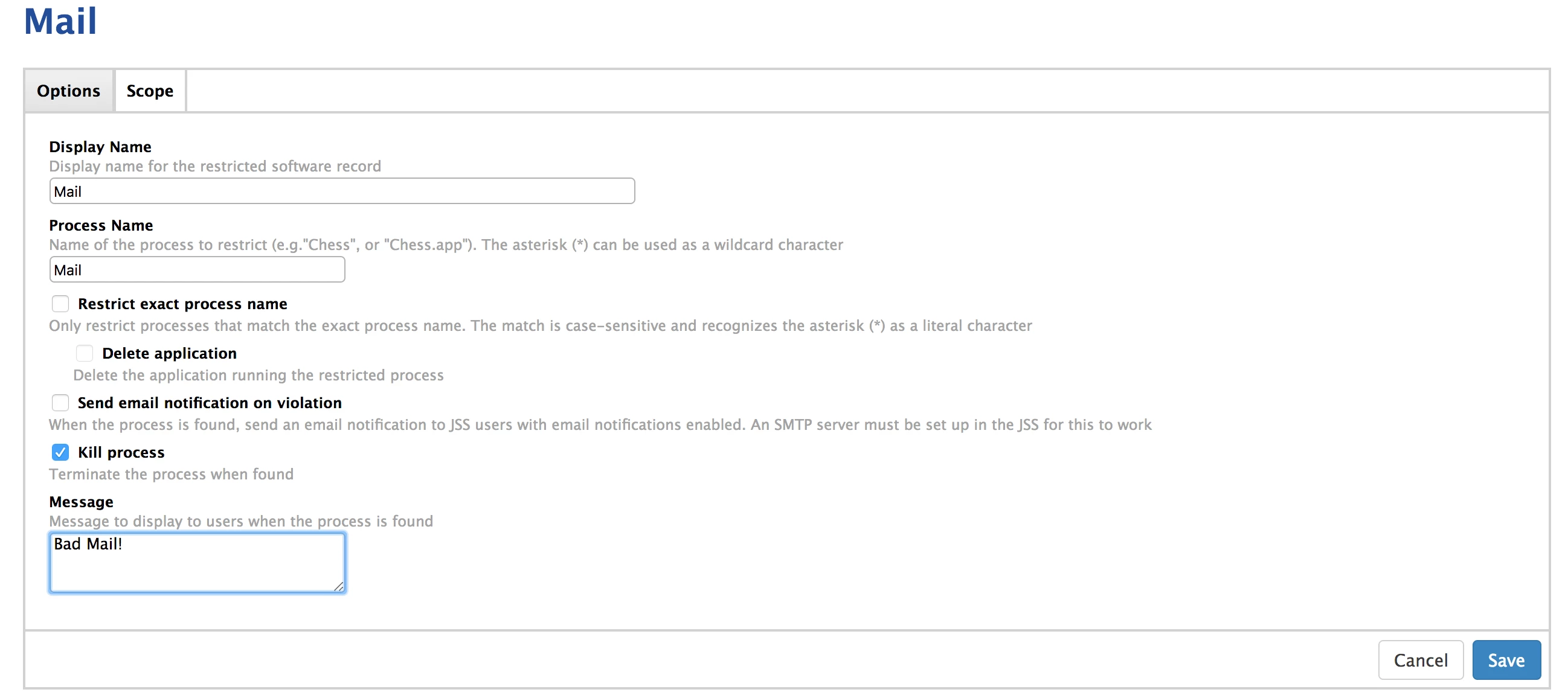
-Create an entry in the Restricted Software for Mail. Please see my settings in the screen shot. Do not restrict the exact process name (this is what catches the "MailCacheDelete" process). If you want to see when the "MailCacheDelete" process is being killed, set a 'Message' in the last box. I do not have a message enabled as I do not want my end users knowing when this process is being killed.

Hope that helps! And just a quick FYI, I spoke with a Senior Engineer at Apple, and nobody is aware of a way to trigger the MailCacheDelete process manually (for testing purposes). I found that it typically kicks off within a minute after restarting a machine.


Forum|alt.badge.img+1
  • New Contributor
  • September 27, 2017
-Create an entry in the Restricted Software for Mail.

melegastudios:
Where is this "Restricted Software" tool with which I am supposed to make an entry? In the Profile Manager (configured via Safari) I only see one place to restrict software, and that is in Users-->MyGenericUser-->Settings-->Restrictions (macOS)-->Apps. That has "Allow Apps," which is where I assume I am to allow Mail, "Allow Folders," and "Disallow Folders." I can't find a Restricted Software place to create an entry as seen in your screen shot.

Thanks for your help.


Forum|alt.badge.img+8
  • Valued Contributor
  • July 9, 2019

@PatMullen In Jamf Pro (not Profile Manager), under Computers, on the left-hand side you'll find "Restricted Software".