Question

2018-001 & Safari Update causing crashes on 10.12.6

  • January 23, 2018
  • 72 replies
  • 267 views

Show first post

72 replies

Forum|alt.badge.img+3
  • New Contributor
  • January 24, 2018

We're running Sophos AV 9.6.6 and Ensilo 2.0.1.21 here and seeing the issue. We do not use any Carbon Black products here.

Will test to see if it's Ensilo.

@sahmed Did you uninstall Sophos - if so, any luck?


Forum|alt.badge.img
  • New Contributor
  • January 24, 2018

I am running 10.11.6 as well and encountering this same crashing error. Anyone able to resolve the issue?

Update: Reinstalling MacOS just got this error fixed. Thanks to rlee for the solution.

Garry Joshi https://dltutuapp.com/ https://show-box.ooo/ https://tutuappx.com/


Forum|alt.badge.img+3
  • New Contributor
  • January 24, 2018

Forgot to mention that re-installing MacOS from the Recovery partition worked for me.

Give that a shot @garryjoshi


Forum|alt.badge.img+13
  • Valued Contributor
  • January 24, 2018

Let's all open cases w/the vendors for confirming this compatibility. I'm hoping the message will be clear - we expect this kind of validation during betas if possible, or day zero otherwise.


mojo21221
Forum|alt.badge.img+12
  • Valued Contributor
  • January 24, 2018

Carbon black has informed us that a patch is a week out. Their recommendation was to block the Apple update. Another solution is safe boot the mac (Hold Shift on startup), log in as an admin, then Uninstall the CB agent via terminal (sudo sh /Applications/CarbonBlack/sensoruninst.sh). Reboot and your Mac's Kernal will be happy again.


Forum|alt.badge.img+1
  • New Contributor
  • January 24, 2018

We have Carbon Black running and that caused the crashes here

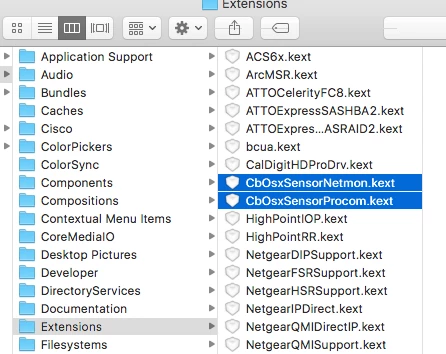
Boot in Safe Mode and delete the Carbon Black .kexts in /Library/Extensions


Forum|alt.badge.img
  • New Contributor
  • January 24, 2018

Removing Carbon Black was also the solution for me. Thanks to @daz_wallace, @jwojda, and @mojo21221 ! Mac updated to 10.12.6 with the 2018-001 update for Sierra, rebooted, and could not boot up normally. I was able to get into safe mode, then remove CB using Terminal and Admin account.

Of note: simply trashing the Carbon Black folder does not solve the issue. If you have done this, reinstall CB, then use @mojo21221's solution: Uninstall the CB agent via terminal (sudo sh /Applications/CarbonBlack/sensoruninst.sh) and reboot.


Forum|alt.badge.img+2
  • New Contributor
  • January 24, 2018

For me I had to uninstall Carbon Black and Trend to get the machine running again. I have not tried updating Trend to a newer version yet.


Forum|alt.badge.img+7
  • Contributor
  • January 24, 2018

We couldn't boot into Safe Mode or Single User Mode on nearly all of the systems affected by this, perhaps because we have both Carbon Black Response and Carbon Black Protect installed on our Macs. I figured out the files that need to be removed before the Mac could boot normally:

For Response, I deleted:

/Library/Extensions/CbOsxSensorNetmon.kext
/Library/Extensions/CbOsxSensorProcmon.kext
/Library/LaunchDaemons/com.carbonblack.daemon.plist
/Applications/CarbonBlack/CbOsxSensorService

For Protect, I deleted:

/Library/Extensions/b9kernel.kext
/Library/LaunchDaemons/com.bit9.Daemon.plist
/Applications/Bit9/Daemons/b9daemon

I either booted the affected Mac to Target Disk Mode and connected it to a working Mac, and used the Finder to delete the files, or I booted into the Recovery partition and use Terminal to delete them (remembering to target "/Volume/Macintosh HD" in the commands). After removing those files, the Mac should be able to start up without kernel panicking, and the uninstall scripts for each product still remained, which I then ran in Terminal:

sudo /Applications/CarbonBlack/sensoruninst.sh
sudo /Applications/Bit9/uninstall.sh

This worked on all affected Macs that I had yesterday.


jconte
Forum|alt.badge.img+12
  • Valued Contributor
  • January 24, 2018

I am seeing this on 10.11 and 10.12, kernel panics after patch and restart. Booted in Safe Mode, removed Carbon Black, machine works again.


AVmcclint
Forum|alt.badge.img+21
  • Esteemed Contributor
  • January 24, 2018

I've installed it on about 90 Macs so far and none of them have crashed. We're running McAfee ePO 10.2.2, and all computers are FileVaulted.


Forum|alt.badge.img+2
  • New Contributor
  • January 24, 2018

Just FYI, the only anti-virus/malware software my organization uses is Sophos. Our Sophos Central Endpoint clients are on 9.6.6 and we are not experiencing any boot-loops or kernel panics in my testing of our Macs running 10.11/10.12. I will continue testing and update you all if anything changes.

Just wanted to add another data point to the thread since I've gleaned some useful information from it. Thanks, all.


Forum|alt.badge.img+3
  • New Contributor
  • January 24, 2018

It is Ensilo on our systems and not Sophos or OpenDNS. Did testing this morning with each software installed prior to installing 2018-001 to isolate which software was the issue.

After a macOS reinstall, the App store does show 2018-001 as being installed. I haven't seen any further issues on these systems. Even Ensilo console is reporting back properly.


Forum|alt.badge.img+12
  • Contributor
  • January 24, 2018

Okay so we have seen the same issues with Carbon Black. We are removing the b9kernel.kext by going into recovery mode, then using disk utility and terminal to remove the offending kext. On reboot this has shown to work well.


Forum|alt.badge.img+13
  • Valued Contributor
  • January 24, 2018

10.11.6 and 10.12.6 installed the updates (SecUpd2018-001 and Safari 11.0.3, both as .pkg in Self Service) fine. We run SEP 14 and CrowdStrike Falcon Host, no Carbon Black.


Forum|alt.badge.img+9
  • Contributor
  • January 24, 2018

2018-001 & Safari Update & 10.12.6 & Sophos Vn 9.6.7 ?

Anyone seen issues with that combination ?
I have tried to block for now…

But haven't yet really run a full set of tests.
Sophos app says Vn 9.6.2 but SAV is Vn 9.6.7

I'll run some tests tomorrow…


roiegat
Forum|alt.badge.img+16
  • Valued Contributor
  • January 24, 2018

Just wanted to report the issue is also happening with Digital Guardian. They are working on a hot fix.


Forum|alt.badge.img+1
  • New Contributor
  • January 24, 2018

Forgot to include the we fixed all of the ones adversely affected by booting into safe mode and the reinstalling the OS. Frustrating but at least we didn’t have to rebuild them or loose peoples ‘stuff’.


bradtchapman
Forum|alt.badge.img+20
  • Valued Contributor
  • January 25, 2018

Has Symantec SEP 12.1.6* for Mac been updated to support Spectre/Meltdown?


mark_mahabir
Forum|alt.badge.img+15
  • Jamf Heroes
  • January 25, 2018

Not seeing any issues (yet) with just Sophos v9.6.6 installed (and not the other products mentioned above).


Forum|alt.badge.img+7
  • Contributor
  • January 25, 2018

Have McAfee Endpoint Security 10.2.3 and ePO Agent 5.0.6.347:
- Sierra Test VM 10.12.6 - No issues so far
- High Sierra MacBook 10.13.13 - No issues so far


Forum|alt.badge.img
  • New Contributor
  • January 25, 2018

I was experimenting this problem, but was the ESET NOD32, so I uninstalled it. I dunno if I should install it again


Forum|alt.badge.img+9
  • Contributor
  • January 25, 2018

mac OSX 10.12.6 & Safari 11.0.3 & Sophos 9.67 - No problems so far…

We have not done much testing yet… But so far no problems with this combination…
We need to test with more Software applications still…

It seems to me the 'most likely' products we have that might suffer issues are:
Video related software - especially drivers of various sorts
Audio related software - again including various drivers etc.
We need to ensure that these continue to work - so testing is going to be awkward…
So start with the simpler things first… and use test equipment wherever possible
- an alternative where specialised equipment is concerned - when we get to it…
- will be to test while booted from an alternate system disk…


Forum|alt.badge.img+13
  • Valued Contributor
  • January 26, 2018

My test worked ok, so I tried on another machine (10.3.3 upgrade) and now it reboots once I get through FileVault authentication... I tried removing all traces of Symantec and Tanium but no luck. I also tried reinstalling 10.13.3 from a USB drive after unlocking the drive with the same results. I'm working on rebuilding now.


Forum|alt.badge.img+6
  • Contributor
  • February 1, 2018

Hi, a client of ours is running Trend Micro Security on their Macs.
We experienced the same problem - after the 2018-001 security update the machine crashes on reboot.
Unfortunately the official Trend Micro Security Uninstaller doesn't completely remove everything.

We fixed it this way:
boot into safe mode (shift key pressed)
run the following commands to completely remove the Trend Micro Security client:
(as root)

launchctl unload /Library/LaunchDaemons/com.trendmicro.icore.av.plist
rm /Library/LaunchDaemons/com.trendmicro.*
rm -r "/Library/Application Support/TrendMicro"
rm -r /Library/Frameworks/TMAppCommon.framework
rm -r /Library/Frameworks/TMAppCore.framework
rm -r /Library/Frameworks/TMGUIUtil.framework
rm -r /Library/Frameworks/iCoreClient.framework
rm -r /Applications/TrendMicroSecurity.app

killall -kill TmLoginMgr
killall -kill UIMgmt

Update!

The Jamf framework has limited functionality when booted into Safe Mode however It does work to manually trigger a policy.
Create a policy with a custom trigger f.x UninstallTMS , boot the Mac (in Safe Mode), and run sudo jamf policy - event UninstallTMS

Hope this helps.