Question

9.8 is out...

  • September 16, 2015
  • 40 replies
  • 196 views

davidacland
Forum|alt.badge.img+18

Would be good to hear your experiences upgrading to the new version, good or bad!

40 replies

Forum|alt.badge.img+12
  • Valued Contributor
  • September 16, 2015

I'm hoping someone can confirm if the new AppleID-less VPP distribution is available in this release. I was under the impression that this was ready on Apple's end in the iOS 9 beta in some part, but I haven't seen anything about it in the release notes.


Forum|alt.badge.img+13
  • Honored Contributor
  • September 16, 2015

I updated my test instance from 9.73 to 9.8 with no issues. Windows Server 2012r2, Java 8, MySQL 5.6.25.


Forum|alt.badge.img+18
  • Valued Contributor
  • September 16, 2015

@jbourdon this is in the letter I think it answers your question:

Watch for another announcement in a few weeks: we'll provide another product update to support OS X El Capitan when it's publicly available. This next release will add support for the new DEP and VPP enhancements that were announced at WWDC this summer.

Forum|alt.badge.img+17
  • Honored Contributor
  • September 16, 2015

Is there a KB/walk through on the GSX set up somewhere?


Forum|alt.badge.img+3
  • New Contributor
  • September 16, 2015

No issues here, other than the missing VPP enhancements. We really could have used those... K-6 iPads with Apple IDs are a PITA.


Forum|alt.badge.img+7
  • Employee
  • September 16, 2015

@jbourdon and @bcourtade ,

Thanks for the post, we are jacked up about device based VPP managed distribution too. Please keep an eye on JAMFNation for a beta release very soon that will give you a chance to start trying out your workflows with iOS 9 and this new functionality.

@CasperSally,

Check out the newly updated GSX KB here


Forum|alt.badge.img+14
  • Contributor
  • September 16, 2015

I noticed Java 6 is not supported on the JSS anymore. Looks like I will be upgrading that first.


cdenesha
Forum|alt.badge.img+14
  • Honored Contributor
  • September 16, 2015

From the email announcement:

Support for iOS 9 so you can maintain device inventory, deployment workflows, and security policies during the OS upgrade process

If we do not upgrade to 9.8 and a user updates their iPad to iOS 9, what are the consequences?


Forum|alt.badge.img+8
  • Contributor
  • September 16, 2015

My work iPad has been on iOS9 for like 2 months now in JSS and hasn't thrown any issues.

The only issues i've had is with El Capitan and package deployments using file share distribution points.


Forum|alt.badge.img+9
  • Contributor
  • September 16, 2015

addressing the Java upgrade I posted a related question here
https://jamfnation.jamfsoftware.com/discussion.html?id=16954


kitzy
Forum|alt.badge.img+14
  • Valued Contributor
  • September 16, 2015

@cdenesha

In the past, updating to a new version of iOS before the JSS has been upgraded generally doesn't break communication, but you won't be able to take advantage of the new iOS 9 features on the JSS side until you've upgraded. I have been able to manage iOS 9 devices with a 9.73 JSS, but as always test for yourself and YMMV.


Forum|alt.badge.img
  • New Contributor
  • September 16, 2015

The faster we can get our hands on the AppleID-less VPP distribution the better. We have some students that are unable to get apple ID's and we are a month into classes. We thought iOS 9 was going to be our "Golden Goose".


Forum|alt.badge.img+3
  • New Contributor
  • September 16, 2015

+1 on that. We are trying to get the U13 kids through the Apple ID for students program, but we only have ~70% adoption so far. Teachers are frustrated and not needing the Apple ID would be a godsend.


Forum|alt.badge.img+17
  • Honored Contributor
  • September 16, 2015

In the presentation about the AppleID less VPP they said that app developers had to opt in to let their app be pushed to devices instead of users.

I'm wondering on the list of apps we support how many won't opt in. It will make the idea of apps being sent to devices instead of IDs much more difficult to implement if there are a few apps not on the opt in list that our district already bought hundreds of copies of & wants to use.


Forum|alt.badge.img+3
  • New Contributor
  • September 16, 2015

The update went flawlessly, although there was an issue with the DEP after the update that a quick upload of new server tokens fixed. Now I'm just waiting for the VPP enhancements and not requiring Apple IDs to install apps to come through.

*As a note, someone asked about people updating to iOS 9 before the JSS is updated to 9.8 - They only issue is if they are wiping and starting it from scratch. It doesn't seem to get the Self-Service app correctly, but if they just update, the Self-Service App is already there and works fine. No other noticed issues beyond that! We've had two students testing the beta iOS 9 on our server for a few weeks.


Forum|alt.badge.img+7
  • Contributor
  • September 16, 2015

Absolutely flawless upgrade on win 2008 R2! (nice change from the chaos I had with 9.73!!)


Forum|alt.badge.img+16
  • Honored Contributor
  • September 17, 2015

Has anyone else had issues with remote recon via the 9.8 recon app? I'm getting a communications error and the binary fails to install. JAMF was able to recreate the exact issue internally. Just curious if anyone else has encountered it and if they found a quick work around.

Quickadd packages still work, so I'm not totally dead in the water for enrollment.


Forum|alt.badge.img+5
  • New Contributor
  • September 17, 2015

Upgrade went without issues, as normal.

Was disappointed to see no Device assigned VPP though


Forum|alt.badge.img+13
  • Valued Contributor
  • September 17, 2015

I agree CasperSally - it should been opposite, automatically enabled after a month unless specified by the developer otherwise.

I think you will find most apps will support it, otherwise it doesn't hurt tot send them feedback, indicating you were going to make further VPP purchases but cause they don't support it your not going to purchase.


donmontalvo
Forum|alt.badge.img+36
  • Hall of Fame
  • September 17, 2015

Odd...manually building a test box. I have the latest Java 8 installed (JDK & JCE), and the latest MySQL installed (5.6.20). I configured MySQL, first by memory, and sighing and going line by line in case I forgot a step. The JSS 9.8 installer doesn't seem to want to install.

I did not change the defaults:

Server Name (localhost)
Server Port (3306)
Database Name (jamfsoftware)
Username (jamfsoftware)
Password (jamfsw03)

The installer gives me the dreaded Error: Please verify server, port, username and password error.

Yes, MySQL is running. This is on a Mac Pro running 10.9.5.

Any ideas?


donmontalvo
Forum|alt.badge.img+36
  • Hall of Fame
  • September 17, 2015

donmontalvo
Forum|alt.badge.img+36
  • Hall of Fame
  • September 17, 2015

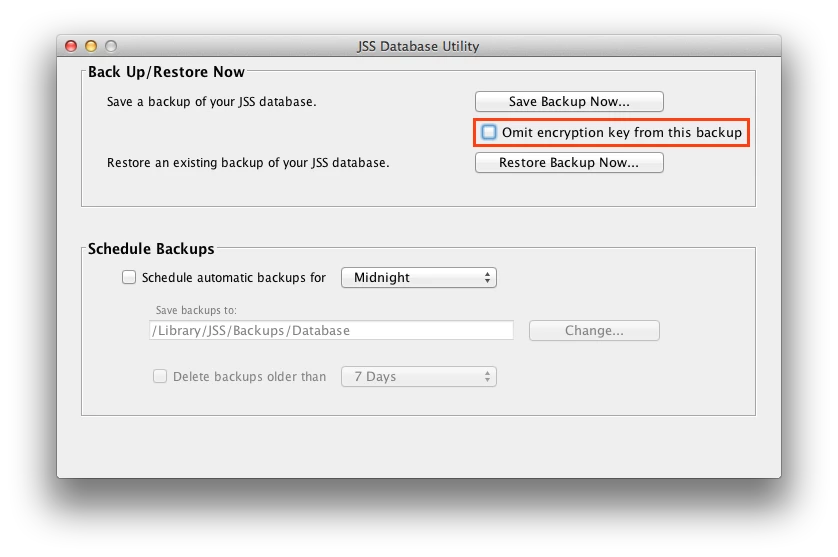
Nice, we can "Omit encryption key from this backup" using the 9.8 JSS Database Utility.

Sounds like a FV2 th'ang...nothing in the admin guide...leaving it off until we know what it does.


davidacland
Forum|alt.badge.img+18
  • Author
  • Valued Contributor
  • September 17, 2015

@donmontalvo youre using Java 8? I tried that last week but the JSS installer complained and wanted either 6 or 7. Is this a new thing for JSS 9.8?

I saw that MySQL thing last week, something about the method you use to enable it, some ways it's 3306 and some are 3307 with the same files installed!


Forum|alt.badge.img+17
  • Contributor
  • September 17, 2015

@donmontalvo

That option has always been available; it was just tucked away in menus that users would typically never go into without Support telling them to.

In the older versions of the JSS Database Utility, the option was under Main >> Preferences, and was a checkbox at the bottom of the dialogue that came up. It had to be manually turned on and manually turned off again after the backup without the encryption key was made to send in to Support for troubleshooting.
If the step of going back in and unchecking that box again was missed, it tended to eventually end in catastrophe if it wasn't caught and re-enabled before a situation occurred in which we needed to restore a backup of the database.

There is only ever one reason we would check that box: The person you're working with, on an existing case, from JAMF Support has requested you to send a copy of your database to us for in house testing. Even in that scenario, it is ONLY checked for that ONE backup, then we would immediately go back and uncheck it again.

In 9.8 making the option more visible also helps to reduce the chance that it will be accidentally checked and left checked. It should NOT affect scheduled backups, even if it is checked but I like to err on the side of complete caution with this option and just leave it unchecked and only check it for a single backup under the direction of JAMF Support.

The reasoning for that is kind of the story you'd tell new admins to terrify them away from even looking at the checkbox without someone from Support on the line:

Omitting the encryption key from the backup means you are left with no workable backup if you ever need to restore a backup for any reason. The long and short of it is: The restore won't be successful, you won't have a working database that you can use in production, and there is no way to 'fix' it if a backup from prior to the encryption key omission is not available.

...to put it another way, you have to start over in that scenario. From the ground up, every policy, every profile, every distribution point, every network segment, every setting, every certificate, just like you were setting up a brand new JSS, complete with having to re-enroll all of your devices.

We can't fix it, you can't fix it, and information it wants to function properly isn't there anymore and there is no secret backdoor to get it back.

Nobody wants that.
Nobody wants to be the Support person that has to tell someone that either (I've had to three times since I've been at JAMF, not fun, 0/10, do not recommend.).

The short, short version of the above is: Please do not check that box unless someone from JAMF Support has specifically told you to do so, and always make sure it is unchecked after using the option to make a backup without the encryption keys.

If you have more questions on that particular option, or want some more in-depth information on it, please get in touch with your Technical Account Manager, either by giving them a call, sending an e-mail to support@jamfsoftware.com, or using the My Support section of JAMF Nation.

Thanks!
Amanda Wulff
JAMF Software Support


Forum|alt.badge.img+11
  • Contributor
  • September 17, 2015

Curious if 9.8 JSS would be compatible with 9.4 Self Service app? (allowing me time to rebrand and distribute later)

How about JDS 9.73 ?