Question

About Enterprise Connect

  • November 6, 2015
  • 243 replies
  • 1405 views

Show first post

243 replies

Forum|alt.badge.img+9
  • Valued Contributor
  • October 6, 2017

hi @rjlemmon , a couple of questions

  • Our business is based in the US, but have offices across the globe...will this still function for our international offices or does it depend on infrastructure set-up (how/what/etc)?

  • Do users have one or two passwords? For example if we only had a local user account and we supply them company credentials (email/shares/etc). what password is used to log into the Mac, unlock file vault, etc?

Thank you


iJake
Forum|alt.badge.img+23
  • Contributor
  • October 6, 2017

@donmontalvo

1.) It alerts the users via Notification Center like any other alert.
2.) Yes
3.) Yes

EC takes no action other than an alert on an account being locked in AD.


iJake
Forum|alt.badge.img+23
  • Contributor
  • October 6, 2017

@walt

1.) As long as it is AD then it should work. If there are multiple domains globally you might need to have different configurations for these different regions.

2.) They can have as many as two password but its up to you the admin and the user to reduce this to one. EC can have the user sync their AD password to the local account if you configure it. This can't be forced so up to your users to comply.


iJake
Forum|alt.badge.img+23
  • Contributor
  • October 6, 2017

@macmanmk

If this file

$HOMEFOLDER/Library/Preferences/com.apple.Enterprise-Connect.plist

doesn't exist then Enterprise Connect has never been logged into. Key off of that but I'd actually take it a step further and even if the prefs exist verify that it is actually connecting.

defaults read $HOMEFOLDER/Library/Preferences/com.apple.Enterprise-Connect.plist dateLastConnected

And you can easily convert that to epoch for easy comparison and see if they've check in in the last X days

timeStamp14dBack=$(date -v-14d -u +"%s")
dateLastConnecedEpoch=$(date -j -f "%Y-%M-%d %T" "$($HOMEFOLDER/Library/Preferences/com.apple.Enterprise-Connect.plist dateLastConnected | cut -d " " -f1,2)" "+%s")

if [[ $dateLastConnecedEpoch -lt $timeStamp14dBack ]]
then
echo "they have connected in the last two weeks. good user"
else
echo "they have not in a couple weeks. bad user."
fi

Forum|alt.badge.img+6
  • New Contributor
  • October 30, 2017

I am getting ready to rollout EC to my Macs within the organization. All of our Macs are joined to the domain and accounts are managed. Has anyone used managed accounts with EC. I already did my two day training and they suggested to create local accounts on each Macbook.


Forum|alt.badge.img+7
  • Valued Contributor
  • October 30, 2017

Hi, I posted this question last week, and I just notice this post today so I thought I should ask the same question here:

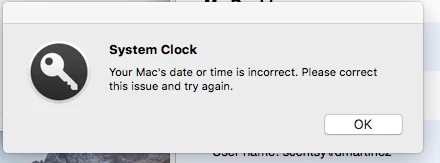
Apple Enterprise Connect - System Clock - Your Mac's date or time is incorrect.

I'm using Apple Enterprise Connect 1.7.1 I normally don't log out.
And when I log back in from "sleep mode" I'm getting this popup after I log in:
"System Clock - Your Mac's date or time is incorrect. Please correct this issue and try again."
time is set to "time.apple.com" and when I get the popup I see the time and date is correct.
I just click "ok" and on the "EC" icon I right click and select "Reconnect" and it connects fine.

any thoughts on how to resolve this?

thank you.

what I have is a "Smart Computer Groups" with a Criteria=OS - Verify Time Server, Operator=like, Value=Fail if it finds a "Fail" for the time it automatically applies a policy with a really basic command:

#!/bin/sh
systemsetup -setnetworktimeserver time.apple.com

Has anyone seen the same "issue" on EC version 1.8?

user schultza posted this:

Posted: 10/27/17 at 7:47 PM by schultza This might be related. Time on Macs has been allowed drift since ~2013. Apple is no longer using NTP directly from source, it's been changed so that time updates itself less frequently; as I understand it this was done to save power. I have a policy that runs that syncs the time once a day with our local NTP server. This might not be your issue, but I've seen strange time problems with machines coming out of sleep related to this. /usr/sbin/ntpdate -u serverurlhere Alternatively you can compile NTP from source if you want to.

pavanraju
Forum|alt.badge.img+8
  • Employee
  • January 25, 2018

@rjlemmon Thanks for the detailed info. Can we please have a demo of it?


Forum|alt.badge.img+4
  • Contributor
  • January 25, 2018
Enterprise Connect is only available to USA based customers.

sigh


Forum|alt.badge.img+8
  • Contributor
  • January 25, 2018

HI all,

Enterprise Connect, Apple Provisionning Utility and other engagements can now be purchased outside of USA.

Please check with your Apple Representative or send an email to :consultingservices at Apple.


noahdowd
Forum|alt.badge.img+11
  • Contributor
  • March 13, 2018

@rjlemmon I haven't dived deep into the EC 1.9.0 beta but I'm wondering if there's any plan to leverage EC or possibly built-in support for offline mobile account logins with SmartCards.
My company is planning a transition to full PIV SmartCard multi-factor authentication and I was pleased to discover fairly robust support for this in 10.13.3 (my Windows counterparts struggled with this mandate for months and I got a working demo up in one day). The only feature that doesn't exist is the ability to log in to AD-supplied mobile accounts off-network. I've heard that apps like NoMAD might be able to provide this ability but since we already have EC I figured I'd see if it was something that was coming or maybe that could be bashed together with EC and Ticket Viewer or something.
Thanks!


Forum|alt.badge.img+7
  • Contributor
  • March 13, 2018

@macmanmk and @iJake

This is what I ended up with... The echos at the start were for debugging

Also @macmanmk I would check out https://www.jamf.com/jamf-nation/discussions/20817/enterprise-connect-login-item

#!/bin/bash

username=$(/usr/bin/defaults read /Library/Preferences/com.apple.loginwindow lastUserName)
ecdate=$(defaults read /Users/$username/Library/Preferences/com.apple.Enterprise-Connect.plist dateLastConnected | cut -d " " -f1,2)


timeStamp14dBack=$(date -v-14d -u +"%s")
dateLastConnecedEpoch=$(date -j -f "%Y-%m-%d%n %H:%M:%S" "$ecdate" "+%s")

echo "$dateLastConnecedEpoch"
echo "$timeStamp14dBack"

if [[ "$timeStamp14dBack" -lt "$dateLastConnecedEpoch" ]]
then
echo '<result>Within 2 Weeks</result>'
else
echo '<result>Over 2 Weeks</result>'
fi

Edit: both results were the same!!


Forum|alt.badge.img+10
  • Contributor
  • March 13, 2018

You are over-thinking that EA. You don't need to do that logic. Just set the EA type to "date." Let the JSS do the logic for you.

Plus - dates take up alot less room in your database than strings, and are much more efficient overall.


Forum|alt.badge.img+10
  • Contributor
  • March 13, 2018

So this is all you need.

This also should account for a user that has a non-standard home directory.

#!/bin/bash
IFS=$'
'

currentUser=$(stat -f %Su /dev/console)
currentUserHome=$(/usr/bin/dscl . -read /Users/$currentUser NFSHomeDirectory | sed -n 's|.* (/.*)|1|p')
ecdate=$(defaults read "$currentUserHome/Library/Preferences/com.apple.Enterprise-Connect.plist" dateLastConnected)

echo "<result>$ecdate</result>"

Forum|alt.badge.img+1

My environment has Enterprise Connect and Jamf. My understanding when we set up Enterprise Connect was that once you logged into Enterprise Connect it would change the user account password, but that doesn't seem to be the case.


Forum|alt.badge.img+10
  • Contributor
  • April 2, 2018

@michaelsawilson - can you clarify "user account password" ? The unbound local account? The bound mobile account?


Forum|alt.badge.img+4
  • Contributor
  • April 9, 2018

For those interested in Enterprise Connect, Apple is having a webinar tomorrow (10 April 2018) at 12:15 PM Eastern Daylight time (GMT -4).

You can register at this link.

The webinar is a technical presentation, live demo and Q&A with one of Apple's senior consulting engineers.


Forum|alt.badge.img+19
  • Valued Contributor
  • April 26, 2018

Hey all...

I just read through nearly two years of comments to get an answer to my question... and I am still not clear.

Q; Does enterprise connect only work with local accounts or will it also work with mobile (AD) accounts?


Forum|alt.badge.img+6
  • New Contributor
  • April 26, 2018

Hi PeterG,

It works with both local and domain accounts, including mobile. Certain Enterprise Connect features will only work with certain account types (such as password syncing). We're using it with regular AD and AD mobile accounts.

--Ben


easyedc
Forum|alt.badge.img+16
  • Esteemed Contributor
  • April 26, 2018

I'll throw my 2¢ in also. We're exclusively domain (mobile) accounts (except for service account for jamf) and Enterprise Connect works fine for us. The only thing is we use a password manager application which EC can't leverage for password changes.


Forum|alt.badge.img+19
  • Valued Contributor
  • April 26, 2018

Ah... so that is what i was looking for.

I want to do password synching but I have (AD) mobile accounts. not local.


Forum|alt.badge.img+7
  • New Contributor
  • April 26, 2018

Password syncing is not necessary when using mobile accounts, as Enterprise Connect only allows for a password change if the domain is accessible. Password syncing is an implied function when utilizing mobile accounts.


Forum|alt.badge.img+19
  • Valued Contributor
  • April 26, 2018

So the password “countdown “ will still work? (because users never log out or restart).


Forum|alt.badge.img+7
  • New Contributor
  • April 26, 2018

@PeterG Yes, the password expiration notifications still apply. Upon actual expiration of the users password, the next time Enterprise Connect authenticates the user they will be forced to change their password (no logout or restart required).


Forum|alt.badge.img+13
  • Valued Contributor
  • May 2, 2018

Is this available in the UK yet??

Can't be a$%&d looking through all the posts..

Ta


Forum|alt.badge.img+7
  • Valued Contributor
  • May 3, 2018

Enterprise Connect started asking for the username and password when mounting my network share. I swear this didn't start happening until upgrading to 1.9.0. Is this setting stored somewhere? I forget it's been so long since I configured this and haven't had to address it.