Question

AD CS Connector Experience, Tips, and Lessons Learned

  • August 21, 2018
  • 39 replies
  • 373 views

Forum|alt.badge.img+5

The AD CS connector was released a few weeks ago, and I found setting it up to by quite tricky - at least it was for my environment. I want to share my experience in hope it will help others.

AD CS Connector requires Windows Server 2016.
The PowerShell script that performs the installation uses functions that don't exist in earlier editions of the server OS, so don't try to hack the script to make it work on older OS's.

AD CS When you're behind an F5 or similar
My company uses an F5 BIG-IP load balancer to publish internal servers like the AD CS connector to the internet. As standard practice, the public DNS name for the AD CS connector points to the F5, and the F5 NAT's the traffic on to the AD CS connector. The F5 is configured with a wildcard certificate (*.yourdomain.com) from a trusted certificate authority, allowing all sites behind the F5 to be encrypted by this one certificate (and allowing the F5 to inspect all traffic). The AD CS connector uses client certificate to authenticate the Jamf Pro cloud server (meaning, the Jamf Pro cloud server has to present its own identity certificate before it is allowed to access the AD CS connector). If you allow the F5 to play man-in-the-middle, it will block the AD CS Connector from successfully negotiating the connection with the Jamf Pro cloud server. (IIS logs on AD CS connector will display 403 error, unauthorized). To resolve, you need to have the F5 allow traffic from Jamf Pro cloud server to directly hit the AD CS connector, and allow the AD CS connector to present its own HTTPS certificate (self-signed one generated during install) rather than presenting the F5 wildcard certificate.

Permissions
The AD CS connector makes requests to your certificate issuing server using the system account of the AD CS connector host server, rather than using a service account. I'm sure there is a way to make this work, but I could not get it. I had to create a domain service account and change the identity of the ADCSProxy application pool on the AD Cs Connector so that it used that service account. I also added the service account to the IIS users group on the AD CS Connector host server. After making those changes, restarted the site and app pool.

Template Permissions
After setting up the service account, I gave it "Read" and "Enroll" permissions on the AD CS Template. I had tried giving these same permissions to the system account for the AD CS Connector host server, but it didn't work. Using a service account worked.

Certificate Format
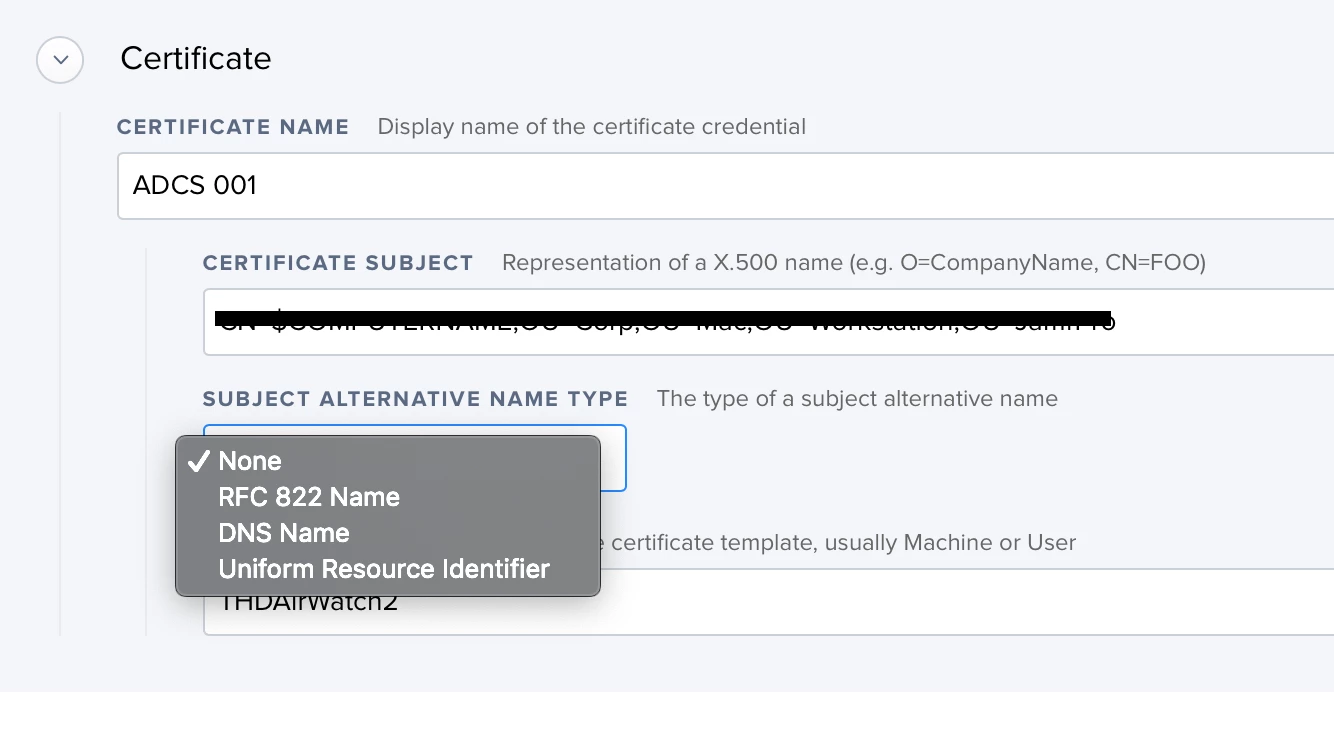
If you're using EAP-TLS authentication, you must have the user's UserPrincipalName (UPN) in the subject or SAN property of the certificate. The Jamf certificate payload does not give you the option to specify UPN in the SAN property, so you need to set it in the certificate subject. Subject example: CN=user@domain.com

Bug?
Here is where I hit what I believe to be a bug. I added a device extension attribute to be the LDAP property userPrincipalName. The device inventory would properly display the extension attribute as user@domain.com, but when I used $EXTENSIONATTRIBUTE_# variable in the certificate subject (CN=$EXTENSIONATTRIBUTE_#) I found that Jamf would convert "@" to be "@" so that a UPN of "me@domain.com" becomes "me@domain.com" in the certificate subject. Since "me@domain.com" is not a valid UPN, the RADIUS server could not locate the user and thus did not allow the wi-fi connection. I had to work around this bug (which has been reported to Jamf) by hard-coding the certificate payload to use a service account UPN as the subject (CN=serviceaccount@domain.com). This will cause every certificate to have the same subject, which is not ideal, but at least it works.

Hope this helps someone.

39 replies

KyleEricson
Forum|alt.badge.img+17
  • Valued Contributor
  • August 22, 2018

I made a guide on how to set this up located Here


Forum|alt.badge.img+5
  • Author
  • Contributor
  • August 23, 2018

Update on the bug:
It turns out, the "@" is only transposed to text when it is used as the value of an extension attribute. I was able to map UserPrincipalName to the $ROOM variable using LDAP user mapping, and then it passed the @ correctly.


Forum|alt.badge.img+5
  • Author
  • Contributor
  • August 23, 2018

Update #2 on the bug:
Jamf team confirmed it is a bug and has documented for the product team as PI-006195.


Forum|alt.badge.img+6
  • Contributor
  • August 27, 2018

you posted omain service account and change the identity of the ADCSProxy application pool on the AD Cs Connector so that it used that service account.

where did you change to user the service account... I cant seem to find where to change it


Forum|alt.badge.img+5
  • Author
  • Contributor
  • August 27, 2018

@jimderlatka 1. Open IIS Manager
2. Expand the Connections column to review Applicaton Pools
3. Right-click AdcsProxyPool and select Advanced Settings
4. In the Process Model group, change Identity to be your service account
5. Save and close IIS manager
6. Open Computer Management
7. Navigate to Local Users and Groups Groups
8. Open "IIS_USRS" group
9. Add your service account as a member
10. Save and close
11. Restart site and app pool.


Forum|alt.badge.img+8
  • Valued Contributor
  • September 4, 2018

@KMerendaTFMC do you know how much storage space the AD CS Connector takes total?


Forum|alt.badge.img+5
  • Author
  • Contributor
  • September 10, 2018

@prbsparx My entire host server C: drive is consuming 24 GB. including OS, IIS, and ADCS. The website for ADCS is 24 MB


Forum|alt.badge.img+8
  • Valued Contributor
  • September 10, 2018

awesome, thanks!


Forum|alt.badge.img+8
  • Valued Contributor
  • September 13, 2018

The jamfProDn isn't very clear on what hostname this should be... Does this need to be:
1. the client-facing hostname?
2. the master server's actual hostname (the one the IP resolves to)?
3. The child's actual hostname (the one the IP resolves to)?


Forum|alt.badge.img+9
  • Valued Contributor
  • September 14, 2018

We have now run through the first couple of tests with ADCS.

One thing that is missing in ADCS is that you are not able to revoke any certificates at all (manually via JSS or automatically once the profile get remove or so). Also we had struggle with CRL (Certificate Revocation List) as our Access Controllers do check for such.

Something that might need to considered in any future development for ADCS.


Forum|alt.badge.img+5
  • Author
  • Contributor
  • September 17, 2018

@prbsparx I'm using a hosted instance of Jamf, so my JamfProDN was company.jamfcloud.com. I assume it should be the name of the JSS that is resolvable by the ADCS proxy.


Forum|alt.badge.img+5
  • New Contributor
  • September 17, 2018

Hello

looking at imlimenting the ADCS connector. But the big concern is allowing 443 inbound with out using a reverse proxy. How did you convince your secuirty department to allow this?

Also whats the alternitive to using the ADCS if it doesn't work with a reverse proxy. Will SCEP work with a reverse proxy? I'm aware Jamf acts as a scep proxy, but that would still require 443 to the internal CA. So could the 443 connection from Jamf to the CA go through a reverse proxy?

Or am i going about this all wrong?


Forum|alt.badge.img+5
  • Author
  • Contributor
  • September 17, 2018

@JPWheatley I'm using it behind an F5 BIG-IP as a reverse proxy. You'll need to make sure the F5 does not try to inspect the SSL traffic by presenting its own certificate instead of the one created during the AD CS connector install.

Essentially, if you visit https://your.adcsconnector.com/adcsproxy from a laptop on an external network, you should get an invalid certificate warning from your web browser. If you tell it to trust that certificate then reload the page, the website should ask you to provide your identity certificate. If that is happening, everything is working properly.

If, however, you go to https://your.adcsconnector.com/adcsproxy and get HTTP 403 error, its likely that the reverse proxy intercepted the traffic and presented its own SSL certificate rather than the one used on the AD CS connector. This interferes with the auth process and will make it impossible for Jamf to authenticate to your connector.


Forum|alt.badge.img+8
  • Valued Contributor
  • November 28, 2018

@KMerendaTFMC @JPWheatley My company requires SSL inspection and we figure out how to do it... I'm gonna post as much as I can in the near future about how to do this. We're using F5 as well.


Forum|alt.badge.img+10
  • Contributor
  • November 29, 2018

For us we seems to get the error - no clue what that means. Have made a service account for both IIS pool and on CA template

Caused by: com.jamfsoftware.pki.adcs.exception.AdcsConnectorCertificateNotIssuedException: CR_DISP_DENIED: Request denied

I can get a certicate request if going to https://ouradcs and accepting the trust of certificate and I am presented a certificate. So seems to work outside jamf


Forum|alt.badge.img+10
  • Contributor
  • November 30, 2018

@KMerendaTFMC I have got the ADCS working for Computer certificates. Now when I use the exact same template and in the configuration payload in the subject field write CN=$USERNAME@domain.com it does only add an certificate named "@domain.com" - so it does not include username. Can you give any input why this happen?


Forum|alt.badge.img+8
  • Valued Contributor
  • December 4, 2018

@jameson look at "certificate requests" in the AD CS, it'll tell you the reason for why the request failed. Most likely the server or user account isn't allowed to request that template or you passed an invalid value.


Forum|alt.badge.img+10
  • Contributor
  • December 7, 2018

Is there any difference in setup when using Local account, as we don´t use any ldap - so we want local account users to get the certificate

Anyone tried this ?


Forum|alt.badge.img+9
  • New Contributor
  • December 7, 2018

@jameson Account type does not matter. These are device certs.


Forum|alt.badge.img+10
  • Contributor
  • December 8, 2018

Ok I see. Is SAN supported or only Subject ?


Forum|alt.badge.img+9
  • New Contributor
  • December 12, 2018

Forum|alt.badge.img+10
  • Valued Contributor
  • January 25, 2019

anyone ever try this with a Microsoft app proxy?

how are you getting a dmz server to communicate with an internal domain CA? I can't get this or scep working with my cloud configuration, very frustrating right now


Forum|alt.badge.img+14
  • Honored Contributor
  • February 28, 2019

@prbsparx

Where is the "certificate requests" that you mentioned above so we can see why its failing?


Forum|alt.badge.img+1
  • New Contributor
  • March 3, 2019

Glad to hear I'm not the only one with issues. I'm getting an "Unable to retrieve ADCS certificate for profile payload". If I try to manually download and install the profile it gives a "Could not open profile." error. Any ideas?

I'm wondering if there are any log files I can check to see if things are working throughout the different steps in the process to try to zero in on where things are getting hung up?


Forum|alt.badge.img+3
  • New Contributor
  • March 9, 2019

@KMerendaTFMC We are getting http 403 error when access the https://jamfconnector/adcsproxy, how to fix it?