
Newbie here, where do I find the actual Adobe Reader 11.0..09 update? When I try to download it on my test machine, it just automatically installs through Safari. I need to download so I can put it into Casper Admin. Thanks.
- Home
- Community
- Get Support
- General Discussions
- Adobe Reader Update
Question
Adobe Reader Update
- October 6, 2014
- 54 replies
- 246 views
54 replies
 +10
+10- New Contributor
- April 6, 2016
@C.Long I see where your going. I'll put it on my to-do list. But the way I see it is:
Check to see if Reader DC is running
If not, start script.
If yes, pop up a box. Button 1(continue) quits Reader DC or button 2 (exit) quits script.
I'll have to think about putting some time delay in it or looping it. Let me know if you have other thoughts.
 +1
+1- New Contributor
- April 6, 2016
@millersc, thank you for taking the time to help me out. I think they way you've described it would be a good idea. That is if I am following your correctly. I am assuming the 2 buttons are for the user to choose between. So not to kick them out of anything important they maybe working on. Also, I just wanted to mention that in my case, it wasn't Reader DC that was running. It was good old Adobe Reader 11 that is causing the issue.

- Valued Contributor
- May 3, 2016
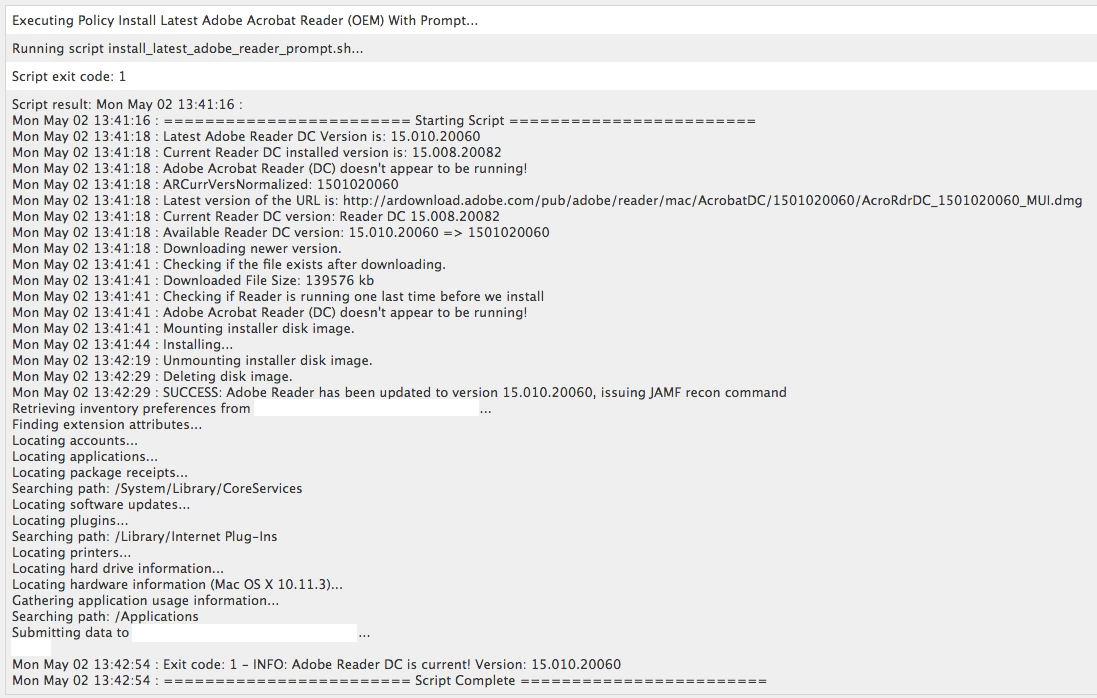
I've taken the work @joe.farage and @millersc have done and sort of ran with it. I updated the script to update both Reader and Reader DC to the latest Reader DC version. I also add an alternate download in case the client can't download the full installer. The attached photo shows what it looks like in the policy logs when it runs successfully (I have since changed the exit codes, so it should show 0 instead of 1 now). I have the JAMF RECON command if it's successful because I have it scoped to only run on machines that aren't current, and I want to make sure it falls out of scope ASAP when it's updated.
#!/bin/bash

#####################################################################################################
#
# ABOUT THIS PROGRAM
#
# NAME
#   AdobeReaderUpdate.sh -- Installs or updates Adobe Reader
#
# SYNOPSIS
#   sudo AdobeReaderUpdate.sh
#
# EXIT CODES
#   0 - Adobe Reader DC installed successfully
#   1 - Adobe Reader DC is current
#   2 - Adobe Reader DC NOT installed
#   3 - Adobe Reader DC update unsuccessful
#   4 - Adobe Reader (DC) is running or was attempted to be installed manually and user deferred install
#   5 - Not an Intel-based Mac
#
####################################################################################################
#
# HISTORY
#   Based on the threads:
#   https://jamfnation.jamfsoftware.com/viewProductFile.html?id=42&fid=761
#   https://jamfnation.jamfsoftware.com/discussion.html?id=12042
#   Version: 1.4
#
#   - v.1.0 Joe Farage, 23.01.2015
#   - v.1.1 Joe Farage, 08.04.2015 : support for new Adobe Acrobat Reader DC
#   - v.1.2 Steve Miller, 15.12.2015
#   - v.1.3 Luis Lugo, 07.04.2016 : updates both Reader and Reader DC to the latest Reader DC
#   - v.1.4 Luis Lugo, 28.04.2016 : attempts an alternate download if the first one fails
#
####################################################################################################
# Script to download and install Adobe Reader DC.
# Only works on Intel systems.

# Setting variables
readerProcRunning=0

# Echo function
echoFunc () {
    # Date and Time function for the log file
    fDateTime () { echo $(date +"%a %b %d %T"); }

    # Title for beginning of line in log file
    Title="InstallLatestAdobeReader:"

    # Header string function
    fHeader () { echo $(fDateTime) $(hostname) $Title; }

    # Check for the log file
    if [ -e "/Library/Logs/AdobeReaderDCUpdateScript.log" ]; then
        echo $(fHeader) "$1" >> "/Library/Logs/AdobeReaderDCUpdateScript.log"
    else
        cat > "/Library/Logs/AdobeReaderDCUpdateScript.log"
        if [ -e "/Library/Logs/AdobeReaderDCUpdateScript.log" ]; then
            echo $(fHeader) "$1" >> "/Library/Logs/AdobeReaderDCUpdateScript.log"
        else
            echo "Failed to create log file, writing to JAMF log"
            echo $(fHeader) "$1" >> "/var/log/jamf.log"
        fi
    fi

    # Echo out
    echo $(fDateTime) ": $1"
}

# Exit function
exitFunc () {
    case $1 in
        0) exitCode="0 - SUCCESS: Adobe Reader has been updated to version $2";;
        1) exitCode="1 - INFO: Adobe Reader DC is current! Version: $2";;
        2) exitCode="2 - INFO: Adobe Reader DC NOT installed!";;
        3) exitCode="3 - ERROR: Adobe Reader DC update unsuccessful, version remains at  $2!";;
        4) exitCode="4 - ERROR: Adobe Reader (DC) is running or was attempted to be installed manually and user deferred install.";;
        5) exitCode="5 - ERROR: Not an Intel-based Mac.";;
        *) exitCode="$1";;
    esac
    echoFunc "Exit code: $exitCode"
    echoFunc "======================== Script Complete ========================"
    exit $1
}

# Check to see if Reader or Reader DC is running
readerRunningCheck () {
    processNum=$(ps aux | grep "Adobe Acrobat Reader DC" | wc -l)
    if [ $processNum -gt 1 ]
    then
        # Reader is running, prompt the user to close it or defer the upgrade
        readerRunning
    else
        # Check if the older Adobe Reader is running
        processNum=$(ps aux | grep "Adobe Reader" | wc -l)
        if [ $processNum -gt 1 ]
        then
            # Reader is running, prompt the user to close it or defer the upgrade
            readerRunning
        else
            # Adobe Reader shouldn't be running, continue on
            echoFunc "Adobe Acrobat Reader (DC) doesn't appear to be running!"
        fi
    fi
}

# If Adobe Reader is running, prompt the user to close it
readerRunning () {
    echoFunc "Adobe Acrobat Reader (DC) appears to be running!"
    hudTitle="Adobe Acrobat Reader DC Update"
    hudDescription="Adobe Acrobat Reader needs to be updated. Please save your work and close the application to proceed. You can defer if needed.
If you have any questions, please call the help desk."

    jamfHelperPrompt=`/Library/Application Support/JAMF/bin/jamfHelper.app/Contents/MacOS/jamfHelper -windowType hud -lockHUD -title "$hudTitle" -description "$hudDescription" -button1 "Proceed" -button2 "Defer" -defaultButton 1`

    case $jamfHelperPrompt in
        0)
            echoFunc "Proceed selected"
            readerProcRunning=1
            readerRunningCheck
        ;;
        2)
            echoFunc "Deferment Selected"
            exitFunc 4
        ;;
        *)
            echoFunc "Selection: $?"
            exitFunc 3 "Unknown"
        ;;
    esac
}

# Let the user know we're installing Adobe Acrobat Reader DC manually
readerUpdateMan () {
    echoFunc "Letting the user know we're installing Adobe Acrobat Reader DC manually!"
    hudTitle="Adobe Acrobat Reader DC Update"
    hudDescription="Adobe Acrobat Reader needs to be updated. You will see a program downloading the installer. You can defer if needed.
If you have any questions, please call the help desk."

    jamfHelperPrompt=`/Library/Application Support/JAMF/bin/jamfHelper.app/Contents/MacOS/jamfHelper -windowType hud -lockHUD -title "$hudTitle" -description "$hudDescription" -button1 "Defer" -button2 "Proceed" -defaultButton 1 -timeout 60 -countdown`

    case $jamfHelperPrompt in
        0)
            echoFunc "Deferment Selected or Window Timed Out"
            exitFunc 4
        ;;
        2)
            echoFunc "Proceed selected"
            readerRunningCheck
        ;;
        *)
            echoFunc "Selection: $?"
            exitFunc 3 "Unknown"
        ;;
    esac
}

echoFunc ""
echoFunc "======================== Starting Script ========================"

# Are we running on Intel?
if [ '`/usr/bin/uname -p`'="i386" -o '`/usr/bin/uname -p`'="x86_64" ]; then
    ## Get OS version and adjust for use with the URL string
    OSvers_URL=$( sw_vers -productVersion | sed 's/[.]/_/g' )

    ## Set the User Agent string for use with curl
    userAgent="Mozilla/5.0 (Macintosh; Intel Mac OS X ${OSvers_URL}) AppleWebKit/535.6.2 (KHTML, like Gecko) Version/5.2 Safari/535.6.2"

    # Get the latest version of Reader available from Adobe's About Reader page.
    latestver=``
    while [ -z "$latestver" ]
    do
        latestver=`curl -s -L -A "$userAgent" https://get.adobe.com/reader/ | grep "<strong>Version" | /usr/bin/sed -e 's/<[^>][^>]*>//g' | /usr/bin/awk '{print $2}' | cut -c 3-14`
    done

    echoFunc "Latest Adobe Reader DC Version is: $latestver"
    latestvernorm=`echo ${latestver}`
    # Get the version number of the currently-installed Adobe Reader, if any.
    if [ -e "/Applications/Adobe Acrobat Reader DC.app" ]; then
        currentinstalledapp="Reader DC"
        currentinstalledver=`/usr/bin/defaults read /Applications/Adobe Acrobat Reader DC.app/Contents/Info CFBundleShortVersionString`
        echoFunc "Current Reader DC installed version is: $currentinstalledver"
        if [ ${latestvernorm} = ${currentinstalledver} ]; then
            exitFunc 1 "${currentinstalledapp} ${currentinstalledver}"
        else
            # Not running the latest DC version, check if Reader is running
            readerRunningCheck
        fi
    elif [ -e "/Applications/Adobe Reader.app" ]; then
        currentinstalledapp="Reader"
        currentinstalledver=`/usr/bin/defaults read /Applications/Adobe Reader.app/Contents/Info CFBundleShortVersionString`
        echoFunc "Current Reader installed version is: $currentinstalledver"
        processNum=$(ps aux | grep "Adobe Reader" | wc -l)
        if [ $processNum -gt 1 ]
        then
            readerRunning
        else
            echoFunc "Adobe Reader doesn't appear to be running!"
        fi
    else
        currentinstalledapp="None"
        currentinstalledver="N/A"
        exitFunc 2
    fi

    # Build URL and dmg file name
    ARCurrVersNormalized=$( echo $latestver | sed -e 's/[.]//g' )
    echoFunc "ARCurrVersNormalized: $ARCurrVersNormalized"
    url1="http://ardownload.adobe.com/pub/adobe/reader/mac/AcrobatDC/${ARCurrVersNormalized}/AcroRdrDC_${ARCurrVersNormalized}_MUI.dmg"
    url2=""
    url=`echo "${url1}${url2}"`
    echoFunc "Latest version of the URL is: $url"
    dmgfile="AcroRdrDC_${ARCurrVersNormalized}_MUI.dmg"

    # Compare the two versions, if they are different or Adobe Reader is not present then download and install the new version.
    if [ "${currentinstalledver}" != "${latestvernorm}" ]; then
        echoFunc "Current Reader DC version: ${currentinstalledapp} ${currentinstalledver}"
        echoFunc "Available Reader DC version: ${latestver} => ${ARCurrVersNormalized}"
        echoFunc "Downloading newer version."
        curl -s -o /tmp/${dmgfile} ${url}
        case $? in
            0)
                echoFunc "Checking if the file exists after downloading."
                if [ -e "/tmp/${dmgfile}" ]; then
                    readerFileSize=$(du -k "/tmp/${dmgfile}" | cut -f 1)
                    echoFunc "Downloaded File Size: $readerFileSize kb"
                else
                    echoFunc "File NOT downloaded!"
                    exitFunc 3 "${currentinstalledapp} ${currentinstalledver}"
                fi
                echoFunc "Checking if Reader is running one last time before we install"
                readerRunningCheck
                echoFunc "Mounting installer disk image."
                hdiutil attach /tmp/${dmgfile} -nobrowse -quiet
                echoFunc "Installing..."
                installer -pkg /Volumes/AcroRdrDC_${ARCurrVersNormalized}_MUI/AcroRdrDC_${ARCurrVersNormalized}_MUI.pkg -target / > /dev/null

                sleep 10
                echoFunc "Unmounting installer disk image."
                umount "/Volumes/AcroRdrDC_${ARCurrVersNormalized}_MUI"
                sleep 10
                echoFunc "Deleting disk image."
                rm /tmp/${dmgfile}

                # double check to see if the new version got updated
                if [ -e "/Applications/Adobe Acrobat Reader DC.app" ]; then
                    newlyinstalledver=`/usr/bin/defaults read /Applications/Adobe Acrobat Reader DC.app/Contents/Info CFBundleShortVersionString`
                    if [ "${latestvernorm}" = "${newlyinstalledver}" ]; then
                        echoFunc "SUCCESS: Adobe Reader has been updated to version ${newlyinstalledver}, issuing JAMF recon command"
                        jamf recon
                        if [ $readerProcRunning -eq 1 ];
                        then
                            /Library/Application Support/JAMF/bin/jamfHelper.app/Contents/MacOS/jamfHelper -windowType hud -lockHUD -title "Adobe Reader DC Updated" -description "Adobe Reader DC has been updated to version ${newlyinstalledver}." -button1 "OK" -defaultButton 1
                        fi
                        exitFunc 1 "${newlyinstalledver}"
                    else
                        exitFunc 3 "${currentinstalledapp} ${currentinstalledver}"
                    fi
                else
                    exitFunc 3 "${currentinstalledapp} ${currentinstalledver}"
                fi
            ;;
            *)
                echoFunc "Curl function failed on primary download! Error: $?. Review error codes here: https://curl.haxx.se/libcurl/c/libcurl-errors.html"
                echoFunc "Attempting alternate download from https://admdownload.adobe.com/bin/live/AdobeReader_dc_en_a_install.dmg"
                curl -s -o /tmp/AdobeReader_dc_en_a_install.dmg https://admdownload.adobe.com/bin/live/AdobeReader_dc_en_a_install.dmg
                case $? in
                    0)
                        echoFunc "Checking if the file exists after downloading."
                        if [ -e "/tmp/AdobeReader_dc_en_a_install.dmg" ]; then
                            readerFileSize=$(du -k "/tmp/AdobeReader_dc_en_a_install.dmg" | cut -f 1)
                            echoFunc "Downloaded File Size: $readerFileSize kb"
                        else
                            echoFunc "File NOT downloaded!"
                            exitFunc 3 "${currentinstalledapp} ${currentinstalledver}"
                        fi
                        echoFunc "Checking if Reader is running one last time before we install"
                        readerRunningCheck
                        echoFunc "Checking with the user if we should proceed"
                        readerUpdateMan
                        echoFunc "Mounting installer disk image."
                        hdiutil attach /tmp/AdobeReader_dc_en_a_install.dmg -nobrowse -quiet
                        echoFunc "Installing..."
                        /Volumes/Adobe Acrobat Reader DC Installer/Install Adobe Acrobat Reader DC.app/Contents/MacOS/Install Adobe Acrobat Reader DC
                        sleep 10
                        echoFunc "Unmounting installer disk image."
                        umount "/Volumes/Adobe Acrobat Reader DC Installer"
                        sleep 10
                        echoFunc "Deleting disk image."
                        rm /tmp/AdobeReader_dc_en_a_install.dmg

                        # double check to see if the new version got updated
                        if [ -e "/Applications/Adobe Acrobat Reader DC.app" ]; then
                            newlyinstalledver=`/usr/bin/defaults read /Applications/Adobe Acrobat Reader DC.app/Contents/Info CFBundleShortVersionString`
                            if [ "${latestvernorm}" = "${newlyinstalledver}" ]; then
                                echoFunc "SUCCESS: Adobe Reader has been updated to version ${newlyinstalledver}, issuing JAMF recon command"
                                jamf recon
                                exitFunc 0 "${newlyinstalledver}"
                            else
                                exitFunc 3 "${currentinstalledapp} ${currentinstalledver}"
                            fi
                        else
                            exitFunc 3 "${currentinstalledapp} ${currentinstalledver}"
                        fi
                    ;;
                    *)
                        echoFunc "Curl function failed on alternate download! Error: $?. Review error codes here: https://curl.haxx.se/libcurl/c/libcurl-errors.html"
                        exitFunc 3 "${currentinstalledapp} ${currentinstalledver}"
                    ;;
                esac
            ;;
        esac
    else
        # If Adobe Reader DC is up to date already, just log it and exit.
        exitFunc 1 "${currentinstalledapp} ${currentinstalledver}"
    fi
else
    # This script is for Intel Macs only.
    exitFunc 5
fi- New Contributor
- May 4, 2016
This is awesome. These could really be the answer I have been seeking to all these teacher that never logout or restart their machines. I think I'll give it a test run here in our environment. Thanks so much.
+10- New Contributor
- May 4, 2016
@PhillyPhoto Way to go! I do like the logging you built in! So far testing is working well.
- Valued Contributor
- May 4, 2016
I had a user that I was working with that wasn't getting the download with the first or second URL. It turns out, when he went home it worked. I then realized that some users might be connecting to our in-office WiFi network that only allows internal connections (Citrix gateways, etc) and that's why it was failing. I added the following code to my script and wanted to put it out in case anyone else using this has users on a similar wireless network.
You'll be able to use a passed variable (i.e. $4) for the badSSIDs array with space delimiters, just make sure to escape any spaces in SSID names with a "".
# Are we on a bad wireless network?
if [[ "$4" != "" ]]
then
    wifiSSID=`/System/Library/PrivateFrameworks/Apple80211.framework/Versions/Current/Resources/airport -I |     awk '/ SSID/ {print substr($0, index($0, $2))}'`
    echoFunc "Current Wireless SSID: $wifiSSID"

    badSSIDs=( $4 )
    for (( i = 0; i < "${#badSSIDs[@]}"; i++ ))
    do
        if [[ "$wifiSSID" == "${badSSIDs[i]}" ]]
        then
            echoFunc "Connected to a WiFi network that blocks downloads!"
            exitFunc 6 "${badSSIDs[i]}"
        fi
    done
fi
I added this right above the Intel check, and added a 6th case check in the exit function to state that it was connected to a bad SSID:
6) exitCode="6 - ERROR: Wireless connected to a known bad WiFi network that won't allow downloading of the installer! SSID: $2";;
- Honored Contributor
- June 3, 2016
@joe.farage unfortunately the Adobe Reader script found here my link text no longer works and results in error
Latest Version is:
Adobe Reader is not installed
Latest version of the URL is: http://ardownload.adobe.com/pub/adobe/reader/mac/.x//en_US/AdbeRdr_en_US.dmg
2016-06-03 10:36:04.611 defaults[28860:4321864]
The domain/default pair of (/Applications/Adobe Reader.app/Contents/Info, CFBundleShortVersionString) does not exist

any idea on getting the normal Reader working? +12
+12- Contributor
- June 21, 2016
Which part of that script removes the Adobe Reader.app and replaces it with the Adobe Reader DC app? @PhillyPhoto
+12- Contributor
- June 22, 2016
@PhillyPhoto Awesome, thanks for posting!
Everything is working great. I did find in some cases with users running 10.9.5. Not a huge deal as we're moving away from 10.9.5 at the moment.
Script result: Wed Jun 22 10:50:20 :
Wed Jun 22 10:50:20 : ======================== Starting Script ========================
Wed Jun 22 10:50:21 : Latest Adobe Reader DC Version is: 15.016.20039
Wed Jun 22 10:50:21 : Current Reader installed version is: 11.0.15
Wed Jun 22 10:50:21 : Adobe Acrobat Reader (DC) appears to be running!
Wed Jun 22 10:50:21 : Selection: 0
Wed Jun 22 10:50:21 : Exit code: 3 - ERROR: Adobe Reader DC update unsuccessful, version remains at Unknown!
Wed Jun 22 10:50:21 : ======================== Script Complete ========================
 +13
+13- Valued Contributor
- June 23, 2016
why not just do this.....
https://helpx.adobe.com/creative-cloud/packager/update-server-setup-tool.html
it just works!!
Gluck!
 +5
+5- Contributor
- September 8, 2016
Anyone know where Reader DC stores its license info? I'd like to deploy it such that users won't have to accept the EULA on launch. I tried capturing it with Composer but it didn't work.
 +13
+13- Contributor
- November 18, 2016
@joe.farage , @millersc and @PhillyPhoto
Running the latest tweaked version as well as the fixed version Joe posted, thank you all, and thank you for the logging! I see there's still nothing in the script to catch the possibility that Adobe screwed up or downgraded their release. I'm not sure there' s a single good way to handle that, but what Im seeing is that the assumption the the online version is different, is therefore considered newer during the compare, downloads, tries to install, but the app installer fails.
If you run it through the GUI, you get this message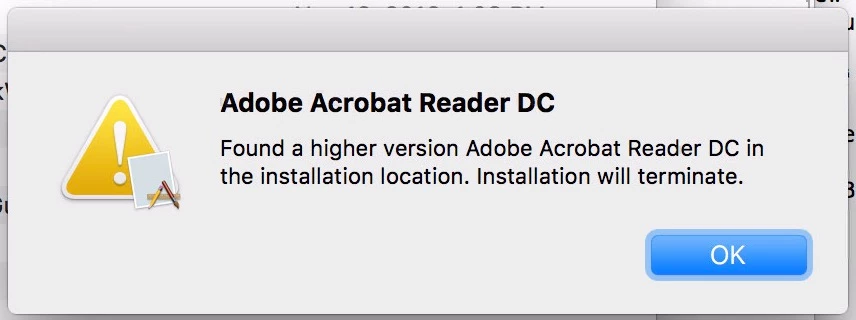
I'm not a great scripter but Perhaps somebody could consider modifying the script so that if it's newer, it logs the message and leaves the newer installed. If it's older, it downloads the newer and updates and if it's the same, it just leaves it alone. Perhaps a popup could be built in to offer the end-user the choice to accept or defer/deny the change?
Since I run the script in the background in Casper, my users wouldn't see the message. But if it's run in Self Service, they see a Policy Failed message and no reason displayed to them, can be annoying.
I'd also like to see the echo's to the log and not just stdout.
these are not criticism, but some feedback based on my experience and could help us to better our product to those we support.
Thanks!
Fri Nov 18 15:18:47 : ======================== Starting Script ========================
Fri Nov 18 15:18:49 : Latest Adobe Reader DC Version is: 15.020.20039
Fri Nov 18 15:18:49 : Current Reader DC installed version is: 15.020.20042
Fri Nov 18 15:18:49 : Adobe Acrobat Reader (DC) doesn't appear to be running!
Fri Nov 18 15:18:49 : ARCurrVersNormalized: 1502020039
Fri Nov 18 15:18:49 : Latest version of the URL is: http://ardownload.adobe.com/pub/adobe/reader/mac/AcrobatDC/1502020039/AcroRdrDC_1502020039_MUI.dmg
Fri Nov 18 15:18:49 : Current Reader DC version: Reader DC 15.020.20042
Fri Nov 18 15:18:49 : Available Reader DC version: 15.020.20039 => 1502020039
Fri Nov 18 15:18:49 : Downloading newer version.
Fri Nov 18 15:19:15 : Checking if the file exists after downloading.
Fri Nov 18 15:19:15 : Downloaded File Size: 151020 kb
Fri Nov 18 15:19:15 : Checking if Reader is running one last time before we install
Fri Nov 18 15:19:15 : Adobe Acrobat Reader (DC) doesn't appear to be running!
Fri Nov 18 15:19:15 : Mounting installer disk image.
Fri Nov 18 15:19:19 : Installing...
Fri Nov 18 15:19:35 : Unmounting installer disk image.
Fri Nov 18 15:19:45 : Deleting disk image.
Fri Nov 18 15:19:45 : Exit code: 3 - ERROR: Adobe Reader DC update unsuccessful, version remains at Reader DC 15.020.20042!
Fri Nov 18 15:19:45 : ======================== Script Complete ========================
+10- New Contributor
- December 14, 2016
@chuck3000 Sorry no one has updated this thread.... darn turkey coma!
Update line 183 to the following:
if [ "${latestvernorm} -le ${currentinstalledver}" ]; thenYou should be able to test and see the following result:
Wed Dec 14 13:08:41 :
Wed Dec 14 13:08:41 : ======================== Starting Script ========================
Wed Dec 14 13:08:42 : Latest Adobe Reader DC Version is: 15.020.20039
Wed Dec 14 13:08:42 : Current Reader DC installed version is: 15.020.20042
Wed Dec 14 13:08:42 : Exit code: 1 - INFO: Adobe Reader DC is current! Version: Reader DC 15.020.20042
Wed Dec 14 13:08:42 : ======================== Script Complete ========================
This should help with Adobe pulling updates, after the script has run. Also, what is the frequency you have your policy running for this?
Stand by.... seeing issues with Philly's script and the exit codes. Will update shortly.
+10- New Contributor
- December 15, 2016
Adding on where @PhillyPhoto left off, I needed to modify his script a little to go with jamfPro 9.9x updating exit codes. Also added some error checking for when Adobe drops a new update then pulls it.
#!/bin/bash

#####################################################################################################
#
# ABOUT THIS PROGRAM
#
# NAME
#   AdobeReaderUpdate.sh -- Installs or updates Adobe Reader
#
# SYNOPSIS
#   sudo AdobeReaderUpdate.sh
#
# EXIT CODES
#   0 - Adobe Reader DC installed successfully or is current
#   3 - Adobe Reader DC NOT installed
#   4 - Adobe Reader DC update unsuccessful
#   5 - Adobe Reader (DC) is running or was attempted to be installed manually and user deferred install
#   6 - Not an Intel-based Mac
#
####################################################################################################
#
# HISTORY
#   Based on the threads:
#   https://jamfnation.jamfsoftware.com/viewProductFile.html?id=42&fid=761
#   https://jamfnation.jamfsoftware.com/discussion.html?id=12042
#   Version: 1.5
#
#   - v.1.0 Joe Farage, 23.01.2015
#   - v.1.1 Joe Farage, 08.04.2015 : support for new Adobe Acrobat Reader DC
#   - v.1.2 Steve Miller, 15.12.2015
#   - v.1.3 Luis Lugo, 07.04.2016 : updates both Reader and Reader DC to the latest Reader DC
#   - v.1.4 Luis Lugo, 28.04.2016 : attempts an alternate download if the first one fails
#   - v.1.5 Steve Miller, 15.12.2016 : checking if installed is greater than online, exit code updated
#
####################################################################################################
# Script to download and install Adobe Reader DC.
# Only works on Intel systems.

# Setting variables
readerProcRunning=0

# Echo function
echoFunc () {
    # Date and Time function for the log file
    fDateTime () { echo $(date +"%a %b %d %T"); }

    # Title for beginning of line in log file
    Title="InstallLatestAdobeReader:"

    # Header string function
    fHeader () { echo $(fDateTime) $(hostname) $Title; }

    # Check for the log file
    if [ -e "/Library/Logs/AdobeReaderDCUpdateScript.log" ]; then
        echo $(fHeader) "$1" >> "/Library/Logs/AdobeReaderDCUpdateScript.log"
    else
        cat > "/Library/Logs/AdobeReaderDCUpdateScript.log"
        if [ -e "/Library/Logs/AdobeReaderDCUpdateScript.log" ]; then
            echo $(fHeader) "$1" >> "/Library/Logs/AdobeReaderDCUpdateScript.log"
        else
            echo "Failed to create log file, writing to JAMF log"
            echo $(fHeader) "$1" >> "/var/log/jamf.log"
        fi
    fi

    # Echo out
    echo $(fDateTime) ": $1"
}

# Exit function
# Exit code examples: http://www.tldp.org/LDP/abs/html/exitcodes.html
exitFunc () {
    case $1 in
        0) exitCode="0 - SUCCESS: Adobe Reader up to date with version $2";;
        3) exitCode="3 - INFO: Adobe Reader DC NOT installed!";;
        4) exitCode="4 - ERROR: Adobe Reader DC update unsuccessful, version remains at $2";;
        5) exitCode="5 - ERROR: Adobe Reader (DC) is running or was attempted to be installed manually and user deferred install.";;
        6) exitCode="6 - ERROR: Not an Intel-based Mac.";;
        *) exitCode="$1";;
    esac
    echoFunc "Exit code: $exitCode"
    echoFunc "======================== Script Complete ========================"
    exit $1
}

# Check to see if Reader or Reader DC is running
readerRunningCheck () {
    processNum=$(ps aux | grep "Adobe Acrobat Reader DC" | wc -l)
    if [ $processNum -gt 1 ]
    then
        # Reader is running, prompt the user to close it or defer the upgrade
        readerRunning
    else
        # Check if the older Adobe Reader is running
        processNum=$(ps aux | grep "Adobe Reader" | wc -l)
        if [ $processNum -gt 1 ]
        then
            # Reader is running, prompt the user to close it or defer the upgrade
            readerRunning
        else
            # Adobe Reader shouldn't be running, continue on
            echoFunc "Adobe Acrobat Reader (DC) doesn't appear to be running!"
        fi
    fi
}

# If Adobe Reader is running, prompt the user to close it
readerRunning () {
    echoFunc "Adobe Acrobat Reader (DC) appears to be running!"
    hudTitle="Adobe Acrobat Reader DC Update"
    hudDescription="Adobe Acrobat Reader needs to be updated. Please save your work and close the application to proceed. You can defer if needed.
If you have any questions, please call the help desk."

    jamfHelperPrompt=`/Library/Application Support/JAMF/bin/jamfHelper.app/Contents/MacOS/jamfHelper -windowType hud -lockHUD -title "$hudTitle" -description "$hudDescription" -button1 "Proceed" -button2 "Defer" -defaultButton 1`

    case $jamfHelperPrompt in
        0)
            echoFunc "Proceed selected"
            readerProcRunning=1
            readerRunningCheck
        ;;
        2)
            echoFunc "Deferment Selected"
            exitFunc 5
        ;;
        *)
            echoFunc "Selection: $?"
            exitFunc 3 "Unknown"
        ;;
    esac
}

# Let the user know we're installing Adobe Acrobat Reader DC manually
readerUpdateMan () {
    echoFunc "Letting the user know we're installing Adobe Acrobat Reader DC manually!"
    hudTitle="Adobe Acrobat Reader DC Update"
    hudDescription="Adobe Acrobat Reader needs to be updated. You will see a program downloading the installer. You can defer if needed.
If you have any questions, please call the help desk."

    jamfHelperPrompt=`/Library/Application Support/JAMF/bin/jamfHelper.app/Contents/MacOS/jamfHelper -windowType hud -lockHUD -title "$hudTitle" -description "$hudDescription" -button1 "Defer" -button2 "Proceed" -defaultButton 1 -timeout 60 -countdown`

    case $jamfHelperPrompt in
        0)
            echoFunc "Deferment Selected or Window Timed Out"
            exitFunc 5
        ;;
        2)
            echoFunc "Proceed selected"
            readerRunningCheck
        ;;
        *)
            echoFunc "Selection: $?"
            exitFunc 3 "Unknown"
        ;;
    esac
}

echoFunc ""
echoFunc "======================== Starting Script ========================"

# Are we running on Intel?
if [ '`/usr/bin/uname -p`'="i386" -o '`/usr/bin/uname -p`'="x86_64" ]; then
    ## Get OS version and adjust for use with the URL string
    OSvers_URL=$( sw_vers -productVersion | sed 's/[.]/_/g' )

    ## Set the User Agent string for use with curl
    userAgent="Mozilla/5.0 (Macintosh; Intel Mac OS X ${OSvers_URL}) AppleWebKit/535.6.2 (KHTML, like Gecko) Version/5.2 Safari/535.6.2"

    # Get the latest version of Reader available from Adobe's About Reader page.
    latestver=``
    while [ -z "$latestver" ]
    do
        latestver=`curl -s -L -A "$userAgent" https://get.adobe.com/reader/ | grep "<strong>Version" | /usr/bin/sed -e 's/<[^>][^>]*>//g' | /usr/bin/awk '{print $2}' | cut -c 3-14`
    done

    echoFunc "Latest Adobe Reader DC Version is: $latestver"
    latestvernorm=`echo ${latestver}`
    # Get the version number of the currently-installed Adobe Reader, if any.
    if [ -e "/Applications/Adobe Acrobat Reader DC.app" ]; then
        currentinstalledapp="Reader DC"
        currentinstalledver=`/usr/bin/defaults read /Applications/Adobe Acrobat Reader DC.app/Contents/Info CFBundleShortVersionString`
        echoFunc "Current Reader DC installed version is: $currentinstalledver"
        if [ "${latestvernorm}" < "${currentinstalledver}" ] || [ "${latestvernorm}" = "${currentinstalledver}" ]; then
            exitFunc 0 "${currentinstalledapp} ${currentinstalledver}"
        else
            # Not running the latest DC version, check if Reader is running
            readerRunningCheck
        fi
    elif [ -e "/Applications/Adobe Reader.app" ]; then
        currentinstalledapp="Reader"
        currentinstalledver=`/usr/bin/defaults read /Applications/Adobe Reader.app/Contents/Info CFBundleShortVersionString`
        echoFunc "Current Reader installed version is: $currentinstalledver"
        processNum=$(ps aux | grep "Adobe Reader" | wc -l)
        if [ $processNum -gt 1 ]
        then
            readerRunning
        else
            echoFunc "Adobe Reader doesn't appear to be running!"
        fi
    else
        currentinstalledapp="None"
        currentinstalledver="N/A"
        exitFunc 0
    fi

    # Build URL and dmg file name
    ARCurrVersNormalized=$( echo $latestver | sed -e 's/[.]//g' )
    echoFunc "ARCurrVersNormalized: $ARCurrVersNormalized"
    url1="http://ardownload.adobe.com/pub/adobe/reader/mac/AcrobatDC/${ARCurrVersNormalized}/AcroRdrDC_${ARCurrVersNormalized}_MUI.dmg"
    url2=""
    url=`echo "${url1}${url2}"`
    echoFunc "Latest version of the URL is: $url"
    dmgfile="AcroRdrDC_${ARCurrVersNormalized}_MUI.dmg"

    # Compare the two versions, if they are different or Adobe Reader is not present then download and install the new version.
    if [ "${currentinstalledver}" != "${latestvernorm}" ]; then
        echoFunc "Current Reader DC version: ${currentinstalledapp} ${currentinstalledver}"
        echoFunc "Available Reader DC version: ${latestver} => ${ARCurrVersNormalized}"
        echoFunc "Downloading newer version."
        curl -s -o /tmp/${dmgfile} ${url}
        case $? in
            0)
                echoFunc "Checking if the file exists after downloading."
                if [ -e "/tmp/${dmgfile}" ]; then
                    readerFileSize=$(du -k "/tmp/${dmgfile}" | cut -f 1)
                    echoFunc "Downloaded File Size: $readerFileSize kb"
                else
                    echoFunc "File NOT downloaded!"
                    exitFunc 3 "${currentinstalledapp} ${currentinstalledver}"
                fi
                echoFunc "Checking if Reader is running one last time before we install"
                readerRunningCheck
                echoFunc "Mounting installer disk image."
                hdiutil attach /tmp/${dmgfile} -nobrowse -quiet
                echoFunc "Installing..."
                installer -pkg /Volumes/AcroRdrDC_${ARCurrVersNormalized}_MUI/AcroRdrDC_${ARCurrVersNormalized}_MUI.pkg -target / > /dev/null

                sleep 10
                echoFunc "Unmounting installer disk image."
                umount "/Volumes/AcroRdrDC_${ARCurrVersNormalized}_MUI"
                sleep 10
                echoFunc "Deleting disk image."
                rm /tmp/${dmgfile}

                # double check to see if the new version got updated
                if [ -e "/Applications/Adobe Acrobat Reader DC.app" ]; then
                    newlyinstalledver=`/usr/bin/defaults read /Applications/Adobe Acrobat Reader DC.app/Contents/Info CFBundleShortVersionString`
                    if [ "${latestvernorm}" = "${newlyinstalledver}" ]; then
                        echoFunc "SUCCESS: Adobe Reader has been updated to version ${newlyinstalledver}, issuing JAMF recon command"
                        jamf recon
                        if [ $readerProcRunning -eq 1 ];
                        then
                            /Library/Application Support/JAMF/bin/jamfHelper.app/Contents/MacOS/jamfHelper -windowType hud -lockHUD -title "Adobe Reader DC Updated" -description "Adobe Reader DC has been updated to version ${newlyinstalledver}." -button1 "OK" -defaultButton 1
                        fi
                        exitFunc 0 "${newlyinstalledver}"
                    else
                        exitFunc 4 "${currentinstalledapp} ${currentinstalledver}"
                    fi
                else
                    exitFunc 3 "${currentinstalledapp} ${currentinstalledver}"
                fi
            ;;
            *)
                echoFunc "Curl function failed on primary download! Error: $?. Review error codes here: https://curl.haxx.se/libcurl/c/libcurl-errors.html"
                echoFunc "Attempting alternate download from https://admdownload.adobe.com/bin/live/AdobeReader_dc_en_a_install.dmg"
                curl -s -o /tmp/AdobeReader_dc_en_a_install.dmg https://admdownload.adobe.com/bin/live/AdobeReader_dc_en_a_install.dmg
                case $? in
                    0)
                        echoFunc "Checking if the file exists after downloading."
                        if [ -e "/tmp/AdobeReader_dc_en_a_install.dmg" ]; then
                            readerFileSize=$(du -k "/tmp/AdobeReader_dc_en_a_install.dmg" | cut -f 1)
                            echoFunc "Downloaded File Size: $readerFileSize kb"
                        else
                            echoFunc "File NOT downloaded!"
                            exitFunc 4 "${currentinstalledapp} ${currentinstalledver}"
                        fi
                        echoFunc "Checking if Reader is running one last time before we install"
                        readerRunningCheck
                        echoFunc "Checking with the user if we should proceed"
                        readerUpdateMan
                        echoFunc "Mounting installer disk image."
                        hdiutil attach /tmp/AdobeReader_dc_en_a_install.dmg -nobrowse -quiet
                        echoFunc "Installing..."
                        /Volumes/Adobe Acrobat Reader DC Installer/Install Adobe Acrobat Reader DC.app/Contents/MacOS/Install Adobe Acrobat Reader DC
                        sleep 10
                        echoFunc "Unmounting installer disk image."
                        umount "/Volumes/Adobe Acrobat Reader DC Installer"
                        sleep 10
                        echoFunc "Deleting disk image."
                        rm /tmp/AdobeReader_dc_en_a_install.dmg

                        # double check to see if the new version got updated
                        if [ -e "/Applications/Adobe Acrobat Reader DC.app" ]; then
                            newlyinstalledver=`/usr/bin/defaults read /Applications/Adobe Acrobat Reader DC.app/Contents/Info CFBundleShortVersionString`
                            if [ "${latestvernorm}" = "${newlyinstalledver}" ]; then
                                echoFunc "SUCCESS: Adobe Reader has been updated to version ${newlyinstalledver}, issuing JAMF recon command"
                                jamf recon
                                exitFunc 0 "${newlyinstalledver}"
                            else
                                exitFunc 4 "${currentinstalledapp} ${currentinstalledver}"
                            fi
                        else
                            exitFunc 4 "${currentinstalledapp} ${currentinstalledver}"
                        fi
                    ;;
                    *)
                        echoFunc "Curl function failed on alternate download! Error: $?. Review error codes here: https://curl.haxx.se/libcurl/c/libcurl-errors.html"
                        exitFunc 4 "${currentinstalledapp} ${currentinstalledver}"
                    ;;
                esac
            ;;
        esac
    else
        # If Adobe Reader DC is up to date already, just log it and exit.
        exitFunc 0 "${currentinstalledapp} ${currentinstalledver}"
    fi
else
    # This script is for Intel Macs only.
    exitFunc 5
fi- Contributor
- December 22, 2016
can I be picky? Since I'm not a coder, thought I'd at least ask...
The update is awesome, except... It seems that if I have Acrobat Pro installed, the install recognizes it and doesn't seem to install reader.
The log presents "Exit Code: 0 - SUCCESS: Adobe Reader up to date with version Reader DC ... "
However, Reader isn't installed (it was deleted) but I do have Adobe Acrobat DC/Adobe Acrobat.app And, in one case, also Adobe Acrobat XI Pro/Adobe Acrobat Pro.app
Perhaps I'm being needy thinking that perhaps the script can recognize that Pro is installed and prompt "do you also want Reader?" Or maybe it recognizes it automatically? or if Pro is installed it updates Pro and Reader?
My brain is twisting and appreciate any ideas to make your great script even more awesomer ( ¯_(ツ)_/¯ )
 +4
+4- New Contributor
- January 13, 2017
This script is great. First, I want to say thank you Joe for writing this awesome script. Second, thanks to those that have made it even better.
I am having an issue I am hoping someone has an insight in or can help. The script used to work for me. I have used it a few times with past updates. With this most recent Reader update, there seems to be an issue. I have tested with version 1.4 and 1.5. The issue is that it thinks that Reader is running, although it is not. The box pops up and it asks the user to close Reader or defer the install. Reader is not running on my machine, but it still thinks it is. This is happening on every single test machine I test with before I push out to the masses. Is this an issue with Reader or the script? I'm leaning towards Reader. Does anyone have any ideas?
+10- New Contributor
- January 13, 2017
@bburn Was there a PDF opened in a browser or browser still open when this occurs?
+4- New Contributor
- January 17, 2017
@millersc No, there is no PDF open on my desktop anywhere. I even just tested by quiting my browser. I still get the popup asking me to close Reader.
 +12
+12- Contributor
- February 16, 2017
@millersc Thanks for your work on the script! I had to go back to version 1.1, it seems with version 1.5 I'm not getting an installed Reader app on a fresh computer (no previous install). Here's the output I get, if you're interested:
1.5:
Running script AdobeReaderUpdate.sh...
Script exit code: 0
Script result: Thu Feb 16 12:09:36 :
Thu Feb 16 12:09:36 : ======================== Starting Script ========================
Thu Feb 16 12:09:37 : Latest Adobe Reader DC Version is: 15.023.20053
Thu Feb 16 12:09:37 : Exit code: 0 - SUCCESS: Adobe Reader up to date with version
Thu Feb 16 12:09:37 : ======================== Script Complete ========================
1.1:
Running script AdobeReaderUpdate.sh...
Script exit code: 0
Script result: Latest Version is: 2015.023.20053
Adobe Reader DC is not installed
ARCurrVersNormalized: 1502320053
Latest version of the URL is: http://ardownload.adobe.com/pub/adobe/reader/mac/AcrobatDC/1502320053/AcroRdrDC_1502320053_MUI.dmg- New Contributor
- February 17, 2017
+9- Contributor
- November 10, 2017
Anyone have any suggestions for the non-DC version? We're still using version XI and don't plan on moving away from that version anytime soon.

 +7
+7- Valued Contributor
- November 16, 2017
Any one modified @millersc script to use the Adobe Acrobat Classic track? I would like to deploy, AcroRdr2017 rather then AcroRdrDC
Enter your E-mail address. We'll send you an e-mail with instructions to reset your password.
Scanning file for viruses.
Sorry, we're still checking this file's contents to make sure it's safe to download. Please try again in a few minutes.
OKThis file cannot be downloaded
Sorry, our virus scanner detected that this file isn't safe to download.
OK