
Newbie here, where do I find the actual Adobe Reader 11.0..09 update? When I try to download it on my test machine, it just automatically installs through Safari. I need to download so I can put it into Casper Admin. Thanks.
- Home
- Community
- Get Support
- General Discussions
- Adobe Reader Update
Question
Adobe Reader Update
- October 6, 2014
- 54 replies
- 245 views
54 replies
 +5
+5- Contributor
- March 12, 2018
I found a couple minor problems... the ! kills the script, and it had an exitFunc in there where it shouldn't be, as far as I can tell. This version works for me:
#!/bin/bash

#####################################################################################################
#
# ABOUT THIS PROGRAM
#
# NAME
#   AdobeReaderUpdate.sh -- Installs or updates Adobe Reader
#
# SYNOPSIS
#   sudo AdobeReaderUpdate.sh
#
# EXIT CODES
#   0 - Adobe Reader DC installed successfully or is current
#   3 - Adobe Reader DC NOT installed
#   4 - Adobe Reader DC update unsuccessful
#   5 - Adobe Reader (DC) is running or was attempted to be installed manually and user deferred install
#   6 - Not an Intel-based Mac
#
####################################################################################################
#
# HISTORY
#   Based on the threads:
#   https://jamfnation.jamfsoftware.com/viewProductFile.html?id=42&fid=761
#   https://jamfnation.jamfsoftware.com/discussion.html?id=12042
#   Version: 1.5.1
#
#   - v.1.0 Joe Farage, 23.01.2015
#   - v.1.1 Joe Farage, 08.04.2015 : support for new Adobe Acrobat Reader DC
#   - v.1.2 Steve Miller, 15.12.2015
#   - v.1.3 Luis Lugo, 07.04.2016 : updates both Reader and Reader DC to the latest Reader DC
#   - v.1.4 Luis Lugo, 28.04.2016 : attempts an alternate download if the first one fails
#   - v.1.5 Steve Miller, 15.12.2016 : checking if installed is greater than online, exit code updated
#   - v.1.5.1 Shannon Johnson, 12.03.2018 : removed problematic exclamation point, removed exit function
#
####################################################################################################
# Script to download and install Adobe Reader DC.
# Only works on Intel systems.

# Setting variables
readerProcRunning=0

# Echo function
echoFunc () {
    # Date and Time function for the log file
    fDateTime () { echo $(date +"%a %b %d %T"); }

    # Title for beginning of line in log file
    Title="InstallLatestAdobeReader:"

    # Header string function
    fHeader () { echo $(fDateTime) $(hostname) $Title; }

    # Check for the log file
    if [ -e "/Library/Logs/AdobeReaderDCUpdateScript.log" ]; then
        echo $(fHeader) "$1" >> "/Library/Logs/AdobeReaderDCUpdateScript.log"
    else
        cat > "/Library/Logs/AdobeReaderDCUpdateScript.log"
        if [ -e "/Library/Logs/AdobeReaderDCUpdateScript.log" ]; then
            echo $(fHeader) "$1" >> "/Library/Logs/AdobeReaderDCUpdateScript.log"
        else
            echo "Failed to create log file, writing to JAMF log"
            echo $(fHeader) "$1" >> "/var/log/jamf.log"
        fi
    fi

    # Echo out
    echo $(fDateTime) ": $1"
}

# Exit function
# Exit code examples: http://www.tldp.org/LDP/abs/html/exitcodes.html
exitFunc () {
    case $1 in
        0) exitCode="0 - SUCCESS: Adobe Reader up to date with version $2";;
        3) exitCode="3 - INFO: Adobe Reader DC NOT installed!";;
        4) exitCode="4 - ERROR: Adobe Reader DC update unsuccessful, version remains at $2";;
        5) exitCode="5 - ERROR: Adobe Reader (DC) is running or was attempted to be installed manually and user deferred install.";;
        6) exitCode="6 - ERROR: Not an Intel-based Mac.";;
        *) exitCode="$1";;
    esac
    echoFunc "Exit code: $exitCode"
    echoFunc "======================== Script Complete ========================"
    exit $1
}

# Check to see if Reader or Reader DC is running
readerRunningCheck () {
    processNum=$(ps aux | grep "Adobe Acrobat Reader DC" | wc -l)
    if [ $processNum -gt 1 ]
    then
        # Reader is running, prompt the user to close it or defer the upgrade
        readerRunning
    else
        # Check if the older Adobe Reader is running
        processNum=$(ps aux | grep "Adobe Reader" | wc -l)
        if [ $processNum -gt 1 ]
        then
            # Reader is running, prompt the user to close it or defer the upgrade
            readerRunning
        else
            # Adobe Reader shouldn't be running, continue on
            echoFunc "Adobe Acrobat Reader (DC) doesn't appear to be running."
        fi
    fi
}

# If Adobe Reader is running, prompt the user to close it
readerRunning () {
    echoFunc "Adobe Acrobat Reader (DC) appears to be running!"
    hudTitle="Adobe Acrobat Reader DC Update"
    hudDescription="Adobe Acrobat Reader needs to be updated. Please save your work and close the application to proceed. You can defer if needed.
If you have any questions, please call the help desk."

    jamfHelperPrompt=`/Library/Application Support/JAMF/bin/jamfHelper.app/Contents/MacOS/jamfHelper -windowType hud -lockHUD -title "$hudTitle" -description "$hudDescription" -button1 "Proceed" -button2 "Defer" -defaultButton 1`

    case $jamfHelperPrompt in
        0)
            echoFunc "Proceed selected"
            readerProcRunning=1
            readerRunningCheck
        ;;
        2)
            echoFunc "Deferment Selected"
            exitFunc 5
        ;;
        *)
            echoFunc "Selection: $?"
            exitFunc 3 "Unknown"
        ;;
    esac
}

# Let the user know we're installing Adobe Acrobat Reader DC manually
readerUpdateMan () {
    echoFunc "Letting the user know we're installing Adobe Acrobat Reader DC manually!"
    hudTitle="Adobe Acrobat Reader DC Update"
    hudDescription="Adobe Acrobat Reader needs to be updated. You will see a program downloading the installer. You can defer if needed.
If you have any questions, please call the help desk."

    jamfHelperPrompt=`/Library/Application Support/JAMF/bin/jamfHelper.app/Contents/MacOS/jamfHelper -windowType hud -lockHUD -title "$hudTitle" -description "$hudDescription" -button1 "Defer" -button2 "Proceed" -defaultButton 1 -timeout 60 -countdown`

    case $jamfHelperPrompt in
        0)
            echoFunc "Deferment Selected or Window Timed Out"
            exitFunc 5
        ;;
        2)
            echoFunc "Proceed selected"
            readerRunningCheck
        ;;
        *)
            echoFunc "Selection: $?"
            exitFunc 3 "Unknown"
        ;;
    esac
}

echoFunc ""
echoFunc "======================== Starting Script ========================"

# Are we running on Intel?
if [ '`/usr/bin/uname -p`'="i386" -o '`/usr/bin/uname -p`'="x86_64" ]; then
    ## Get OS version and adjust for use with the URL string
    OSvers_URL=$( sw_vers -productVersion | sed 's/[.]/_/g' )

    ## Set the User Agent string for use with curl
    userAgent="Mozilla/5.0 (Macintosh; Intel Mac OS X ${OSvers_URL}) AppleWebKit/535.6.2 (KHTML, like Gecko) Version/5.2 Safari/535.6.2"

    # Get the latest version of Reader available from Adobe's About Reader page.
    latestver=``
    while [ -z "$latestver" ]
    do
        latestver=`curl -s -L -A "$userAgent" https://get.adobe.com/reader/ | grep "<strong>Version" | /usr/bin/sed -e 's/<[^>][^>]*>//g' | /usr/bin/awk '{print $2}' | cut -c 3-14`
    done

    echoFunc "Latest Adobe Reader DC Version is: $latestver"
    latestvernorm=`echo ${latestver}`
    # Get the version number of the currently-installed Adobe Reader, if any.
    if [ -e "/Applications/Adobe Acrobat Reader DC.app" ]; then
        currentinstalledapp="Reader DC"
        currentinstalledver=`/usr/bin/defaults read /Applications/Adobe Acrobat Reader DC.app/Contents/Info CFBundleShortVersionString`
        echoFunc "Current Reader DC installed version is: $currentinstalledver"
        if [ "${latestvernorm}" < "${currentinstalledver}" ] || [ "${latestvernorm}" = "${currentinstalledver}" ]; then
            exitFunc 0 "${currentinstalledapp} ${currentinstalledver}"
        else
            # Not running the latest DC version, check if Reader is running
            readerRunningCheck
        fi
    elif [ -e "/Applications/Adobe Reader.app" ]; then
        currentinstalledapp="Reader"
        currentinstalledver=`/usr/bin/defaults read /Applications/Adobe Reader.app/Contents/Info CFBundleShortVersionString`
        echoFunc "Current Reader installed version is: $currentinstalledver"
        processNum=$(ps aux | grep "Adobe Reader" | wc -l)
        if [ $processNum -gt 1 ]
        then
            readerRunning
        else
            echoFunc "Adobe Reader doesn't appear to be running!"
        fi
    else
        currentinstalledapp="None"
        currentinstalledver="N/A"
    fi

    # Build URL and dmg file name
    ARCurrVersNormalized=$( echo $latestver | sed -e 's/[.]//g' )
    echoFunc "ARCurrVersNormalized: $ARCurrVersNormalized"
    url1="http://ardownload.adobe.com/pub/adobe/reader/mac/AcrobatDC/${ARCurrVersNormalized}/AcroRdrDC_${ARCurrVersNormalized}_MUI.dmg"
    url2=""
    url=`echo "${url1}${url2}"`
    echoFunc "Latest version of the URL is: $url"
    dmgfile="AcroRdrDC_${ARCurrVersNormalized}_MUI.dmg"

    # Compare the two versions, if they are different or Adobe Reader is not present then download and install the new version.
    if [ "${currentinstalledver}" != "${latestvernorm}" ]; then
        echoFunc "Current Reader DC version: ${currentinstalledapp} ${currentinstalledver}"
        echoFunc "Available Reader DC version: ${latestver} => ${ARCurrVersNormalized}"
        echoFunc "Downloading newer version."
        curl -s -o /tmp/${dmgfile} ${url}
        case $? in
            0)
                echoFunc "Checking if the file exists after downloading."
                if [ -e "/tmp/${dmgfile}" ]; then
                    readerFileSize=$(du -k "/tmp/${dmgfile}" | cut -f 1)
                    echoFunc "Downloaded File Size: $readerFileSize kb"
                else
                    echoFunc "File NOT downloaded!"
                    exitFunc 3 "${currentinstalledapp} ${currentinstalledver}"
                fi
                echoFunc "Checking if Reader is running one last time before we install"
                readerRunningCheck
                echoFunc "Mounting installer disk image."
                hdiutil attach /tmp/${dmgfile} -nobrowse -quiet
                echoFunc "Installing..."
                installer -pkg /Volumes/AcroRdrDC_${ARCurrVersNormalized}_MUI/AcroRdrDC_${ARCurrVersNormalized}_MUI.pkg -target / > /dev/null

                sleep 10
                echoFunc "Unmounting installer disk image."
                umount "/Volumes/AcroRdrDC_${ARCurrVersNormalized}_MUI"
                sleep 10
                echoFunc "Deleting disk image."
                rm /tmp/${dmgfile}

                # double check to see if the new version got updated
                if [ -e "/Applications/Adobe Acrobat Reader DC.app" ]; then
                    newlyinstalledver=`/usr/bin/defaults read /Applications/Adobe Acrobat Reader DC.app/Contents/Info CFBundleShortVersionString`
                    if [ "${latestvernorm}" = "${newlyinstalledver}" ]; then
                        echoFunc "SUCCESS: Adobe Reader has been updated to version ${newlyinstalledver}, issuing JAMF recon command"
                        jamf recon
                        if [ $readerProcRunning -eq 1 ];
                        then
                            /Library/Application Support/JAMF/bin/jamfHelper.app/Contents/MacOS/jamfHelper -windowType hud -lockHUD -title "Adobe Reader DC Updated" -description "Adobe Reader DC has been updated to version ${newlyinstalledver}." -button1 "OK" -defaultButton 1
                        fi
                        exitFunc 0 "${newlyinstalledver}"
                    else
                        exitFunc 4 "${currentinstalledapp} ${currentinstalledver}"
                    fi
                else
                    exitFunc 3 "${currentinstalledapp} ${currentinstalledver}"
                fi
            ;;
            *)
                echoFunc "Curl function failed on primary download! Error: $?. Review error codes here: https://curl.haxx.se/libcurl/c/libcurl-errors.html"
                echoFunc "Attempting alternate download from https://admdownload.adobe.com/bin/live/AdobeReader_dc_en_a_install.dmg"
                curl -s -o /tmp/AdobeReader_dc_en_a_install.dmg https://admdownload.adobe.com/bin/live/AdobeReader_dc_en_a_install.dmg
                case $? in
                    0)
                        echoFunc "Checking if the file exists after downloading."
                        if [ -e "/tmp/AdobeReader_dc_en_a_install.dmg" ]; then
                            readerFileSize=$(du -k "/tmp/AdobeReader_dc_en_a_install.dmg" | cut -f 1)
                            echoFunc "Downloaded File Size: $readerFileSize kb"
                        else
                            echoFunc "File NOT downloaded!"
                            exitFunc 4 "${currentinstalledapp} ${currentinstalledver}"
                        fi
                        echoFunc "Checking if Reader is running one last time before we install"
                        readerRunningCheck
                        echoFunc "Checking with the user if we should proceed"
                        readerUpdateMan
                        echoFunc "Mounting installer disk image."
                        hdiutil attach /tmp/AdobeReader_dc_en_a_install.dmg -nobrowse -quiet
                        echoFunc "Installing..."
                        /Volumes/Adobe Acrobat Reader DC Installer/Install Adobe Acrobat Reader DC.app/Contents/MacOS/Install Adobe Acrobat Reader DC
                        sleep 10
                        echoFunc "Unmounting installer disk image."
                        umount "/Volumes/Adobe Acrobat Reader DC Installer"
                        sleep 10
                        echoFunc "Deleting disk image."
                        rm /tmp/AdobeReader_dc_en_a_install.dmg

                        # double check to see if the new version got updated
                        if [ -e "/Applications/Adobe Acrobat Reader DC.app" ]; then
                            newlyinstalledver=`/usr/bin/defaults read /Applications/Adobe Acrobat Reader DC.app/Contents/Info CFBundleShortVersionString`
                            if [ "${latestvernorm}" = "${newlyinstalledver}" ]; then
                                echoFunc "SUCCESS: Adobe Reader has been updated to version ${newlyinstalledver}, issuing JAMF recon command"
                                jamf recon
                                exitFunc 0 "${newlyinstalledver}"
                            else
                                exitFunc 4 "${currentinstalledapp} ${currentinstalledver}"
                            fi
                        else
                            exitFunc 4 "${currentinstalledapp} ${currentinstalledver}"
                        fi
                    ;;
                    *)
                        echoFunc "Curl function failed on alternate download! Error: $?. Review error codes here: https://curl.haxx.se/libcurl/c/libcurl-errors.html"
                        exitFunc 4 "${currentinstalledapp} ${currentinstalledver}"
                    ;;
                esac
            ;;
        esac
    else
        # If Adobe Reader DC is up to date already, just log it and exit.
        exitFunc 0 "${currentinstalledapp} ${currentinstalledver}"
    fi
else
    # This script is for Intel Macs only.
    exitFunc 5
fi- Contributor
- March 29, 2018
@omatsei i ran your script and it works when ran manually via terminal. Ive deleted the app and removed it from trash. When trying to install from self service i get the following.
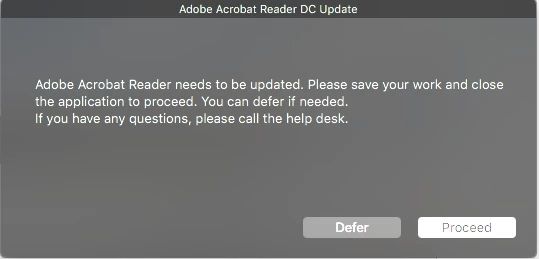
Clicking proceed does nothing but make that box reappear. I can confirm the adobe reader is not running, its not even installed.
Logs show:
[STEP 1 of 4]
Executing Policy Adobe Reader
[STEP 2 of 4]
Running script Adobe Reader DC...
Script exit code: 5
Script result: Thu Mar 29 11:33:52 :
Thu Mar 29 11:33:52 : ======================== Starting Script ========================
Thu Mar 29 11:33:54 : Latest Adobe Reader DC Version is: 18.011.20035
Thu Mar 29 11:33:54 : ARCurrVersNormalized: 1801120035
Thu Mar 29 11:33:54 : Latest version of the URL is: http://ardownload.adobe.com/pub/adobe/reader/mac/AcrobatDC/1801120035/AcroRdrDC_1801120035_MUI.dmg
Thu Mar 29 11:33:54 : Current Reader DC version: None N/A
Thu Mar 29 11:33:54 : Available Reader DC version: 18.011.20035 => 1801120035
Thu Mar 29 11:33:54 : Downloading newer version.
Thu Mar 29 11:33:55 : Checking if the file exists after downloading.
Thu Mar 29 11:33:55 : Downloaded File Size: 185472 kb
Thu Mar 29 11:33:56 : Checking if Reader is running one last time before we install
Thu Mar 29 11:33:56 : Adobe Acrobat Reader (DC) appears to be running!
Thu Mar 29 11:34:00 : Proceed selected
Thu Mar 29 11:34:00 : Adobe Acrobat Reader (DC) appears to be running!
Thu Mar 29 11:34:01 : Proceed selected
Thu Mar 29 11:34:01 : Adobe Acrobat Reader (DC) appears to be running!
Thu Mar 29 11:34:03 : Deferment Selected
Thu Mar 29 11:34:03 : Exit code: 5 - ERROR: Adobe Reader (DC) is running or was attempted to be installed manually and user deferred install.
Thu Mar 29 11:34:03 : ======================== Script Complete ========================
Error running script: return code was 5.
[STEP 3 of 4]
[STEP 4 of 4]
Any ideas?

- Valued Contributor
- March 29, 2018
+5- Contributor
- September 27, 2018
Yeah, I tried it a couple times since I posted the newer version, but also get the "needs to be updated or closed" prompt. I gave up. :) Sorry...
Enter your E-mail address. We'll send you an e-mail with instructions to reset your password.
Scanning file for viruses.
Sorry, we're still checking this file's contents to make sure it's safe to download. Please try again in a few minutes.
OKThis file cannot be downloaded
Sorry, our virus scanner detected that this file isn't safe to download.
OK