#!/usr/bin/python
"""
This script checks whether the installed version of Adobe Acrobat DC is
equal, less, or more than the target version defined by APP_TARGET_VERSION
and reports the result in Casper Suite extension attribute style.
T = Local app version is equal to provided current version
N = Local app version is newer than provided current version
F = Local app version is less than provided current version
N/A = Local app plist was not found at provided path
"""

import os.path
import plistlib
from pkg_resources import parse_version

APP_PATH = "/Applications/Adobe Acrobat DC/Adobe Acrobat.app"
APP_VERSION_KEY = "CFBundleShortVersionString"
APP_TARGET_VERSION = "15.010.20059"


def get_version_check_result(app_path, app_version_key, app_target_version):
    """
    Reports T if the local app version is equal to target version, F if the
    local app version is less than target version, N if the local app
    version is greater than target version, and N/A if the plist is not found.
    """
    app_plist_path = app_path + "/Contents/Info.plist"
    if not os.path.isfile(app_plist_path):
        version_check_result = "N/A"
    else:
        app_info_plist = plistlib.readPlist(app_plist_path)
        app_version = app_info_plist[app_version_key]
        if parse_version(app_target_version) == parse_version(app_version):
            version_check_result = "T"
        elif parse_version(app_target_version) < parse_version(app_version):
            version_check_result = "N"
        else:
            version_check_result = "F"
    return version_check_result


def main():
    """ Executes script functions. """
    result = get_version_check_result(APP_PATH,
                                      APP_VERSION_KEY,
                                      APP_TARGET_VERSION)
    print '<result>%s</result>' % result

if __name__ == "__main__":
    main()
We have been put in touch with the Adobe Acrobat team dev group. Hoping they can at least provide a proper incremental version key in Info.plist so administrators can scope policies without having to jump through hoops.
I'll also ask why this article gives two paths for Continuous vs Classic, but the actual install path is right smack at the top of /Applications.
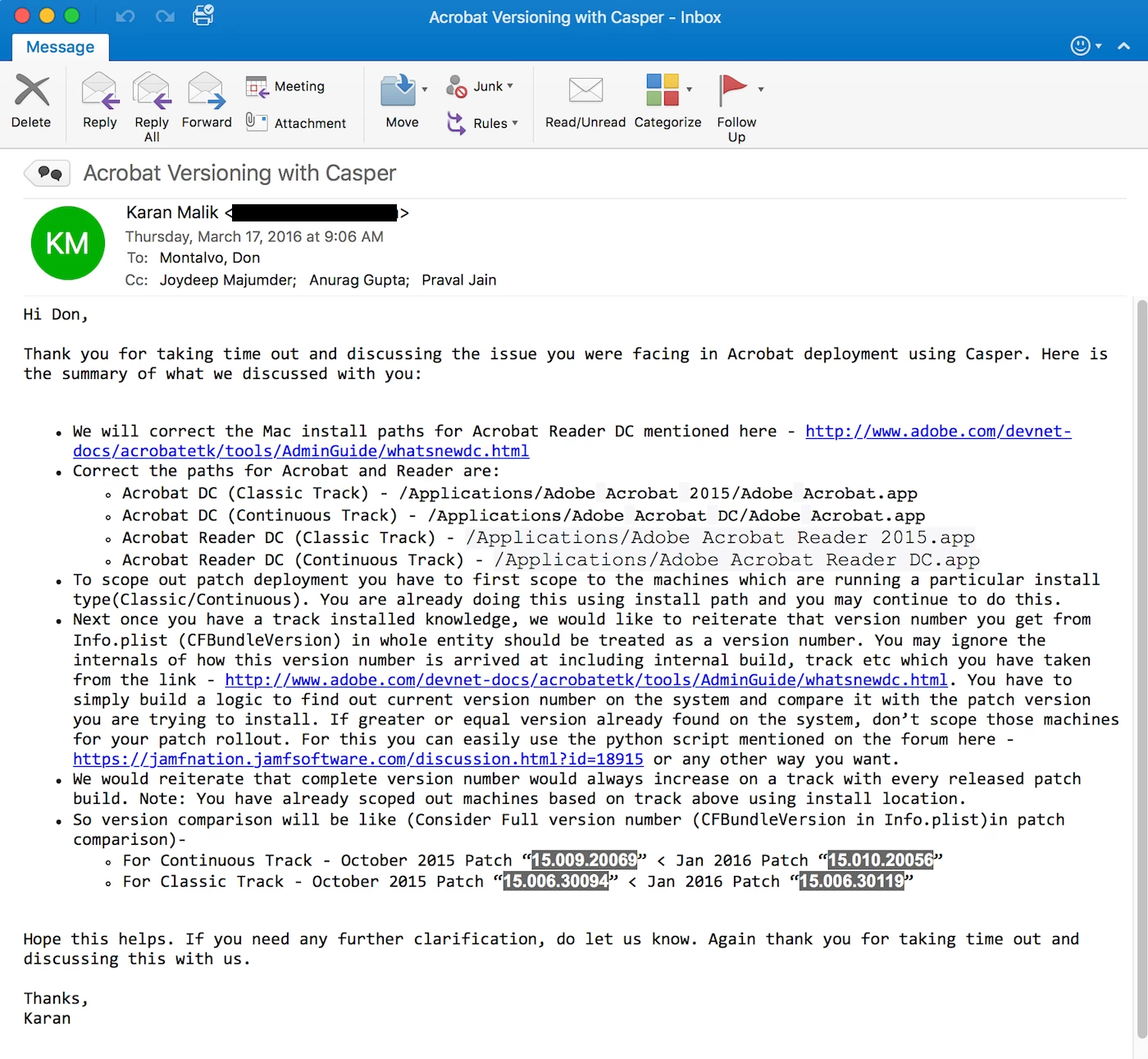
Just got off a conference call with the Adobe team responsible for the Acrobat and Acrobat Reader products. They really like @sean's script. :) Here is their summary email. I would post the text, but it has formatting that needs to be preserved.
Kudos to Adobe's dev/engineer team, JoydeepM, AnuragG, and PravalJ, for reaching out!
Ah, but removing periods and doing a straight integer comparison is a bad way to do it.
During our call, the Adobe engineers explained, we just need to first identify Track ID (Classic vs Continuous), then yes we can treat the XX.XXX.XXXXX string as a number. Seems reliable, if not a bit convoluted.
I pressed for a "TrackID" key in Info.plist, seems that's the simplest way to put this all to rest.
I mean i've read that whatsnewdc.html page a dozen times but for some reason it just isn't clicking for me. I could swear Adobe spends more time and money on confusing the hell out of users than they spend on making products that just work.
I still don't even know what Adobe Reader DC is compared to Adobe Reader 11. I have not found ANYTHING to explain that one.
Continuous Track = Firefox (lots of changes, hard to keep up and manage...and cloud services) Classic Track = Firefox ESR (fewer radical changes; easier to manage...and no cloud services)
Their article is very detailed, but a high(er) level, distilled down, article would be helpful.
Thanks @donmontalvo but I think/agree that @sean's method is better in some ways - my script is contingent on the application path of the two different tracks being static and predictable (which, it may be.. usually). Sean's script accounts for the way Adobe does versioning internally.
The bash and python script I posted may unintentionally work out for the two different tracks due to the way Adobe versions the tracks and the dumb pure integer comparison, haven't thought it about it much yet.
@mscottblake wow, totally missed your post! Nice article, but doesn't seem to give granular version information. The goal of the above is to enable a team of people (who are at varying degrees of capability) the ability to ensure proper scope for a given update release.
OK, circling back with fresh eyes, we found a much more manageable/sustainable way to build logic into Smart Computer Groups to compensate for Adobe's incredibly convoluted versioning string for DC products.
So, if we are pushing 15.010.20056, this is the simplest, and most manageable/sustainable, way to avoid rollback, is to exclude:
Version is 15.010.20056
(or) Version is 15.010.20059
(or) Version is 15.010.20060
(or) Version is 15.016.20039
(or) Version is 15.016.20041
(or) Version is 15.016.20045
Thank goodness I'm hypoglycemic, or Adobe would have drove me to drinking by now. :)
PS, Adobe should still fire their dev team, or at least have them all report under @kagibson. ;)
Is there a way to suppress the welcome screen and make Adobe Reader the default viewer? I found the plist but it's rather long and Im having trouble finding the key for the welcome screen. I don't want to replace the entire plist file, just that particular key.