Question

AirDrop in 10.10 - how to disable?

  • August 20, 2015
  • 8 replies
  • 56 views

chris_kemp
Forum|alt.badge.img+20

It's come to my attention that the old ways of disabling AirDrop file sharing:

defaults write com.apple.NetworkBrowser DisableAirDrop -bool YES

no longer works. This now returns:

defaults[17195:855346] Could not write domain /Library/Preferences/com.apple.NetworkBrowser; exiting

According to Wikipedia (yeah, I know...but still...): "Starting with OS X 10.10 Yosemite, the old version of AirDrop for Mac is replaced with the one for iOS."

Sooo...I need a new method for disabling this to meet security requirements. Any one else cross this bridge yet?

8 replies

Forum|alt.badge.img+18
  • Honored Contributor
  • August 20, 2015

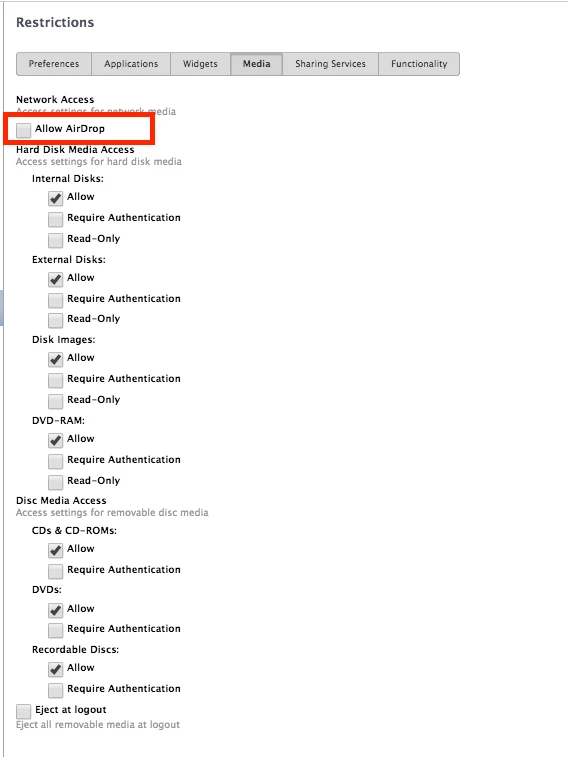
Hi @chris.kemp the way we do it is disable airdrop via config profile under the restrictions payload.


Forum|alt.badge.img+7

Like @rderewianko said, you will have to use a configuration profile or MCX to do this. The plist should be stored in /Library/Managed Preferences/<username>/com.apple.NetworkBrowser.plist if you want to check the setting.


Forum|alt.badge.img+5
  • New Contributor
  • June 13, 2017

@rderewianko Im trying to disable in Sierra. Running JSS 9.98 I do not see any options in the restrictions payload. Can you provide more info?

Thanks,


Forum|alt.badge.img+18
  • Honored Contributor
  • June 13, 2017

Sure!

  1. Click Configuration Policies
  2. Click Plus to Create a new policy
  3. Name Your Policy
  4. Make sure the Level is "Computer Level"
  5. Click on Restrictions
  6. Click Configure
  7. Navigate to Media
  8. Uncheck "allow airdrop"
  9. Save and apply to a test scope

Forum|alt.badge.img+2
  • New Contributor
  • June 14, 2017

This still allow mac receive files, mac can be searched by other mac or iphone.

sorry , poor english..


Forum|alt.badge.img+18
  • Honored Contributor
  • June 14, 2017

Have you tried a reboot? (and confirmed the config profile exists)


Forum|alt.badge.img+5
  • New Contributor
  • June 15, 2017

@rderewianko thank you! looks like its time for me to get some new glasses.


Forum|alt.badge.img+7
  • Contributor
  • August 21, 2017

So can anyone tell me what situations may exist that this wouldn't work. I'm running 10.11 and 10.12 on student devices. Configuration profile is correct and deployed and showing up on student devices. And yet I'm watching two kids send photos and song files back and forth to each other...