

Plenty of cases of this out there, but none of the "fixes" that I've read so far seem to apply.
No issues for months, but now that I've rebuilt a system, suddenly unable to get the mdm profile installed.
When I run "sudo Jamf -manage -verbose", I get the following error:
Error installing the computer level mdm profile: profiles install for file:'/Library/Application Support/JAMF/tmp/mdm.mobileconfig' and user:'root' returned -1096 (The operation couldn’t be completed. (OSStatus error -1096.))
Now... here's the frustrating part: If I watch the '/Library/Application Support/JAMF/tmp/ folder, I DO see a mdm.mobileconfig profile created, then deleted. If I'm quick, I can grab a copy. But then if I attempt to install the copy manually, I get an error in the finder, again listing error -1096. The profile APPEARS correct when I view it - settings/etc. match what I expect. Server name, topic, rights, etc. all line up with my existing systems, but when I apply it... fails as shown here: 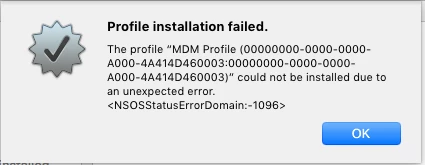
We've checked our certificates, all appear fine. Able to replicate the issue across more than one machine after re-imaging a test box, also able to replicate it in a VM. Existing machines appear to be fine, this is only affecting newly-enrolled.
Thoughts? Help me Jamf Nation, you're my only hope....
