Question

Approving Pulse Secure 9.1.9 System Extension

  • November 17, 2020
  • 27 replies
  • 146 views

Show first post

27 replies

Forum|alt.badge.img+1
  • New Contributor
  • September 29, 2021


@mrinaldi Based on your attached screenshots, it looks like you didn't apply ALL of the recommended settings/values t hat are listed in the Pulse Secure support KB article.

Are those setting simply missing in this screenshot due to cropping, or did you customize your profile differently than what Pulse Secure recommends? Example of some options that appear to be missing in your profile:

    • payloadtype: com.apple.webbcontent-filter
    • team-identifier: 3M2L5SNZL8
    • FilterType: Plugin
    • FilterGrade: firewall
    • PluginBundleID: net.pulsesecure.Pulse-Secure
    • FilterSockets: true
    • FilterPackets: true
    • FilterBrowsers: false 


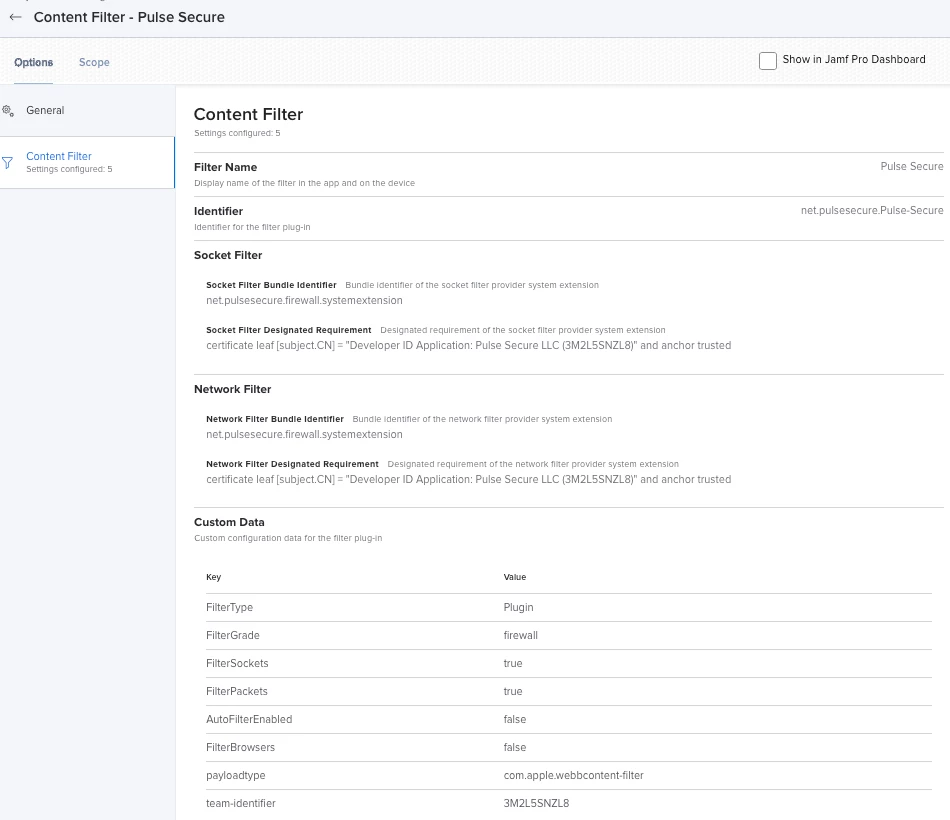
Here is an example of my prototype Content Filter profile (not in production yet)


@dstranathan From what I can tell, those additional settings you mentioned are configured via the built-in fields within the Content Filter and System Extensions profile pages:

  • payloadtype = automatically configured via Jamf. When configuring the "Content Filter" settings, it sets the payloadtype as "com.apple.webcontent-filter" automatically. Confirmed when looking at an export of the .mobileconfig of the Configuration Profile
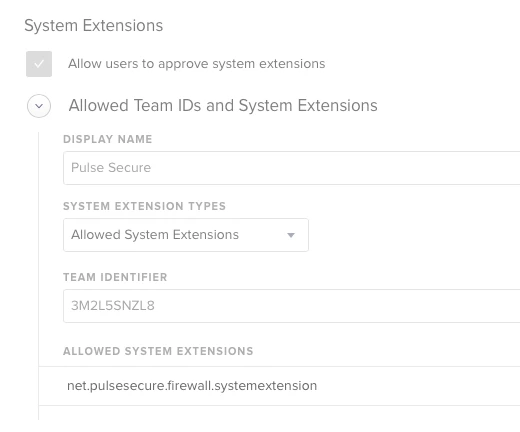
  • team-identifier = "Team Identifer" field within the "System Extensions" settings
  • FilterType = automatically configured via Jamf. When configuring the "Content Filter" settings, it sets the Filter Type as "Plugin" automatically. Confirmed when looking at an export of the .mobileconfig of the Configuration Profile
  • FilterGrade = "Filter Order" field within the "Content Filter" settings
  • PluginBundleID = "Identifier" field within the "Content Filter" settings
  • FilterSockets = automatically configured via Jamf. When configuring the "Socket Filter" settings, it sets the Filter Sockets to "true" automatically. Confirmed when looking at an export of the .mobileconfig of the Configuration Profile
  • FilterPackets = automatically configured via Jamf. When configuring the "Network Filter" settings, it sets the Filter Packets to "true" automatically. Confirmed when looking at an export of the .mobileconfig of the Configuration Profile
  • FilterBrowsers = since the Pulse article says to set this to "true" on the 2nd iteration, I saw in the Apple developer documentation that this is set to "true" by default, so I did omit this setting.

What I've laid out above is somewhat of a theory, but looking at an export of the Configuration Profile, it all does seem to match up based on what I could find. 


dstranathan
Forum|alt.badge.img+19
  • Author
  • Valued Contributor
  • September 29, 2021

@dstranathan From what I can tell, those additional settings you mentioned are configured via the built-in fields within the Content Filter and System Extensions profile pages:

  • payloadtype = automatically configured via Jamf. When configuring the "Content Filter" settings, it sets the payloadtype as "com.apple.webcontent-filter" automatically. Confirmed when looking at an export of the .mobileconfig of the Configuration Profile
  • team-identifier = "Team Identifer" field within the "System Extensions" settings
  • FilterType = automatically configured via Jamf. When configuring the "Content Filter" settings, it sets the Filter Type as "Plugin" automatically. Confirmed when looking at an export of the .mobileconfig of the Configuration Profile
  • FilterGrade = "Filter Order" field within the "Content Filter" settings
  • PluginBundleID = "Identifier" field within the "Content Filter" settings
  • FilterSockets = automatically configured via Jamf. When configuring the "Socket Filter" settings, it sets the Filter Sockets to "true" automatically. Confirmed when looking at an export of the .mobileconfig of the Configuration Profile
  • FilterPackets = automatically configured via Jamf. When configuring the "Network Filter" settings, it sets the Filter Packets to "true" automatically. Confirmed when looking at an export of the .mobileconfig of the Configuration Profile
  • FilterBrowsers = since the Pulse article says to set this to "true" on the 2nd iteration, I saw in the Apple developer documentation that this is set to "true" by default, so I did omit this setting.

What I've laid out above is somewhat of a theory, but looking at an export of the Configuration Profile, it all does seem to match up based on what I could find. 


Thanks for the detailed answer - much appreciated!

Spitballing here:

Because the Pulse Secure Team ID in the System Extension's payload doesn't mean that the Content Filter's payload can see and reference the Team ID, correct?

I have my System Extension Approval payload (which contains the Team Identifier of '3M2L5SNZL8') and my Content Filter payload for Pulse Secure in (2) separate MDM profiles.

I'm wondering if I need to explicitly add the Pulse Secure Team Identifier (3M2L5SNZL8) to my Content Filter profile or not...?