Question

Apps not updating automatically

  • September 1, 2021
  • 5 replies
  • 30 views

Forum|alt.badge.img+3

Good morning, 

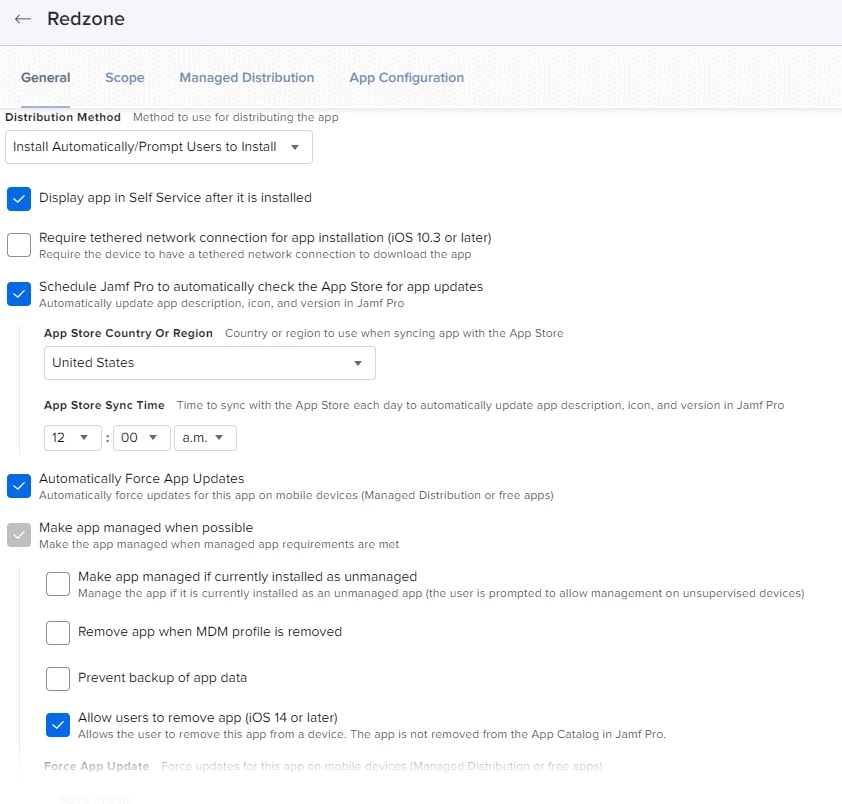
I have all of our apps that are pushed down to the devices set to Automatically force updates. Updates are not happening. Is there a setting that I may be missing? I have spoken with a few device users and the devices are not being turned over night so the updates should be going through. Below is a screenshot of my setup for the app. 


Thank you in advance for any advice. 


Rachel

5 replies

ljcacioppo
Forum|alt.badge.img+17
  • Jamf Heroes
  • September 1, 2021

Are the devices in single app mode by chance? I don't think updates can happen if they're in single app mode


Forum|alt.badge.img+2
  • New Contributor
  • September 2, 2021

What jamf version are you running? Ive seen similar threads to this last year - Thought that maybe it was fixed already. 


Forum|alt.badge.img+3
  • Author
  • New Contributor
  • September 2, 2021

Are the devices in single app mode by chance? I don't think updates can happen if they're in single app mode


No we are not using single App mode. 


Forum|alt.badge.img+3
  • Author
  • New Contributor
  • September 2, 2021

What jamf version are you running? Ive seen similar threads to this last year - Thought that maybe it was fixed already. 


We are on version 10.31.1-t1628520988. i have tried a force update and that is not working either. 


Forum|alt.badge.img+10
  • New Contributor
  • September 16, 2021

I'm having the same problem here. Jamf Hosted Jamf Pro, version 10.31.1-t1628520988

Existing apps aren't updating automatically, but if I add a copy of the app as a new app it comes in with the new version number.