Solved

AutoCAD 2021 Deployment with Network Server

  • June 11, 2020
  • 88 replies
  • 764 views

Forum|alt.badge.img+5

Hey All,

This year Autodesk decided to change the installer for AutoCAD, Maya and Mudbox. Here's how I got AutoCAD to install silently since the new silent installer option is broken. You will want a policy to copy the app from the dmg to a temp directory. I used /tmp

EDIT: You only want to change the license server address in the script below. Nothing else.

#!/bin/sh

year="2021"
pkgpath="/tmp/Install Autodesk AutoCAD ${year} for Mac.app"
pkgPath1="/tmp/Install Autodesk AutoCAD ${year} for Mac.app/Contents/Helper/ObjToInstall/lib.pkg"
pkgPath2="/tmp/Install Autodesk AutoCAD ${year} for Mac.app/Contents/Helper/Packages/AdSSO/AdSSO-v2.pkg"
pkgPath3="/tmp/Install Autodesk AutoCAD ${year} for Mac.app/Contents/Helper/Packages/Licensing/AdskLicensing-10.1.0.3194-mac-installer.pkg"
pkgPath4="/tmp/Install Autodesk AutoCAD ${year} for Mac.app/Contents/Helper/ObjToInstall/licreg.pkg"
pkgPath5="/tmp/Install Autodesk AutoCAD ${year} for Mac.app/Contents/Helper/ObjToInstall/autocad2021.pkg"
pKey="777M1"
networkServer="LICENSE SERVER ADDRESS"
licPath="/Library/Application Support/Autodesk/AdskLicensingService/${pKey}_${year}.0.0.F"
licFile="LICPATH.lic"
lgsFile="LGS.data"

#Declare functions

runInstaller ()
{
    /usr/sbin/installer -verboseR -pkg "${pkgPath1}" -target /
    /usr/sbin/installer -verboseR -pkg "${pkgPath2}" -target /
    /usr/sbin/installer -verboseR -pkg "${pkgPath3}" -target /
    /usr/sbin/installer -verboseR -pkg "${pkgPath4}" -target /
    /usr/sbin/installer -verboseR -pkg "${pkgPath5}" -target /

}

createLicenseFiles ()
{
    if [[ ! -e "${licPath}" ]];
    then
        /bin/mkdir "${licPath}"
    fi
    /usr/bin/touch "${licPath}/${lgsFile}"
    /bin/chmod 777 "${licPath}/${lgsFile}"
    /usr/bin/touch "${licPath}/${licFile}"
    /bin/chmod 777 "${licPath}/${licFile}"
    /bin/echo "SERVER ${networkServer} 000000000000" > "${licPath}/${licFile}"
    /bin/echo "USE_SERVER" >> "${licPath}/${licFile}"
    /bin/echo "_NETWORK" >> "${licPath}/${lgsFile}"
}
licenceHelper ()
{
    /Library/Application Support/Autodesk/AdskLicensing/Current/helper/AdskLicensingInstHelper change --pk "${pKey}" --pv "${year}.0.0.F" --lm NETWORK --ls "${networkServer}"
}
cleanUp ()
{
    /bin/rm -rf "${pkgPath}"
}

#Run script

runInstaller
createLicenseFiles
licenceHelper
cleanUp

Best answer by Qwheel

Just weighing in for others. As we have a bunch of Macbooks within our institution, I had to package up the 2022 standalone versions for CAD and Maya.
I used the script proposed above by others but found the license section wasn't flawless. I suspect it's because spaces weren't escaped (I'm looking at you "Application\\ Support").

When problem solving why licensing wasn't working, I tinkered a fair bit (adding "", sudo, \\ etc) . Actually wasn't sure if /.config was even there but it was hidden (as .folders are...) .

But yeah, as I used the above scripts, I thought I'd show my CAD and Maya standalone 2022 corrections and share my experience getting it working.

#!/bin/sh year="2022" pkgpath="/private/tmp/Install Autodesk AutoCAD ${year} for Mac.app" pkgPath1="/private/tmp/Install Autodesk AutoCAD ${year} for Mac.app/Contents/Helper/ObjToInstall/lib.pkg" pkgPath2="/private/tmp/Install Autodesk AutoCAD ${year} for Mac.app/Contents/Helper/Packages/AdSSO/AdSSO-v2.pkg" pkgPath3="/private/tmp/Install Autodesk AutoCAD ${year} for Mac.app/Contents/Helper/Packages/Licensing/AdskLicensing-11.0.0.4854-mac-installer.pkg" pkgPath4="/private/tmp/Install Autodesk AutoCAD ${year} for Mac.app/Contents/Helper/ObjToInstall/LicregTool/licreg.pkg" pkgPath5="/private/tmp/Install Autodesk AutoCAD ${year} for Mac.app/Contents/Helper/ObjToInstall/autocad2022.pkg" pKey="XXXXX" sn="XXX-XXXXXXXX" licPath="/Library/Application Support/Autodesk/AdskLicensingService/${pKey}_${year}.0.0.F" licFile="LICPATH.lic" lgsFile="LGS.data" #Declare functions runInstaller () { /usr/sbin/installer -verboseR -pkg "${pkgPath1}" -target / /usr/sbin/installer -verboseR -pkg "${pkgPath2}" -target / /usr/sbin/installer -verboseR -pkg "${pkgPath3}" -target / /usr/sbin/installer -verboseR -pkg "${pkgPath4}" -target / /usr/sbin/installer -verboseR -pkg "${pkgPath5}" -target / } licenceHelper () { #/Library/Application\\ Support/Autodesk/AdskLicensing/Current/helper/AdskLicensingInstHelper register --pk "${pKey}" --pv "${year}.0.0.F" --lm STANDALONE --sn "${sn}" --cf /Library/Application Support/Autodesk/Adlm/.config/ProductInformation.Pit -el US sudo /Library/Application\\ Support/Autodesk/AdskLicensing/Current/helper/AdskLicensingInstHelper register --pk "XXXXX" --pv "2022.0.0.F" --lm STANDALONE --sn "XXX-XXXXXXX" --cf /Library/Application\\ Support/Autodesk/Adlm/.config/ProductInformation.Pit -el US } cleanUp () { /bin/rm -rf "${pkgPath}" } #Run script runInstaller licenceHelper cleanUp


And for Maya, I found that the Autodesk build couldn't install MtoA (Arnold renderer). Don't know why it was failing but MacOS version was 11.5.X.
Excluded that line from the installer and went to their website. Using Composer, I dumped the PKG next to the Maya installer in /tmp and ran it from there in the order previously described.
Apologies for not having done the housekeeping to tidy it up, but I consider it useful to see what has been removed.

#!/bin/sh year="2022" pkgpath="/tmp/Install Maya ${year}.app" helperpath="${pkgpath}/Contents/Helper" pkgPath1="${helperpath}/Packages/Licensing/AdskLicensing-11.0.0.4854-mac-installer.pkg" pkgPath2="${helperpath}/Packages/AdSSO/AdSSO-v2.pkg" pkgPath3="${helperpath}/Packages/Maya/Maya_AdLMconf2022.pkg" pkgPath4="${helperpath}/Packages/Maya/Maya_core2022.pkg" #pkgPath5="${helperpath}/Packages/Maya/MtoA.pkg" pkgPath6="${helperpath}/Packages/Maya/bifrost.pkg" pkgPath7="${helperpath}/Packages/Maya/MayaUSD.pkg" pkgPath8="${helperpath}/Packages/Maya/SubstanceInMaya-2.1.9-2022-Darwin.pkg" pkgPath9="${helperpath}/Packages/Maya/motion-library.maya2022-2.0.0.pkg" PkgPathA="${helperpath}/Packages/Maya/Pymel2022.pkg" pKey="XXXXX" networkServer="YOUR LICENSE SERVER NAME HERE" licPath="/Library/Application Support/Autodesk/AdskLicensingService/${pKey}_${year}.0.0.F" licFile="LICPATH.lic" lgsFile="LGS.data" #Declare functions runInstaller () { /usr/sbin/installer -verboseR -pkg "${pkgPath1}" -target / /usr/sbin/installer -verboseR -pkg "${pkgPath2}" -target / /usr/sbin/installer -verboseR -pkg "${pkgPath3}" -target / /usr/sbin/installer -verboseR -pkg "${pkgPath4}" -target / /usr/sbin/installer -verboseR -pkg "/private/tmp/MtoA-4.2.4-darwin-2022.pkg" -target / /usr/sbin/installer -verboseR -pkg "${pkgPath6}" -target / /usr/sbin/installer -verboseR -pkg "${pkgPath7}" -target / /usr/sbin/installer -verboseR -pkg "${pkgPath8}" -target / /usr/sbin/installer -verboseR -pkg "${pkgPath9}" -target / /usr/sbin/installer -verboseR -pkg "${pkgPathA}" -target / } #createLicenseFiles () #{ # if [[ ! -e "${licPath}" ]]; # then # /bin/mkdir "${licPath}" # fi # /usr/bin/touch "${licPath}/${lgsFile}" # /bin/chmod 777 "${licPath}/${lgsFile}" # /usr/bin/touch "${licPath}/${licFile}" #/bin/chmod 777 "${licPath}/${licFile}" # /bin/echo "SERVER ${networkServer} 000000000000" > "${licPath}/${licFile}" # /bin/echo "USE_SERVER" >> "${licPath}/${licFile}" # /bin/echo "_NETWORK" >> "${licPath}/${lgsFile}" #} licenceHelper () { sudo /Library/Application\\ Support/Autodesk/AdskLicensing/Current/helper/AdskLicensingInstHelper register --pk "XXXXX" --pv "2022.0.0.F" --lm STANDALONE --sn "XXX-XXXXXX" --cf /Library/Application\\ Support/Autodesk/ADLM/PIT/2022/MayaConfig.pit -el US } cleanUp () { /bin/rm -rf "${pkgPath}" } #Run script runInstaller #createLicenseFiles licenceHelper cleanUp



88 replies

Forum|alt.badge.img+5
  • New Contributor
  • June 16, 2020

I have a few questions. I tried to use this script, but I was unsuccessful. I could get the PKGs to install fine, but not the license parts. What is the pKey variable? Where did you get the 777M1 value from? I know what to put for our license server in the networkServer variable, but I'm not sure if I need to change the licFile and lgsFile values?


Forum|alt.badge.img+5
  • Author
  • Contributor
  • June 17, 2020

@CooperUser

The pKey is the Product key for the Software and changes every year. A mostly complete list of 2021 Product Keys is available from Autodesk here: Here's the 2021 keys: https://knowledge.autodesk.com/customer-service/download-install/activate/find-serial-number-product-key/product-key-look/2021-product-keys

The only thing you need to change is the network server variable. The other variables need to stay the same.

What is the error you are getting?


Forum|alt.badge.img+5
  • Author
  • Contributor
  • June 17, 2020

edit buttons are helpful.


Forum|alt.badge.img+5
  • New Contributor
  • June 18, 2020

Hey Ohkston. Thanks for the response. I got your script to work finally. I don't remember the error. I think the problem I was really encountering was that the licreg.pkg was failing to install. I think this was because I had previously installed and uninstalled AutoCAD 2021 to test another solution. I fixed this by removing all the AutoCAD files on the machine and restarting. Restarting was really the key to getting the licreg.pkg to not fail for some reason. I wish I could be more exact. Thank you so much for this helpful script.


Forum|alt.badge.img+1

At my office we don't have a Autocad network licence server, but the end users login with their username (e-mailadres) and password. Anyone knows how to change that in this script? Appreciate
EDIT!!
Changed the script by cutting some items..


Forum|alt.badge.img+1

Here is the changed script:

#!/bin/sh
year="2021"
pkgpath="/tmp/Install Autodesk AutoCAD ${year} for Mac.app"
pkgPath1="/tmp/Install Autodesk AutoCAD ${year} for Mac.app/Contents/Helper/ObjToInstall/lib.pkg"
pkgPath2="/tmp/Install Autodesk AutoCAD ${year} for Mac.app/Contents/Helper/Packages/AdSSO/AdSSO-v2.pkg"
pkgPath3="/tmp/Install Autodesk AutoCAD ${year} for Mac.app/Contents/Helper/Packages/Licensing/AdskLicensing-10.1.0.3194-mac-installer.pkg"
pkgPath4="/tmp/Install Autodesk AutoCAD ${year} for Mac.app/Contents/Helper/ObjToInstall/licreg.pkg"
pkgPath5="/tmp/Install Autodesk AutoCAD ${year} for Mac.app/Contents/Helper/ObjToInstall/autocad2021.pkg"
pKey="777M1"
networkServer="LICENSE SERVER ADDRESS"
licPath="/Library/Application Support/Autodesk/AdskLicensingService/${pKey}_${year}.0.0.F"
licFile="LICPATH.lic"
lgsFile="LGS.data"

#Declare functions

runInstaller ()
{
    /usr/sbin/installer -verboseR -pkg "${pkgPath1}" -target /
    /usr/sbin/installer -verboseR -pkg "${pkgPath2}" -target /
    /usr/sbin/installer -verboseR -pkg "${pkgPath3}" -target /
    /usr/sbin/installer -verboseR -pkg "${pkgPath4}" -target /
    /usr/sbin/installer -verboseR -pkg "${pkgPath5}" -target /

}


cleanUp ()
{
    /bin/rm -rf "${pkgPath}"
}

#Run script

runInstaller
cleanUp

Forum|alt.badge.img+7
  • Contributor
  • June 26, 2020

Wow!!! This is great work. Had several arguments with Autodesk to get AutoCAD installation. How would this apply to distributed Servers? In my case I have two autodesk servers...


Forum|alt.badge.img+5
  • Contributor
  • July 2, 2020

Hello,

Thanks for this @Onkston!

Have you figured out, by chance, how to run the 2020.0.1 combo update in conjunction with this?

I'd hate to have to go back to the snapshot capture-and-diff method just to get this in there, but I also hate to not deploy the latest version.

I tried running the hotfix installer with a command similar to /usr/sbin/installer -verboseR -pkg "${pkgPath5}" -target /, modifing appropriately with the path to the installer, and also tried adding -allowUntrusted, but no dice - simply reports the generic error when a pkg install fails.

Thoughts?

Thanks!

Jacob


jbisgett
Forum|alt.badge.img+12
  • Honored Contributor
  • July 14, 2020

How would this differ if we were using the standalone license versus a network license?


Forum|alt.badge.img+5
  • Contributor
  • July 14, 2020

That's a good question.

If it's a single serial number per copy of the product, you'll likely just leave out all of the network-related stuff, but then you'll have to enter the serial number manually on each computer.

I'm sure there is a way to meter out the serial numbers one way or another, but it may be more effort than it's worth (if your number of seats is relatively low, you probably just want to install from Jamf and license separately.


jbisgett
Forum|alt.badge.img+12
  • Honored Contributor
  • July 14, 2020

It's a single serial number for multiple installs.


Forum|alt.badge.img+2
  • New Contributor
  • August 11, 2020

The AdskLicensingInstHelper tool in /Library/Application Support/Autodesk/AdskLicensing/Current/helper/ has a flag to imput a serial number.

-sn 000-00000000

Forum|alt.badge.img+5
  • Contributor
  • August 11, 2020

https://knowledge.autodesk.com/support/autocad/learn-explore/caas/sfdcarticles/sfdcarticles/Use-Installer-Helper.html


jbisgett
Forum|alt.badge.img+12
  • Honored Contributor
  • August 11, 2020

After some research, I was able to modify the script posted here to suit my needs. I have it as a postinstall script on my Composer package.

#!/bin/sh
year="2021"
pkgpath="/private/tmp/Install Autodesk AutoCAD ${year} for Mac.app"
pkgPath1="/private/tmp/Install Autodesk AutoCAD ${year} for Mac.app/Contents/Helper/ObjToInstall/lib.pkg"
pkgPath2="/private/tmp/Install Autodesk AutoCAD ${year} for Mac.app/Contents/Helper/Packages/AdSSO/AdSSO-v2.pkg"
pkgPath3="/private/tmp/Install Autodesk AutoCAD ${year} for Mac.app/Contents/Helper/Packages/Licensing/AdskLicensing-10.1.0.3194-mac-installer.pkg"
pkgPath4="/private/tmp/Install Autodesk AutoCAD ${year} for Mac.app/Contents/Helper/ObjToInstall/licreg.pkg"
pkgPath5="/private/tmp/Install Autodesk AutoCAD ${year} for Mac.app/Contents/Helper/ObjToInstall/autocad2021.pkg"
pKey="777M1"
sn="000-00000000"
licPath="/Library/Application Support/Autodesk/AdskLicensingService/${pKey}_${year}.0.0.F"
licFile="LICPATH.lic"
lgsFile="LGS.data"

#Declare functions

runInstaller ()
{
    /usr/sbin/installer -verboseR -pkg "${pkgPath1}" -target /
    /usr/sbin/installer -verboseR -pkg "${pkgPath2}" -target /
    /usr/sbin/installer -verboseR -pkg "${pkgPath3}" -target /
    /usr/sbin/installer -verboseR -pkg "${pkgPath4}" -target /
    /usr/sbin/installer -verboseR -pkg "${pkgPath5}" -target /

}

licenceHelper ()
{
    /Library/Application Support/Autodesk/AdskLicensing/Current/helper/AdskLicensingInstHelper register --pk "${pKey}" --pv "${year}.0.0.F" --lm 3 --sn "${sn}" --cf /Library/Application Support/Autodesk/Adlm/.config/ProductInformation.Pit -el US
}

cleanUp ()
{
    /bin/rm -rf "${pkgPath}"
}

#Run script

runInstaller
licenceHelper
cleanUp

chrisB
Forum|alt.badge.img+7
  • Valued Contributor
  • August 12, 2020

@jbisgett: Thanks!

I just modified the --lm option in the licencehelper part to:

[…]
/Library/Application Support/Autodesk/AdskLicensing/Current/helper/AdskLicensingInstHelper register --pk "${pKey}" --pv "${year}.0.0.F" --lm STANDALONE --sn "${sn}" --cf /Library/Application Support/Autodesk/Adlm/.config/ProductInformation.Pit -el US
[…]

Now you won't get prompted for the license type when opening AutoCAD 2021 for the first time.

I also had to repackage the updater package 24.0.46.1761 (AutoCAD 2021.0.1) because the original pkg file can not be deployed either.

Also interesting: "AutoCAD for Mac and AutoCAD LT for Mac do not support network deployment.“ ;-)


Forum|alt.badge.img+5
  • Contributor
  • August 12, 2020

@chrisB

What kinda magic did you apply to repackaging the updater?


Forum|alt.badge.img+15
  • Esteemed Contributor
  • August 12, 2020

@pitcherj

Here is my script that downloads and installs the updater (someone else figured out the symbolic link issue).

# Download and install the 2021.0.1 hotfix

# For some reason we have to create a directory and symbolic link in /private/tmp before we can install the hotfix
# https://www.jamf.com/jamf-nation/discussions/34668/deploying-autocad-2020-using-script

# Look for VerTarget.plist in the hotfix package. Locate UpdateVersion and use that below
UpdateVersion="24.0.46.1761"

# Make sure there is no existing directory.
if [[ -d /private/tmp/_adsk_${UpdateVersion} ]]; then
    rm -R /private/tmp/_adsk_${UpdateVersion}
fi

mkdir -p /private/tmp/_adsk_${UpdateVersion}
ln -s /Applications/Autodesk/AutoCAD 2021/AutoCAD 2021.app /private/tmp/_adsk_${UpdateVersion}/acupdt_rone

# Actually download and install the 2021.0.1 hotfix

tmpDir=$(mktemp -d)
echo "Temp dir set to ${tmpDir}"

dmgName="AutoCAD_Mac_2021.0.1_Hotfix_Combo.dmg"
pkgName="AutoCAD_Mac_2021.0.1_Hotfix_Combo.pkg"
dmgVolumePath="/Volumes/R046.M.1761.acad.mac.x64.comboupdate"
downloadUrl="https://up.autodesk.com/2021/ACDMAC/47A46D13-5C55-4D3A-88D3-EF091F79068B"

curl -LSs "${downloadUrl}/${dmgName}" -o "${tmpDir}/${dmgName}"
hdiutil attach "${tmpDir}/${dmgName}" -nobrowse
installer -pkg "${dmgVolumePath}/${pkgName}" -target /
hdiutil detach "${dmgVolumePath}"
rm -f "${tmpDir}/${dmgName}"

Edit: swapped /tmp for an mktemp created temp dir


chrisB
Forum|alt.badge.img+7
  • Valued Contributor
  • August 12, 2020

@pitcherj

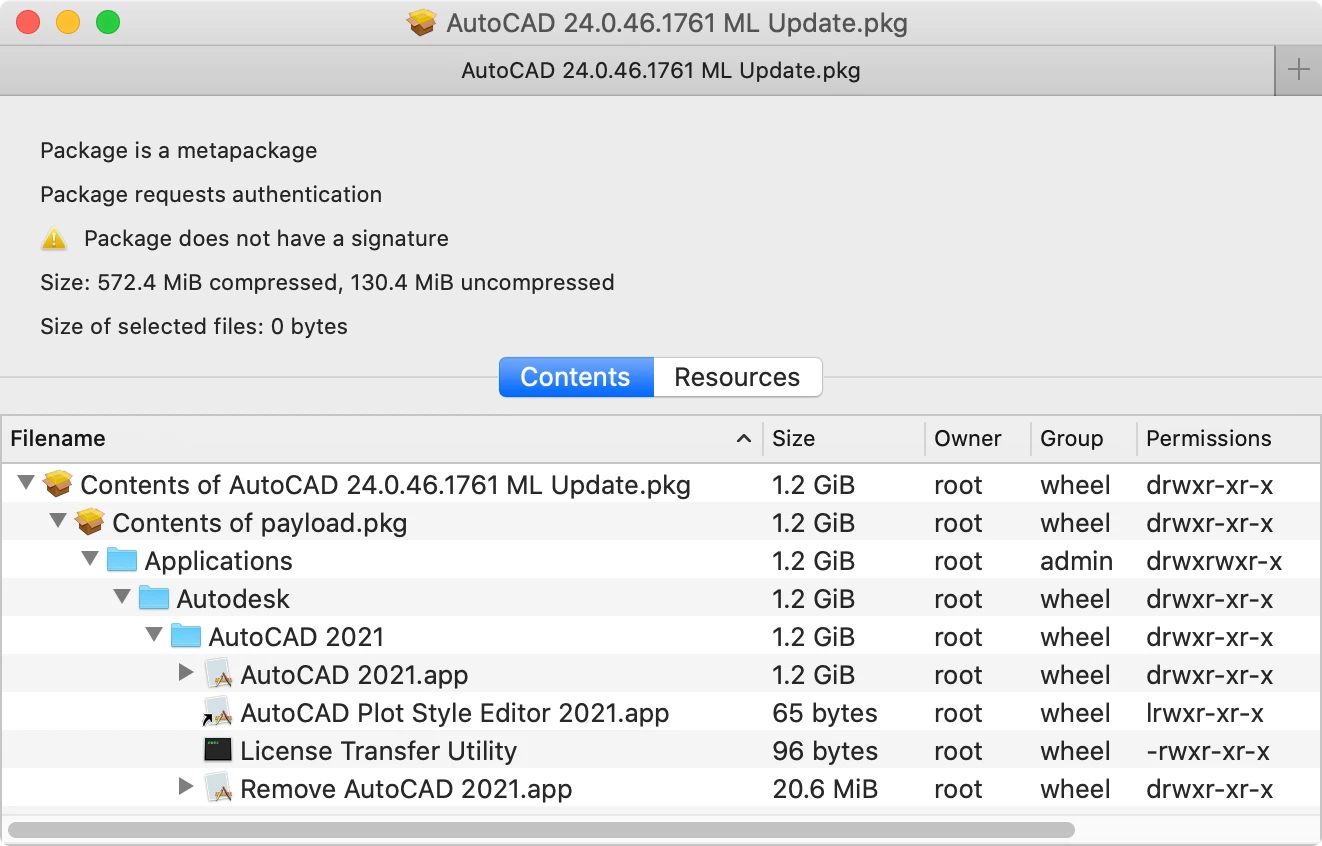
The AutoCAD 2021.0.1 Hotfix Combo just replaces the following 4 files in /Applications/Autodesk/AutoCAD 2021/ :

  • AutoCAD 2021.app
  • AutoCAD Plot Style Editor 2021.app
  • License Transfer Utility
  • Remove AutoCAD 2021.app

I extracted those files with Pacifist.app from the original 2021.0.1 updater and repackaged them with Composer.app as follows:


chrisB
Forum|alt.badge.img+7
  • Valued Contributor
  • August 12, 2020

@jbisgett

I found a typo on line 3 of your postinstall script:

[…]
pkgpath="/private/tmp/Install Autodesk AutoCAD ${year} for Mac.app"
[…]
cleanUp ()
{
    /bin/rm -rf "${pkgPath}"
}
[…]

The variable "pkgpath" needs a capital P -> "pkgPath" - otherwise the installer app "Install Autodesk AutoCAD 2021 for Mac.app" won't be deleted in /private/tmp after the installation (the cleanUp part doesn't work).


Forum|alt.badge.img+9
  • Contributor
  • August 31, 2020

Another great script.

It occurs to me that Year and pKey could be coded as variables in the script and added in the policy. I might have to do that locally.


Lincolnep
Forum|alt.badge.img+4
  • Contributor
  • January 5, 2021

FORGET THIS IDEA DOES NOT WORK AS A JAMF PUSH!

Thought this might help someone only have tested this on macOS 11.0.1

#!/bin/bash

BASEDMG="Autodesk_AutoCAD_2021.1_macOS.dmg"

# Licence info:
PRODUCTION_KEY="777M1"
PRODUCTION_VER="2021.0.0.F"

# Mount DMG
hdiutil attach $BASEDMG

# Install AutoCAD 2021
/Volumes/Installer/Install Autodesk AutoCAD 2021 for Mac.app/Contents/Helper/Setup.app/Contents/MacOS/Setup --silent

# Unmount DMG
hdiutil detach /Volumes/Installer

# Licence AutoCAD 2021
/Library/Application Support/Autodesk/AdskLicensing/Current/helper/AdskLicensingInstHelper change --prod_key $PRODUCTION_KEY --prod_ver $PRODUCTION_VER --lic_method "NETWORK" --lic_server_type "SINGLE" --lic_servers "my.Licserver.com"

Used Whitebox Packages and added this as the postinstall script and the dmg into the Scripts "Additional Resources"

Note make sure you change the licence server to point to your licence server. ;)
Also should be able to make this work with a serial key as well you will just need to play with the Licence AutoCAD 2021 line


Forum|alt.badge.img+10
  • Valued Contributor
  • May 20, 2021

Is there a version of this script for Maya and Mudbox 2022? As I'll be needing to deploy those soon. Was trying to use the Autodesk installer to do it but I see someone said in this thread that it's broken, is that still the case?


Forum|alt.badge.img+5
  • Author
  • Contributor
  • May 27, 2021

I’m packaging up the 2022 versions over the next week. I’ll let ya know how it goes.


Forum|alt.badge.img+10
  • Valued Contributor
  • June 2, 2021

@Onkston how are your packaging efforts coming along?


Forum|alt.badge.img+15
  • Esteemed Contributor
  • June 2, 2021

2022 still has the same limitation where the --silent flag doesn't work if no user is logged in.