Question

Best USB C monitors/docks for the Macbook/Macbook Pro's?

  • October 31, 2016
  • 22 replies
  • 94 views

Forum|alt.badge.img+4

Was wondering if anyone out there had any good suggestions for displays and/or docks for the Macbooks / Macbook Pro's?

Researching docks seem pretty flimsy at best.

22 replies

ImAMacGuy
Forum|alt.badge.img+23
  • Esteemed Contributor
  • October 31, 2016

probably not much right now until they are out in the wild.


rqomsiya
Forum|alt.badge.img+12
  • Honored Contributor
  • October 31, 2016

@pchen_plaid ,

Not too much is available right now. In fact the only reputable brand I see available is this OWC:

https://www.owcdigital.com/products/usb-c-dock/

Give it a few weeks/months before you see any more docks flooding the market.


Forum|alt.badge.img+17
  • Valued Contributor
  • October 31, 2016

We're using the IOGear GUD3C01 for the few MacBooks we've deployed and will likely continue until more options are available.


bpavlov
Forum|alt.badge.img+18
  • Esteemed Contributor
  • October 31, 2016

I wrote a blog post with accompanying spreadsheet on this very topic. Might be helpful to you. I couldn't find too many monitors, but there are sure quite a few adapters out there and some docking options as well.

https://babodee.wordpress.com/2016/10/29/cables-adapters-devices-for-a-brave-new-mac-world


Forum|alt.badge.img+4
  • Author
  • Contributor
  • October 31, 2016

Great thanks everyone!


Forum|alt.badge.img+9
  • Contributor
  • January 27, 2017

@mbezzo Does the IOGear support multiple monitors for you MB Pros?


Forum|alt.badge.img+17
  • Valued Contributor
  • January 27, 2017

Actually, I'm no longer using the IOGear docks. After a lengthy back and forth with their support I learned that unless they have a high speed device plugged into them (like a USB external hard drive or an external display) the gigabit ethernet... isn't. Internally it connects on a USB 2.0 bus. If you unplug the dock from the Mac, plug in a USB 3.0 external hard drive, and plug the dock back in - bam. You get USB 3.0 speeds and actually get gigabit ethernet. I never could get a clear answer on if this was a hardware limitation on their end, or something on Apple's end. Regardless, it's not a great solution for us.

I'll try to test dual displays next week - don't have one handy at the moment.

Thanks!


jhbush
Forum|alt.badge.img+27
  • Esteemed Contributor
  • January 27, 2017

CalDigit has new USB-C / Thunderbolt 3 offerings.

Thunderbolt™ Station 3 Lite

Thunderbolt™ Station 3


Forum|alt.badge.img+9
  • Contributor
  • January 27, 2017

@jhbush1973 Ah interesting! Looks like they'll have to wait a bit for it any solution though. Including the OWC version.

CalDigit Dual monitor Support

OWC Thunderbolt 3 Dock


Forum|alt.badge.img+7
  • Contributor
  • August 21, 2017

I know this post is old, however:

http://plugable.com/products/ud-ultcdl/

I bought one of those and tested it out last week. I had 6 monitors (to include laptop display) all working. Extended and all. Each was playing 2K video. CPU & RAM were right around 50% for the MBP TB 2017. I haven't wrote a review yet, but intend to. Super impressed. Only issue I am running into is how to imagine the macs with the displaylink drivers installed. That way when the mac is initially hooked up to a dock and the user signs in for the first time. The dock is recognized for network, dispalys etc.


Forum|alt.badge.img+8
  • Valued Contributor
  • August 31, 2017

We've tested Belkin Thunderbolt 3 Express Dock HD. We have two 4K monitors hooked up and works great. It also supports Power Delivery, Ethernet.

The price is on the higher end. $350 retail price.


Forum|alt.badge.img+10
  • Contributor
  • September 1, 2017

I have just purchased this Satechi USB-c to Ethernet & 4K video adapter to use on a 15inch MacBook Pro. Does the job!


Forum|alt.badge.img
  • New Contributor
  • March 11, 2019

If you are still looking for recommendations then here I have found few good recommendation https://www.thecrazybuyers.com/best-usb-c-monitor-for-macbook-pro/


RaymoJamf
Forum|alt.badge.img+4
  • Contributor
  • April 1, 2019

Hi. After testing multiple USB-C compat docks, I settled with the CalDigit's Thunderbolt 3 mini-Dock. Works well with HDMI/dual display setup. Now if I could just find a 4K USB-C,HDMI monitor doesn't break the bank. Any suggestions? I hear that LG has good offerings but they're priced more than the original Apple Thunderbolt monitors.


Forum|alt.badge.img+10
  • Valued Contributor
  • April 1, 2019

LG 27UK850 Probably not for high end photoretouching (Eizo...) but slim, handy and with speakers (beside USB-C that actually works and charges 15” MacBook pros
There’s also HDMI input but does not reach full res the monitor is capable Tried some cheaper alternatives with USB-C (not many available) with not satisfying results


bradtchapman
Forum|alt.badge.img+20
  • Valued Contributor
  • April 1, 2019

I have both the OWC Thunderbolt 3 and the CalDigit TS3+. One at home, one at work. Both fantastic products. The OWC looks / feels more like a traditional "docking station" / port replicator, but both have pretty much the same options (multiple USB-A, Ethernet, DisplayPort, and ports on front and back). The CalDigit is a bit more compact and square-ish, and can be set upright or on its side.

Both of these are also prone to the occasional problem of the attached display not being recognized after the attached computer has been asleep for a while, and the only fix is to unplug / reattach the TB3 cable. I chalk this up to a problem with either the Thunderbolt or the DisplayPort protocols. It affects an LG Ultrafine 5K and a Dell 2718Q and the computers are a Mac Mini and multiple 2017 / 2018 laptops. In general, I have found the OWC to be more reliable and less likely to exhibit the behavior than the CalDigit.


Forum|alt.badge.img+1
  • New Contributor
  • April 1, 2019

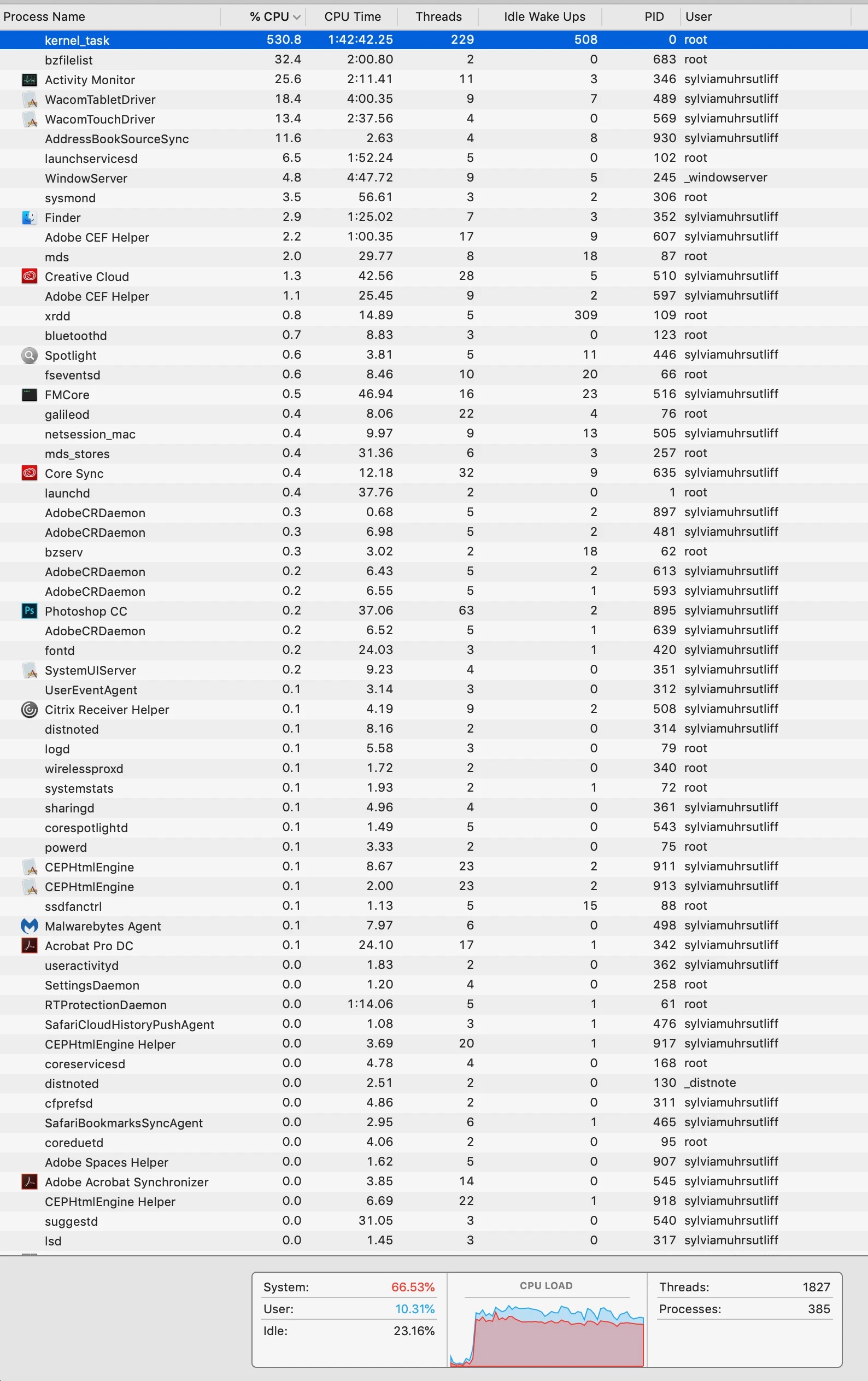
I concur with RaymoJamf on the CalDigit Thunderbolt 3 mini-Dock. It costs a bit more than some options but worth it IMO. As for a suitable 4K, USB-C equipped display, I also like the LG offerings. One issue I've run into though is massive CPU overload (kernel_task) when running a USB-C connected 4K display at full-res on a MacBook Pro Mid-2018.

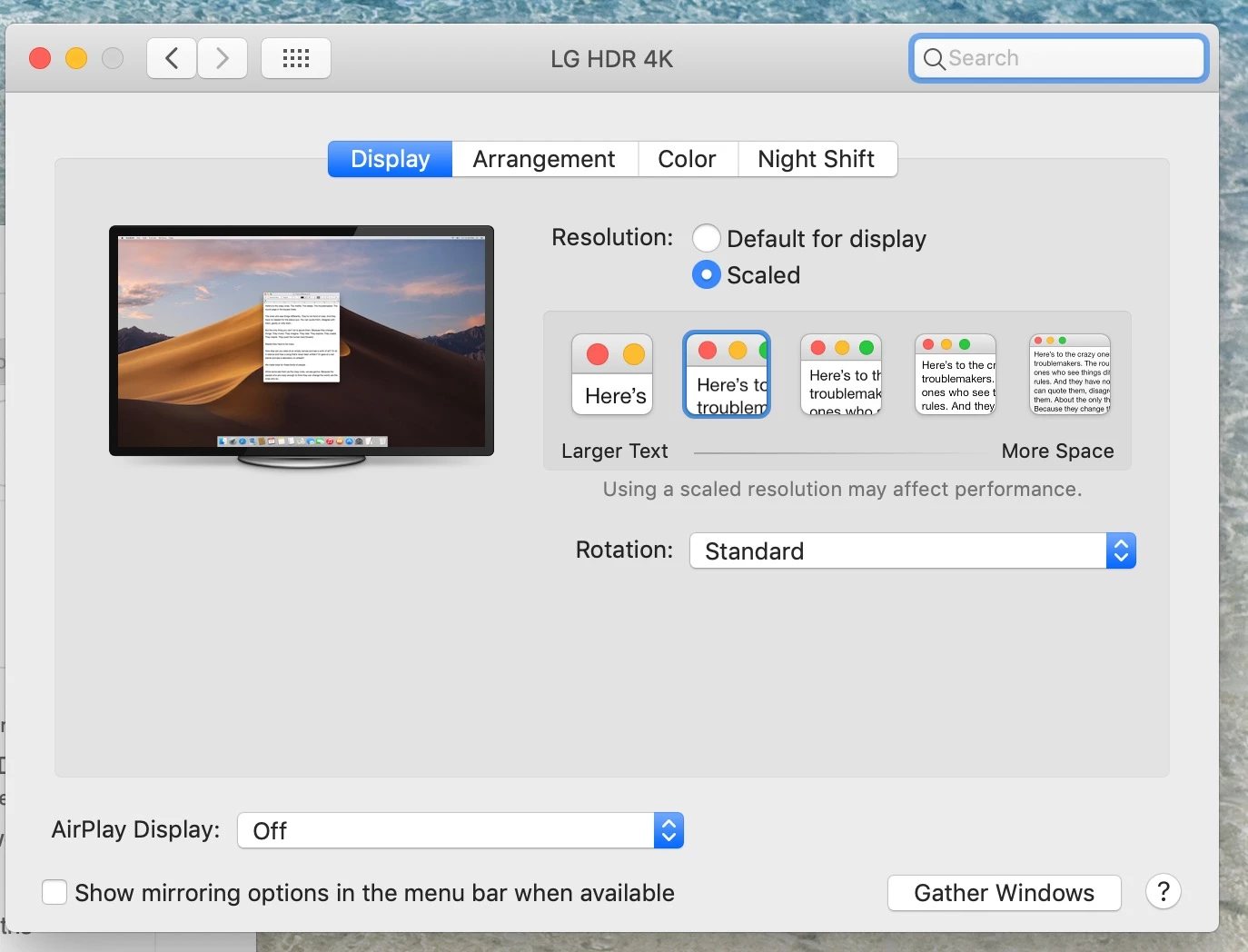
If the 4K display is set in System Preferences/Display to any scaled resolution beyond 'Default for display', the MBP's CPU load goes bonkers. Switch back to 'Default for display' and the world returns to normal. But the nifty 4K display is only running at 1080p resolution.

Apple notes in the Display System Preference that 'Using a scaled resolution may affect performance.' So I guess they're not lying on this one. it's bonkers to me why they would even support 4K or higher resolutions if the computer is useless for production purposes when running at max. 4K res.


Forum|alt.badge.img+1
  • New Contributor
  • April 2, 2019

To update my previous post, I found the following on Apple's Discussion forums re: heat causing the CPU freakout when connected to a 4K/5K display: https://discussions.apple.com/thread/8287774

Sure enough, I removed the bottom plate on this MacBook Pro, blew out the fans and air ducts/channels, re-assembled and 'boom'...CPU performs normally under all system loads. I can now run at the max. 4K res for this LG model without any excessive CPU loading.

Hope this helps someone else as well.


Forum|alt.badge.img+11
  • Valued Contributor
  • April 3, 2019

We have some good success with CalDigit Thunderbolt 3 mini-Dock and Dell P2419HC monitors. Using these allows us to run three external monitors with power coming from the Dell monitor to a MacBook Pro TouchBar 13". Unfortunately the Dell monitor is not Thunderbolt 3 on the output port so cannot have another monitor attached in extended mode. The CalDigit Thunderbolt 3 mini-Dock allows us to have two monitors in extended mode and ethernet with the Dell monitor supplying power and another monitor from a seperate USB-C cable.


smithjw
Forum|alt.badge.img+11
  • Contributor
  • April 3, 2019

We're now deploying the Dell U2719DC monitor as our standard monitor for all employees.

27"
2560x1440
Provides 60w over the included USB-C cable
Has 4 x 3.0 USB-A ports on the monitor

It's a great price and makes deployment a breeze


Forum|alt.badge.img+11
  • Valued Contributor
  • April 3, 2019

@smithjw How are you handling the ethernet connection or are you using only WiFi?


bartreardon
Forum|alt.badge.img+9
  • Contributor
  • April 3, 2019

We also deploy the U2719DC as well as the Dell U3219q (32" 4k variant). Ethernet is handled with a D6000 dock plugged into the monitors USB hub although I literally have a USB Ethernet dongle hanging off mine.

Only think I've noticed as an issue is sometimes the USB hub on the monitor won't initiate when you connect if you leave the monitor on all the time. Switching the monitor off when not in use (vs letting it switch itself to standby) seems to fix this.

I've also used the Dell S2719DC although it's non height adjustable, non rotatable and has a fixed stand.