
Question

Big Sur 11.2.1 update

  • February 12, 2021
  • 3 replies
  • 34 views

Forum|alt.badge.img+20


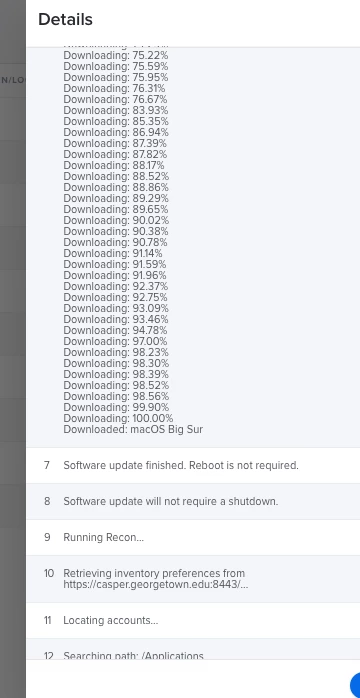
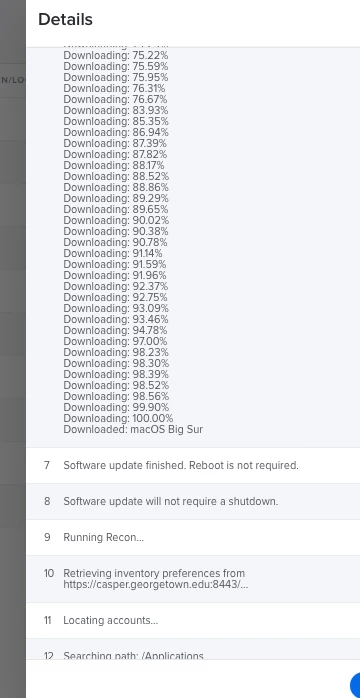
I just noticed that the 11.2.1 update says 'no reboot required' (see picture) policy logs in JAMF when the update installs. But actually a reboot is required.

I have a policy that installs updates (if any) on LOGOFF, so when this Big Sur computer logged off the 11.2.1 update installed. Logs says 'no reboot required'. I logged off again (2 other times) and the update installation policy kicked off again. The computers inventory data still shows 1 macOS update available 11.21
I went to system preferences and it showed the update was pending, so I restarted and the update is now installing.

after completing I will run recon and see if the computers inventory will now accurately show 11.2.1 and 0 macOS software updates

anyone else see this happen?
3 replies

Forum|alt.badge.img+20
  • Author
  • Contributor
  • February 12, 2021

yep, reboot looks to be required. Afterwards the recon accurately updated to show the computer is now running 11.2.1 and 0 macOS software updates.

so some little glitch somewhere either with Apple or JAMF showing 'no reboot required'.


Forum|alt.badge.img+10

I am told that there is a non-public PI for this, PI-009094, so you might open a ticket with Jamf to help convince them to fix this.

In the meantime, you can still use the softwareupdate command as an alternative to the Software Update policy payload (This only works on Intelbased Macs right now):

/usr/sbin/softwareupdate --install --all --restart


Forum|alt.badge.img+20
  • Author
  • Contributor
  • June 9, 2021

@UbiquitousChris are you still using that 'softwareupdate command' you replied with for updating from 11.3.1 to 11.4?
