Question

Big Sur /M1 chip - Filevault2

  • December 31, 2020
  • 37 replies
  • 230 views

Forum|alt.badge.img+9

We are setting up our first Macbook Pro with the new M1 chip. When we enable filevault, the user is prompted for their username and password on boot in just blank fields (one for username another for the password). The drive unlocks and then they get the login with with their badge icon and they have to log in again?

Any idea what is going on?

37 replies

rstasel
Forum|alt.badge.img+13
  • Valued Contributor
  • January 1, 2021

not something I'm seeing on our M1. How are you enabling Filevault? Is the machine on 11.0.1 or 11.1?


Forum|alt.badge.img+9
  • Author
  • Contributor
  • January 4, 2021

We are enabling it through the configuration profile.


Forum|alt.badge.img+4
  • Contributor
  • January 5, 2021

You're not alone.

The M1/Big Sur machines seem to require a double log in. Once at the FileVault unlock screen and again and our NoMad Login screen. We've changed nothing in JAMF and only the M1 machines are affected as far as I can tell.


Forum|alt.badge.img+8
  • New Contributor
  • January 6, 2021

Seeing this as well on my M1 Mac Mini.


rstasel
Forum|alt.badge.img+13
  • Valued Contributor
  • January 6, 2021

we're enabling FV2 with policy and escrow via config profile. not seeing this on our MBP M1 (11.1)


Forum|alt.badge.img+8
  • Valued Contributor
  • January 7, 2021

The only think that I have seen that sounds similar to this is when someone has their local (non-bound) user account password changed via script or a push rather than through the Users and Groups system pref, which causes FV2 to not be changed. This causes FV2 to prompt for the old password and then the normal logon prompt for the new password. Resetting the local user password in Users and Groups solves this.

I doubt this is the same issue since nobody mentioned changing a local password before seeing this - but it may be worth a shot to try to change the local password in Users and Groups (even to the same password) to see if that might re-synch the passwords (or users in some weird way) as a test to see if that has any effect. If it DOES work (which I doubt) it may point to something tinkering with the local user account/password and not doing the same to FV2.


Forum|alt.badge.img+10
  • Valued Contributor
  • January 7, 2021

We see something similar but not a double login.

Mac is AD bound, mobile account, with FV on.

At boot we get a black screen with progress bar for about 10-15 seconds. The login/password box, once authenticated which I assume is FDE auth it boots to the desktop as FDE details are the same as the mobile account details.

What we don't see at auth that we see on intel Mac's is the user images and then just password box.


Forum|alt.badge.img+6
  • New Contributor
  • January 8, 2021

Im seeing the same behavior also, M1 MacBook Pro 11.1 FV enabled. Double login.


burgundyblue
Forum|alt.badge.img+3
  • New Contributor
  • January 8, 2021

We've been seeing this issue as well. Usually it's after all configs from Jamf have completed. Haven't found a way around it, but no passwords are being changed before we see it. So far it's been reported on one 11.1 M1, but previously we saw it on 11.0 and 11.0.1. I'm generally seeing it after a restart, then I run software updates. After that I can reboot the machine several times and don't see it asking to verify the startup disk. Since we don't have zero touch yet, I'm able to catch it before deployment, but I'd still like to see this gone.


roiegat
Forum|alt.badge.img+16
  • Valued Contributor
  • January 21, 2021

We are seeing this as well on our M1 laptops and mac minis. Opened a case with Apple to ask if this is normal.


bwoods
Forum|alt.badge.img+14
  • Honored Contributor
  • January 21, 2021

I would just enable it with a policy.


jmahlman
Forum|alt.badge.img+17
  • Valued Contributor
  • January 21, 2021

We have this same issue and have a ticket with Apple on it. We enable FV using a policy.


Jason33
Forum|alt.badge.img+13
  • Honored Contributor
  • January 22, 2021

Havent seen this so far on M1 MacBook Pro - FV enabled via config policy. Upon reboot, I get the FV enabled users (we have 2) and upon selecting the user just enter password, then we get our acceptable use policy agreement, then the desktop.


Forum|alt.badge.img+1
  • New Contributor
  • January 27, 2021

Also seeing this on our m1 Macs. we enable FV with a policy.


Forum|alt.badge.img+8
  • New Contributor
  • February 4, 2021

FYI - We updated NoMAD Login to version 1.5.0 RC1 and confirmed this resolved the issue for us.


Forum|alt.badge.img+3
  • New Contributor
  • February 9, 2021

we don't use NoMAD and still see this behaviour on our M1 devices (Big Sur 11.2)


Forum|alt.badge.img+5
  • Contributor
  • February 9, 2021

Are there any configs scoped to these macs that contain kernal extensions? This was my issue removed them, wipe and reinstalled OS sorted


Forum|alt.badge.img+3
  • New Contributor
  • February 9, 2021

we filtered out the kernel extensions profile for our M1 devices, same result :(


Forum|alt.badge.img+5
  • New Contributor
  • February 18, 2021

We use Jamf Connect and see this behaviour on M1 devices only.


Forum|alt.badge.img+6
  • Contributor
  • February 23, 2021

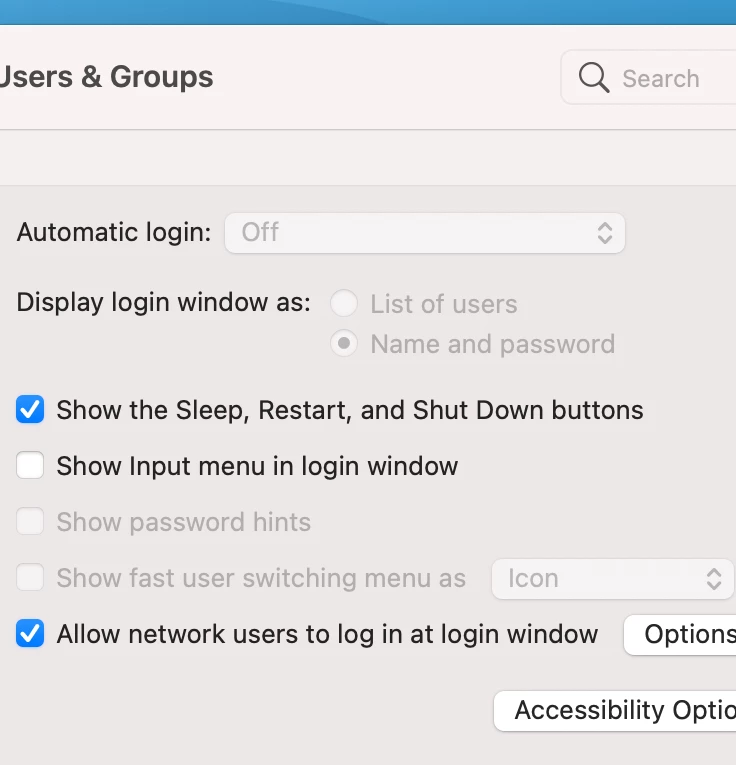
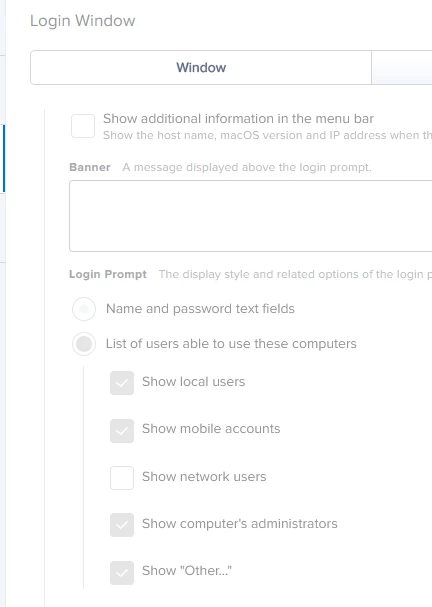
Seeing the same thing on my demo Macbook Pro M1. I was getting the list of users and the associated icons before enabling Filevault. Afterwards, I started getting the login prompt to enter a username and password. Our default configuration profile sets the login window to show all user accounts. The profile applied successfully to the Macbook M1. However, when I check User and Groups (Login Options) it is set to Name and Password and is greyed out (even after unlocking the preference pane). I removed the default profile and it allowed me change it manually to List of users. Once I applied the default config profile back, it changed it again. Only happening on the M1 Mac. All of the others successfully stay on List of Users for login options.


Forum|alt.badge.img+3
  • New Contributor
  • February 26, 2021

anyone made progress?


Forum|alt.badge.img+1
  • New Contributor
  • March 2, 2021

Isn't this behavior expected though? The machine is encrypted with FileVault. It requires authentication to boot up. Once authenticated to boot it can proceed to the login screen. This is how my checkout [Intel] Macbooks have always behaved.


Forum|alt.badge.img+12
  • Valued Contributor
  • March 2, 2021

Having the same here on an Intel mac with FV enabled (OS 11.2.2). It makes it look like they have to log into the same window twice. Before it was pretty clear they were logging in for FV then again for the OS, now it just looks the same.


Forum|alt.badge.img+3
  • New Contributor
  • March 8, 2021

I'm having the same issue on a couple M1 macs, 11.1 and 11.2.1.


Jason33
Forum|alt.badge.img+13
  • Honored Contributor
  • May 4, 2021

Started seeing this now on 11.2.3 with Jamf Connect 2.3.1 (havent updated to 2.3.2 yet). Also, system hangs at the progress bar and I have to hard shut down. Sometimes a second shut down is needed for the machine to log in.