Question

Binding Question

  • July 13, 2016
  • 9 replies
  • 26 views

Forum|alt.badge.img+8

Hi,

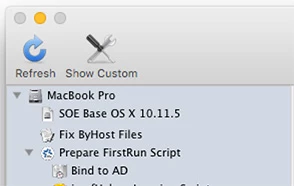
We have an AD binding in our imaging configuration that doesn't seem like it's working. Computer images fine, but when the machine reboots, it's still unbound. I checked the imaging logs for a few of the computers but nothing in the logs helped. What's a good place to start narrowing down this issue?


9 replies

Forum|alt.badge.img+17
  • Valued Contributor
  • July 13, 2016

Can you bind manually with the settings in Casper? I guess I'd try that first.


bentoms
Forum|alt.badge.img+35
  • Hall of Fame
  • July 13, 2016

@ChrisTech You'll want to bind at reboot.

But before binding, you'll probably want to make sure that the Macs time is correct.

I normally do both via a postflight policy.


Forum|alt.badge.img+8
  • Author
  • Contributor
  • July 13, 2016

Thanks for the responses. The account is valid, I even tried another account. Time is synched before it's supposed to bind in the configuration. I can do a manual bind no problem while logged in with a local account. I'll look into the postflight policy.. it's supposed to bind with the configuration after imaging right? We have two AD configs, the desktops don't get a mobile account while the laptops do.

Chris


Forum|alt.badge.img+10
  • Contributor
  • July 13, 2016

@ChrisTech Are you able to run the bind from Casper Remote? If not, then you may want to look at the settings of your bind in Casper Admin.

In our workflow, the AD bind happens straight after restart in the first run script.


Forum|alt.badge.img+8
  • Author
  • Contributor
  • July 14, 2016

Yes, I just used Casper Remote to unbind and rebind a machine. Works fine. In Casper Imaging, machines image, and then reboot and are not bound to the domain. Should it be binding after imaging and then after it reboots from imaging, be bound to the domain? I just created a new configuration to test in the morning.

Chris


Forum|alt.badge.img+10
  • Contributor
  • July 14, 2016

The bind happens only once, at first run.

Have a look in the jamf.log (/var/log/jamf.log). Is there an error?


Forum|alt.badge.img+8
  • Author
  • Contributor
  • July 14, 2016

Yeah I will look at the logs in the morning. Thanks @stevevalle


Forum|alt.badge.img+8
  • Author
  • Contributor
  • July 14, 2016

So, the jamf logs say nothing about binding. I reimaged a machine with the new configuration. It rebooted and was not bound to the domain. How can you tell if the FirstRun script has ran?

Update: so after rebooting, it bound to the domain.....I checked the jamf log and there it was.


Forum|alt.badge.img+10
  • Contributor
  • July 14, 2016

Sounds like the AD bind wasn't part of the configuration!

In the jamf.log, you will see the computer name change from the netboot name to the computer name. This shows the computer restarted and started its first run. This is an extract from an old jamf.log file:

Wed Feb 24 15:19:40 NetBoot150 jamf[3551]: Creating .AppleSetupDone...
...
...
...
Tue Feb 23 20:21:43 iMac jamf[5145]: Creating user (hidden management user)...
Tue Feb 23 20:23:53 iMac jamf[6194]: Checking for policies triggered by "enrollmentComplete"...
Tue Feb 23 20:23:54 iMac jamf[6194]: Upgrading JAMF notification service...
Tue Feb 23 20:23:55 iMac jamf[6194]: Upgrading Self Service.app...
Tue Feb 23 20:23:57 iMac jamf[6313]: Binding iMac to (domain.name.here)…
Tue Feb 23 20:24:04 iMac jamf[6313]: Bound to Active Directory (domain.name.here)
Tue Feb 23 20:24:53 iMac jamf[6065]: Successfully installed Adobe Acrobat Pro DC.pkg.zip.
...
...
...
Wed Feb 24 15:28:43 iMac jamf[14398]: Deleting user (hidden management user)...
Wed Feb 24 15:28:44 iMac jamf[14398]: Deleting home directory for (hidden management user)...
Wed Feb 24 15:28:44 iMac jamf[14409]: Immediate Restart
Wed Feb 24 15:28:44 iMac jamf[14409]: Sending restart to System Events
Wed Feb 24 15:28:44 iMac jamf[14409]: Sending Restart command
Wed Feb 24 15:28:44 iMac jamf[14409]: Attempting normal restart
...
...

Glad it's working for you!