Question

Bomgar SDCUST Unidentified Developer

  • September 23, 2019
  • 26 replies
  • 174 views

Forum|alt.badge.img+7

Hello,

Any one here have issues using bomgar and beta catalina..? We are testing uploading with the PPPC Utility Bomgar Configurations Profiles.
But once a bomgar session is started, the OS give this message - "sdcust cant be opened because its unidentified developer".

Any one know or have a good idea on how to approach this or allow this to be trusted?

26 replies

Forum|alt.badge.img+3
  • New Contributor
  • October 8, 2019

I have run into the same issue on my end.


Forum|alt.badge.img+13

I opened a case today. I don't have a solution but they stated that the 19.1.8 release will support Catalina but didn't have a timeline.


Forum|alt.badge.img+7
  • Author
  • Contributor
  • October 16, 2019

Any update?


Forum|alt.badge.img+13
  • Contributor
  • October 16, 2019

Throwing our names in hat as we also have this issue with Bomgar and Catalina.


Forum|alt.badge.img+1
  • New Contributor
  • October 17, 2019

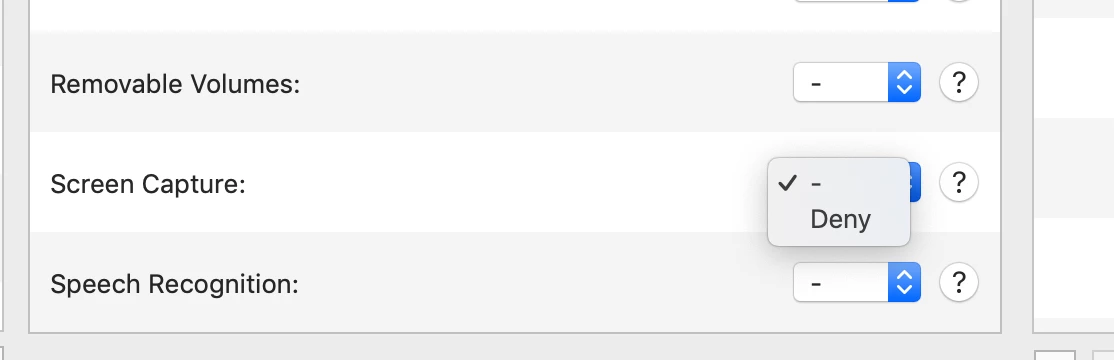
The 19.1.8 installs without issue. But it prompts the user to allow screen recording and screen access. Has anyone figured out how to build the PPPC to allow this without user prompt. The only option I see for screen recording is Deny.


Forum|alt.badge.img+13
  • Honored Contributor
  • October 17, 2019

If the security profile only allows for DENY then there is no way to automate acceptance as that would defeat the purpose of the security tcc policy. It will need to be user education at that point, but fortunately at least that field does not appear to require elevated rights to edit.


KyleEricson
Forum|alt.badge.img+17
  • Valued Contributor
  • November 15, 2019

@inoland So I have the newest version, but it fails to install because it's from a untrusted publisher.


rqomsiya
Forum|alt.badge.img+12
  • Honored Contributor
  • November 15, 2019

Screenshot of your PPPC paylod?


KyleEricson
Forum|alt.badge.img+17
  • Valued Contributor
  • November 15, 2019

Here @rqomsiya


rqomsiya
Forum|alt.badge.img+12
  • Honored Contributor
  • November 16, 2019

Sorry ^^ Didn't need the PPPC. Just pinged you in MacAdmins in slack .


Forum|alt.badge.img+3
  • New Contributor
  • December 2, 2019

We are also having the same issue. Any update on this?


KyleEricson
Forum|alt.badge.img+17
  • Valued Contributor
  • December 2, 2019

@thuvarakan I just created a new PKG and included the Bomgar Jump client DMG inside and a post-install script to install the DMG based on this script. The new PKG has to be code signed.

Script from Jamf Nation

#!/bin/bash

# The Bomgar DMG should have been installed cached prior to this script running, but we should make sure...

if [ -a "/Library/Application Support/JAMF/Waiting Room/bomgar-scc-w0edc30zygihyzd71h6ydyw8e5jy5izdxegz6wfc40hc90.dmg" ]; then

# Attach the Disk Image
    hdiutil attach /Library/Application Support/JAMF/Waiting Room/bomgar-scc-w0edc30zygihyzd71h6ydyw8e5jy5izdxegz6wfc40hc90.dmg

# Run the installer
    /Volumes/bomgar-scc/Double-Click To Start Support Session.app/Contents/MacOS/sdcust

# Wait a minute for it to finish up
    sleep 60

# Unmount the disk image
    hdiutil detach /Volumes/bomgar-scc

# Wait for the unmount to complete
    sleep 15

# Delete the disk image
    rm -R /Library/Application Support/JAMF/Waiting Room/bomgar-scc-w0edc30zygihyzd71h6ydyw8e5jy5izdxegz6wfc40hc90.dmg


else

echo "Bomgar NOT Present"

fi

Forum|alt.badge.img+3
  • New Contributor
  • December 5, 2019

@kericson Thanks for this! My understanding from this script is that the dmg is loaded and executed forcing for sdcust to be installed and then the dmg is deleted. This will allow in new Bomgar sessions initiated to grant screen share without prompting them access?

Another issue I have run into is after a screen share is started, it's all black. I added Bomgar's PPPC in Jamf using PPPC Utility. Unfortunately, there was no way to allow screen share through it. Our users also do not have admin access. I am a bit stuck at the moment. Any thoughts?


Forum|alt.badge.img
  • New Contributor
  • January 29, 2020

@kerickson could you break down how you code signed your PKG and what Developer ID you entered for that?


Forum|alt.badge.img+9
  • Contributor
  • January 29, 2020

The end user still has to accept the screen recording prompt, there is no way around this.


KyleEricson
Forum|alt.badge.img+17
  • Valued Contributor
  • January 30, 2020

@peterkan You need to get an Apple Developer ID Installer Cert
Apple Link


MacWarrior1
Forum|alt.badge.img+3
  • New Contributor
  • April 17, 2020

The PPPC utility works great now with Bomgar. The Jamf support team enabled it.


Forum|alt.badge.img+5
  • Contributor
  • April 20, 2020

We started using Bomgar for remote support recently due to staff working from home. I am stuck in trying to push out a configuration profile that works to allow Accessibility so support staff can control the requestors Mac. What application am I adding into the PPPC to allow Accessibility? I tried Representative Console, which the support staff run locally to connect a remote session to the requestors, but that didn't work. I also tried the Support Session, which is the app the requestor downloads to initiate a remote session and that didn't work either. When I tried both, the requestor is still asked to go to System Prefs > S & P to allow. None of our staff have admin rights, so I am stuck here. Any help would be appreciated.


rqomsiya
Forum|alt.badge.img+12
  • Honored Contributor
  • April 20, 2020

Hi @JeyT,

You will want to add the bomgar-scc binary in the PPPC utilty. Feel free to ping me on macAdmins slack (@macm) if you have any questions.

-R


Forum|alt.badge.img+5
  • Contributor
  • April 20, 2020

@rqomsiua
Hi, and thank you for responding. I did some digging myself and figure it out as it seems to be working on my test macs.

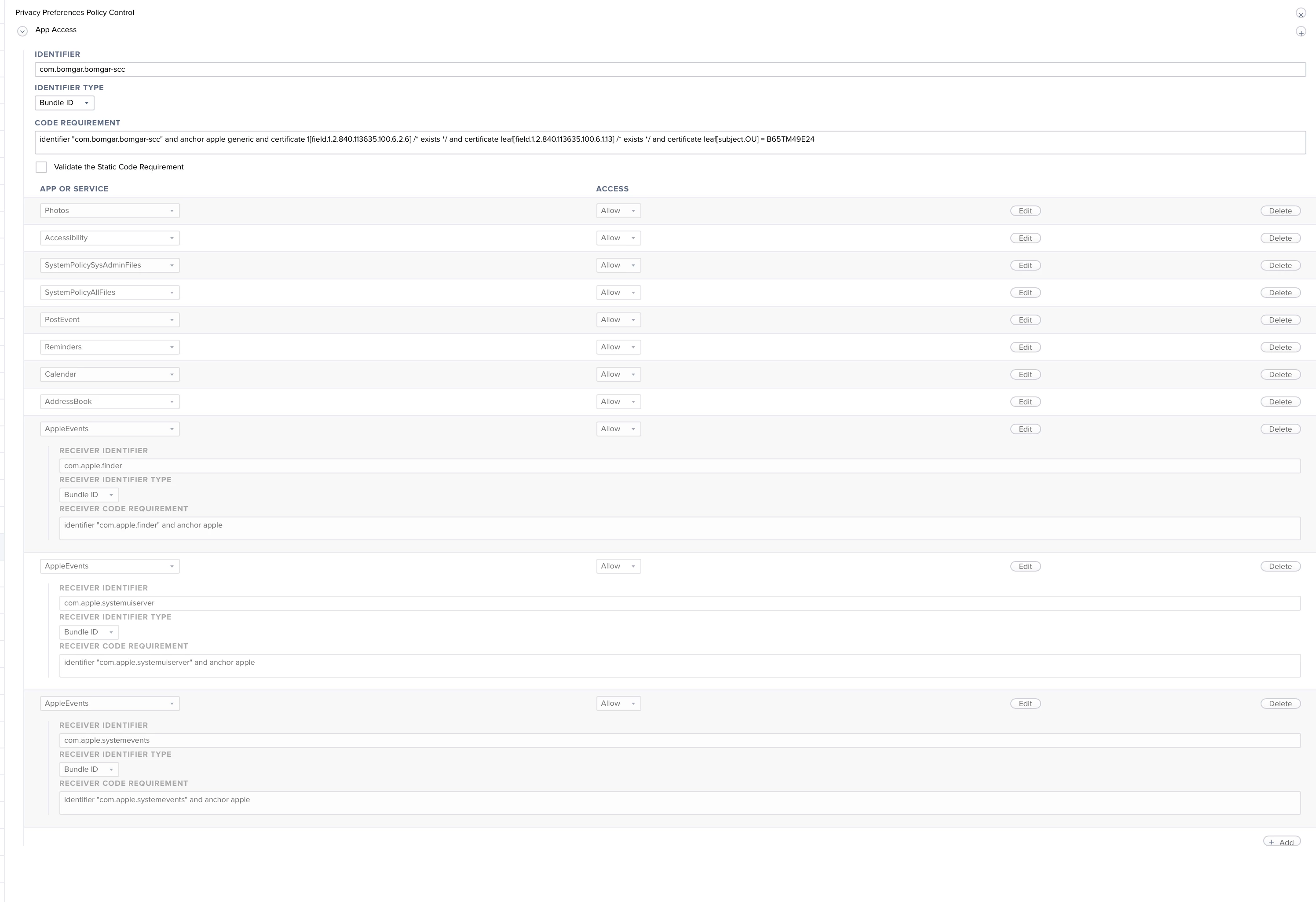
identifier: com.bomgar.bomgar-scc
Code Requirement: identifier "com.bomgar.bomgar-scc" and anchor apple generic and certificate 1[field.1.2.840.113635.100.6.2.6] / exists / and certificate leaf[field.1.2.840.113635.100.6.1.13] / exists / and certificate leaf[subject.OU] = B65TM49E24

I am scoping this out to my smart group, "JAMF PPPC Profile Installed" based on my JAMF cloud Security Settings "Automatically install a Privacy Preferences Policy Control profile on user approved MDM computers that grants necessary permissions for the Jamf management framework ( (macOS 10.14 or later)". I think I'm on the right track. Still trying to wrap my head around the constant configuration profiles needed by all my Mac apps.
Thanks again!


Forum|alt.badge.img+8
  • Valued Contributor
  • April 21, 2020

Certain Versions of Bomgar are not compatible with Catalina, like Representative Console v17.x does not work with Catalina, because it contains 32bit Components - see below some of the Challenges for Mac Users

Version 17.1.4 – Copy/paste from the macOS rep console now works on Windows logon/lock screens.

Version 18.1.1 – introduces full 64bit Support and removes 32bit Code, thus, macOS 10.6 and earlier are no longer supported (!) – Resolved an issue with copy and paste not working properly from a macOS representative to a Windows customer if the login screen was active. – More Scalable Jump Client Upgrades: Jump Clients now upgrade faster than ever. Once a new Bomgar version is installed, technicians can see which Jump Clients are already upgraded and can begin accessing them right away. When a Jump Client is waiting for its upgrade, technicians can modify properties without having to wait for the upgrade to complete.

Version 18.1.3 – Localized software is available for the 18.1 release (including FRENCH..)
– Resolved an issue where the rep console sometimes incorrectly showed online Jump Clients as offline.

Version 18.2.8 – Added mouse wheel support to the customer client.

Version 19.1.1 – 32-bit Jumpoints have been deprecated and will be removed in a future release. – Privacy Screen is now supported on Windows 10.

Version 19.1.3 – Local Jump is now faster when pushing to a Windows system at the login screen.

Version 19.2.1 (Nov. 21st 2019)
– macOS 10.15 Catalina is now supported.


mani2care
Forum|alt.badge.img+7
  • Contributor
  • May 24, 2020

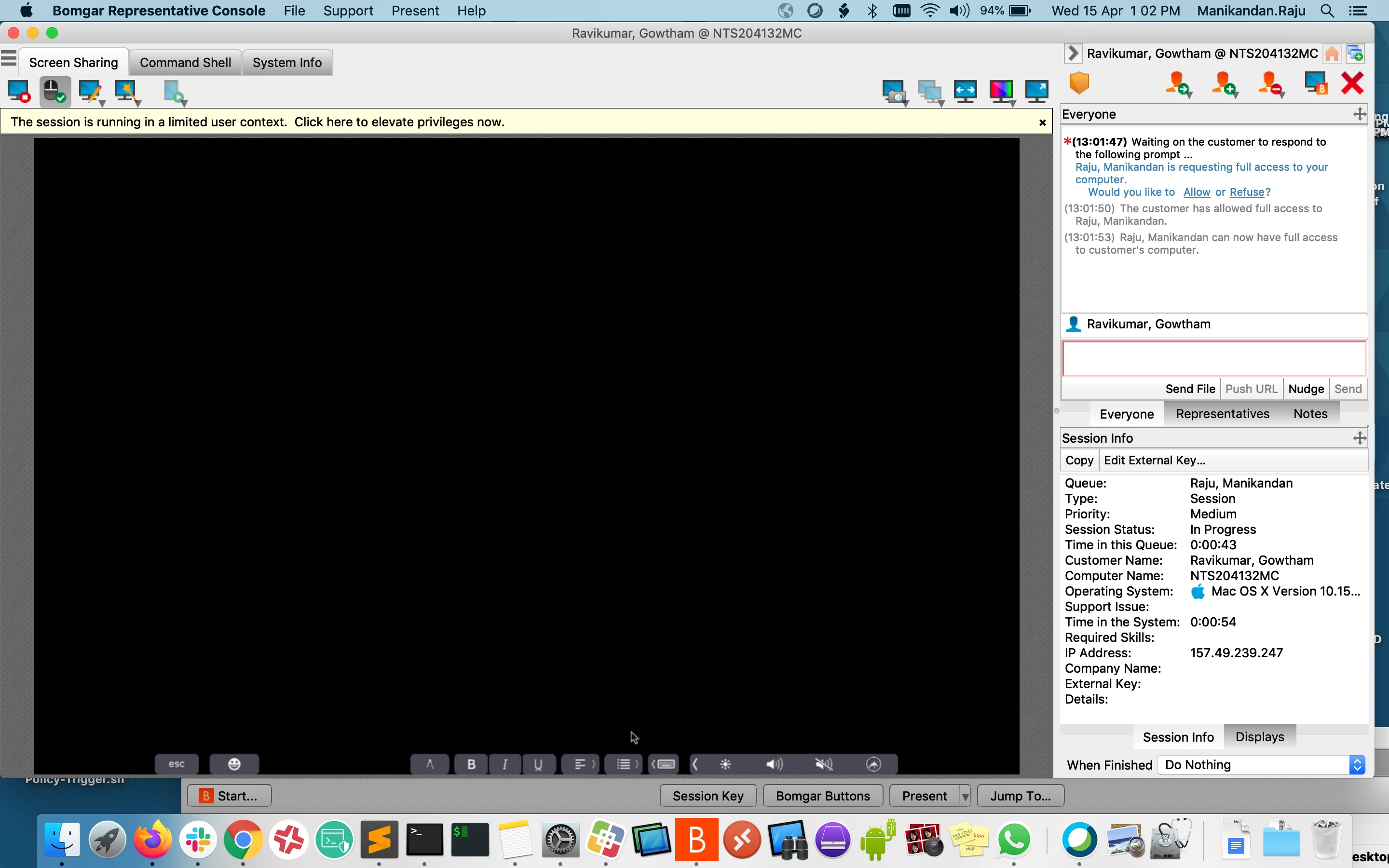
I'm getting the blank screen any idea about this issue.
observed issue when connecting to catalina machine only bomgar version 18.1.4


dlondon
Forum|alt.badge.img+14
  • Honored Contributor
  • May 25, 2020

Hi @mani2care I've seen that blank screen. For me that means the user has not yet allowed screen recording.

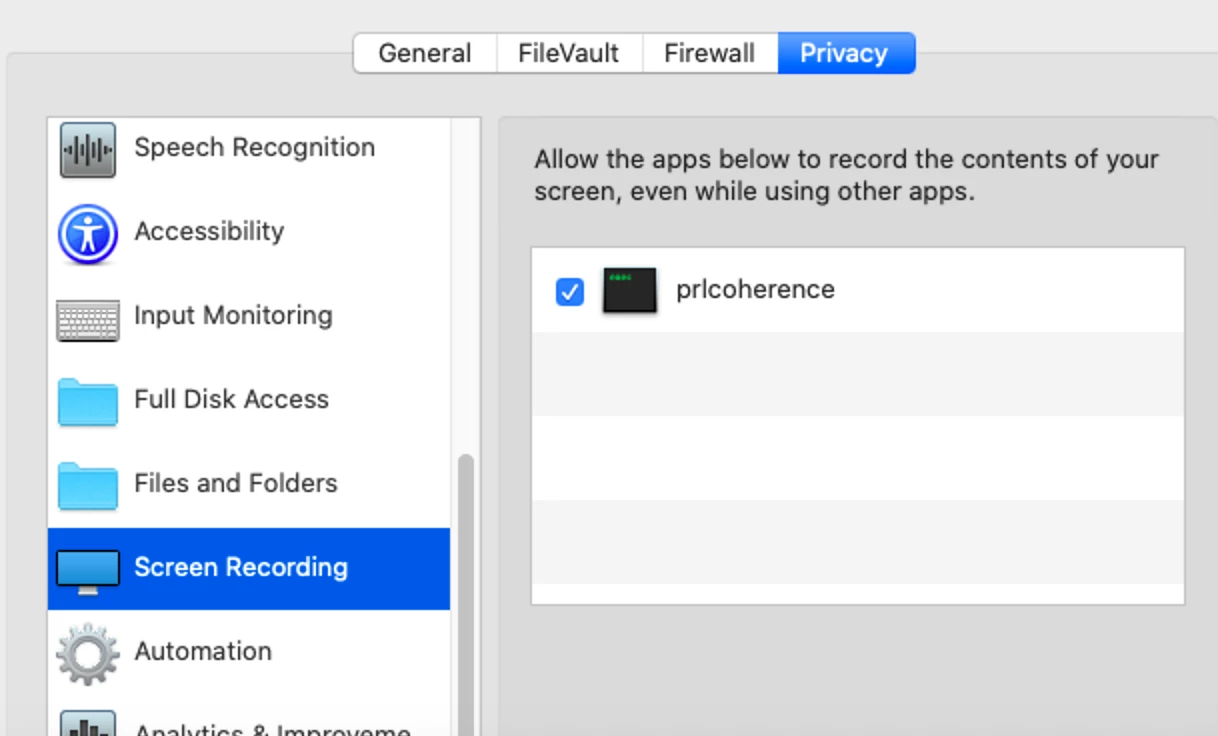
At the User's end they will see a popup about Screen Recording. They must click "Open System Preferences" If they don't you will only see a black screen in your console. If they make a mistake and click "Deny" they can still go to System Preferences > Security & Privacy > Privacy tab > Screen Recording ... and tick the box for Bomgar. They do not have to unlock anything.


mani2care
Forum|alt.badge.img+7
  • Contributor
  • May 25, 2020

I have tried all the options, screen recording was empty and not getting any pop up to allow or deny.
Allowed, accessibility and full disk access, file and folders tried with PPPC also having only denied options there.

i can access the terminal only:


Forum|alt.badge.img+17
  • Valued Contributor
  • June 29, 2020

-