Solved

Bypass New Account Setup Assistant?

  • July 16, 2021
  • 10 replies
  • 173 views

Forum|alt.badge.img+7

Hey Everyone,

I'm trying to find a way to suppress the new account setup assistant when logging into accounts for the first time. I'm currently using DEP with a pre-stage deployment profile to bypass the initial setup assistant and log in straight to the administrator account. When I create a users account, be it through Users & Groups or Jamf Connect, I'm greeted by the new account setup IE) Accessibility, Data & Privacy, Touch ID & Theme. 

Is there any way to skip this when signing into new accounts the first time?

Thank you for your help!
Best answer by KyleEricson

@Levi_ 
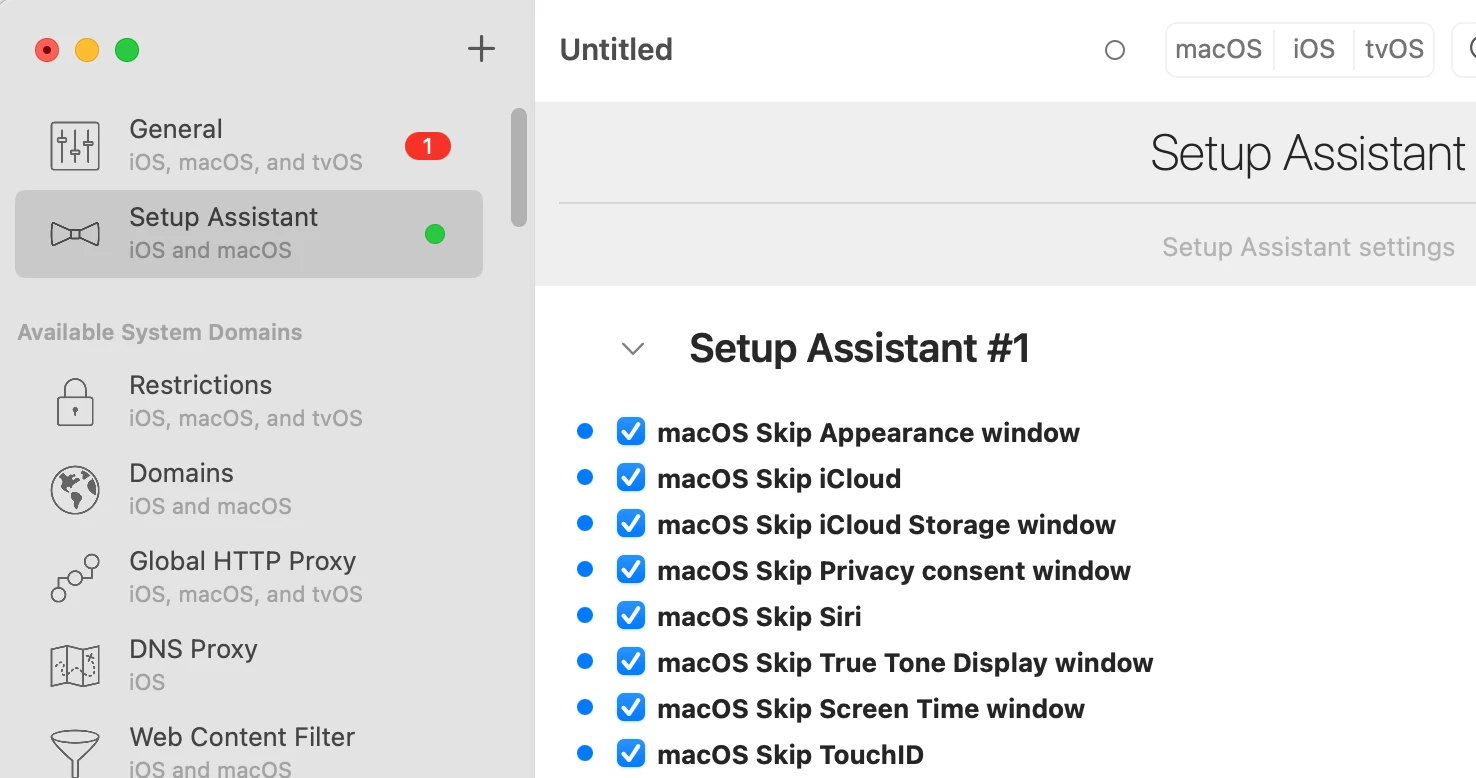
Download iMazing Profile Editor from the Mac app store and use the built-in Skip Setup Assitant payload. 
https://apps.apple.com/app/imazing-profile-editor/id1487860882?ls=1&mt=12

10 replies

Forum|alt.badge.img+8

I believe @aaronpolley has the most recent take on it in the „blogosphere” with macOS Setup Assistant Preferences (Skip Screens) blog post 👍.


KyleEricson
Forum|alt.badge.img+17
  • Valued Contributor
  • Answer
  • July 16, 2021

@Levi_ 
Download iMazing Profile Editor from the Mac app store and use the built-in Skip Setup Assitant payload. 
https://apps.apple.com/app/imazing-profile-editor/id1487860882?ls=1&mt=12


geoff_widdowson
Forum|alt.badge.img+8

@Levi_ 
Download iMazing Profile Editor from the Mac app store and use the built-in Skip Setup Assitant payload. 
https://apps.apple.com/app/imazing-profile-editor/id1487860882?ls=1&mt=12


Hi Kyle,

I've just tried ou this iMazing profile Editor. It didn't skip the Siri setup, but did do the others. I even signed the configuration profile.


Forum|alt.badge.img+7
  • Author
  • Valued Contributor
  • July 19, 2021

Thank you @bartlomiejsojka. I am going to investigate this route for Big Sur and see what happens as this will skip the new account setup specifically. 

Hey @KyleEricson, I'm currently skipping all the OOB setup assistant, do you know if the iMazing Editor will conflict with that?


KyleEricson
Forum|alt.badge.img+17
  • Valued Contributor
  • July 20, 2021

Thank you @bartlomiejsojka. I am going to investigate this route for Big Sur and see what happens as this will skip the new account setup specifically. 

Hey @KyleEricson, I'm currently skipping all the OOB setup assistant, do you know if the iMazing Editor will conflict with that?


No shouldn't be an issue @Levi_ 


KyleEricson
Forum|alt.badge.img+17
  • Valued Contributor
  • July 20, 2021

Hi Kyle,

I've just tried ou this iMazing profile Editor. It didn't skip the Siri setup, but did do the others. I even signed the configuration profile.


I had gotten another one for Siri from Rich Trouton.
https://github.com/kylejericson/JAMF/blob/master/com.apple.SetupAssistant.plist 


Forum|alt.badge.img+7
  • Author
  • Valued Contributor
  • July 22, 2021

@KyleEricson Thank you. When I tried it without signing the profile it failed. Guessing even though the cert is signed by Jamf when deploying it had an issue with it. I signed it and it worked for the next account I tried. I'm going to test it out some more but it seems like this will work so far.


Forum|alt.badge.img+1
  • New Contributor
  • December 2, 2022

Hi Kyle,

I've just tried ou this iMazing profile Editor. It didn't skip the Siri setup, but did do the others. I even signed the configuration profile.


Hey @geoff_widdowson also for me there is something always there, in my case touchID.

Did you resolve you issue somehow?


Forum|alt.badge.img+1
  • New Contributor
  • December 2, 2022

I have the same issue like here, so Accessibility, Data & Privacy, Touch ID & Theme after jamf connect login. I did setup a profile but this doesnt skip TouchID, even I disabled that as well.


Any Idea?


geoff_widdowson
Forum|alt.badge.img+8

Hey @geoff_widdowson also for me there is something always there, in my case touchID.

Did you resolve you issue somehow?


I never got around the issue, just had to live with it.