Question

Can't block Sonoma

  • September 26, 2023
  • 78 replies
  • 524 views

AVmcclint
Forum|alt.badge.img+21

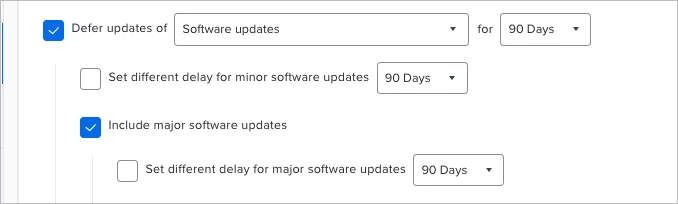
I have deployed a Config Profile with the following code to block Software Update from seeing the major OS releases (Sonoma) for 90 days with com.apple.applicationaccess for the domain:


<plist> <dict> <key>enforcedSoftwareUpdateMajorOSDeferredInstallDelay</key> <integer>90</integer> <key>forceDelayedMajorSoftwareUpdates</key> <true/> </dict> </plist>


Sonoma was released by Apple 25 minutes ago and already I see Macs that are displaying Sonoma as an available update!

 I have verified that the Config Profile has been installed on these Macs for many weeks. Every single time there's a new Major OS release, it's like trying to hit a moving target. How on earth are we supposed to block Major OS releases? 


78 replies

Forum|alt.badge.img+14
  • Honored Contributor
  • September 26, 2023

The same configuration is working fine for me. Is Sonoma actually appearing in Software Update for the Macs reporting it as an available update?


AVmcclint
Forum|alt.badge.img+21
  • Author
  • Esteemed Contributor
  • September 26, 2023

Right now,I can only confirm what Jamf reports and what the softwareupdate -l command reports. 


jamf-42
Forum|alt.badge.img+17
  • Esteemed Contributor
  • September 26, 2023

block the pref pane in System Settings, block softwareupdate binary.. and cross fingers.. (its a major update so correct restrictions config profile should do it)


jamf-42
Forum|alt.badge.img+17
  • Esteemed Contributor
  • September 26, 2023

Right now,I can only confirm what Jamf reports and what the softwareupdate -l command reports. 


if software update bin is reporting available then the config profile is wrong or not deployed? I use the full legacy restrictions profile (yes I know) but.. it works.. just tested.. (for my own sanity.. considering recent events) 😎


Forum|alt.badge.img+5
  • New Contributor
  • September 26, 2023

@AVmcclint Excuse my ignorance, how are you building that Configuration Profile? Is it a specific tool you are using? or directly in Jamf?


sdagley
Forum|alt.badge.img+25
  • Jamf Heroes
  • September 26, 2023

@AVmcclint Make sure you don't have another Configuration Profile that sets the delay key. If you have more than one such profile Apple says the results is ¯\\_(ツ)_/¯ 

Also note that if you do set a deferral that only means the user can't initiate the update. If you send an MDM command to update to latest available version you will now get macOS Sonoma 14 on hardware that supports it.


Forum|alt.badge.img+8
  • Valued Contributor
  • September 26, 2023

Is restriction not working?


Forum|alt.badge.img+8
  • Contributor
  • September 26, 2023

Also, note if you use erase install to install or update it will now pull macOS Sonoma as well unless a different OS is specified with options. 


AJPinto
Forum|alt.badge.img+26
  • Legendary Contributor
  • September 27, 2023

block the pref pane in System Settings, block softwareupdate binary.. and cross fingers.. (its a major update so correct restrictions config profile should do it)


Software Update is under System Settings > General > Software Update as of Ventura. You cant block anything under General. The descriptions on the Preference Pane Configuration Profiles have not been updated by JAMF, many of those payloads only apply to Monterey and below.


AJPinto
Forum|alt.badge.img+26
  • Legendary Contributor
  • September 27, 2023

Have you tried to install the OS update and see what the install.log reports? If the deferral is working correctly, you will see comments saying the OS updates are deferred until XYZ date if the device tries to initiate an update. Id also check for duplicate configuration profiles trying to manage OS updates, as that makes things a mess.


Forum|alt.badge.img+11
  • Contributor
  • September 27, 2023

Starting to see this as well, the config profile was deployed to an M2 prior to release for deferring the major OS update for 90 days..

They still were able to update to Sonoma from System Settings without admin rights.
Previous OS: 13.5.2
Hardware: M2
Account Type: Standard

This is for multiple users, however, it's not consistent. I see the block on my Mac(M1) and test Mac(Intel).. 

So it's something weird going on, that I'm just now having to look into


Forum|alt.badge.img+9
  • Valued Contributor
  • September 27, 2023

It's this kind of stuff that makes me want to pull my hair out. We are restricting the `Install macOS Sonoma.app` and are deferring major updates, so far no one has updated, but if standard users are able to via softwareupdate prior to the 90 day major restriction we have in place then....what in the world Apple?


Forum|alt.badge.img+11
  • Contributor
  • September 27, 2023

So after doing some testing/research.. It seems that the deferral for Major Updates does not prevent the Sonoma upgrade from being seen, if there is a Minor Update for the current OS. 

Once you apply the latest minor updates, the config profile for the Major Update is now working in regards to preventing OS Sonoma as an available upgrade option.

I'm not sure if this a Jamf issue or Apple bug.. However, this is my findings from testing. And I'm sure we can replicate it. At this point, we would have to set the deferral for both minor/major versions for devices that's not on the latest of their current OS


mvu
Forum|alt.badge.img+20
  • Jamf Heroes
  • September 27, 2023

We're seeing Sonoma in System Settings as well. I deferred it using the 90-day Major Update configuration profile. It's hit or miss. Sometimes shows up, and sometimes it doesn't.


Forum|alt.badge.img+11
  • Contributor
  • September 27, 2023

We're seeing Sonoma in System Settings as well. I deferred it using the 90-day Major Update configuration profile. It's hit or miss. Sometimes shows up, and sometimes it doesn't.


Do you have a minor OS update available? If so, apply the minor update, and see if it defers the major update afterwards


jamf-42
Forum|alt.badge.img+17
  • Esteemed Contributor
  • September 27, 2023

as mentioned.. we have this setting, along with a block for access to Software Update in system settings.. and nobody can update.. if you look at the logs for /var/log/install.log you can see the deferral and dates..  

if you run softwareupdate -l  it returns 'no updates available' 

Our devices are on macOS 13.4.1 to 13.5.2


Forum|alt.badge.img
  • New Contributor
  • September 27, 2023

as mentioned.. we have this setting, along with a block for access to Software Update in system settings.. and nobody can update.. if you look at the logs for /var/log/install.log you can see the deferral and dates..  

if you run softwareupdate -l  it returns 'no updates available' 

Our devices are on macOS 13.4.1 to 13.5.2


Yes, but it appears that if you have the "Set different delay for minor software updates" checked to keep up with security updates that it is allowing Sonoma to show up. Just discovered this with a computer running 13.3. Testing JustDeWon's theory now by updating to 13.6.


mvu
Forum|alt.badge.img+20
  • Jamf Heroes
  • September 27, 2023

Yes, but it appears that if you have the "Set different delay for minor software updates" checked to keep up with security updates that it is allowing Sonoma to show up. Just discovered this with a computer running 13.3. Testing JustDeWon's theory now by updating to 13.6.


Yes, on 13.6 on different Macs. Checking conflicting config profiles. 


jamf-42
Forum|alt.badge.img+17
  • Esteemed Contributor
  • September 27, 2023

Yes, but it appears that if you have the "Set different delay for minor software updates" checked to keep up with security updates that it is allowing Sonoma to show up. Just discovered this with a computer running 13.3. Testing JustDeWon's theory now by updating to 13.6.


hindsight on this means when there is a major update, we lock it all off.. mixing point updates and major always goes wonky with the current framework. 

due to Apples user centric update process, we always have a few stragglers.. but less than 10% of the global estate... 

macOS 14 will fix all this.. 🤔 🤔 maybe. hopefully.. 


Forum|alt.badge.img+8
  • Valued Contributor
  • September 28, 2023

If you use "Restricted Software" tab and configure as process name:  Install macOS Sonoma.app

And check the box; Restrict exact process name, Delete application and kill process

That should take care to avoid download or install sonoma app untill you exclude the endpoint the scope.


mvu
Forum|alt.badge.img+20
  • Jamf Heroes
  • September 28, 2023

Customers can still see it in System Settings/General/Software Update. Unless you use a configuration profile to defer.


Forum|alt.badge.img+1
  • New Contributor
  • September 28, 2023

we are using a config profile to defer major updates for 90 days, we just had two users, including myself, where Sonoma installed automatically on it's own. 

There is definitely something amiss here 


mvu
Forum|alt.badge.img+20
  • Jamf Heroes
  • September 28, 2023

we are using a config profile to defer major updates for 90 days, we just had two users, including myself, where Sonoma installed automatically on it's own. 

There is definitely something amiss here 


Same here. Do you happen to have 2 or more Restriction configuration profiles set up?


Forum|alt.badge.img+1
  • New Contributor
  • September 28, 2023

we have two older Restriction config profiles that were setup incorrectly by a previous admin quite some time ago. 

We excluded all of our devices and new devices from these two config profiles and now have just the one. 

It didnt give us any issues during ventura, but i'm wondering if this could somehow be causing issues  

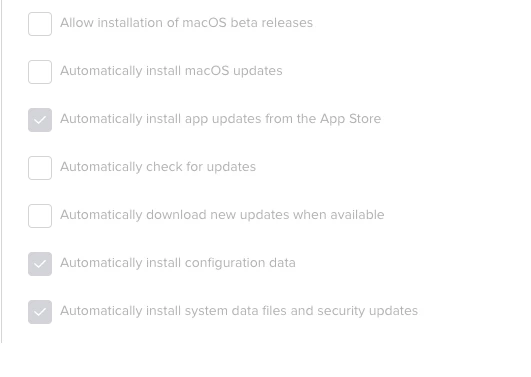
in our main config profile, we had everything here checked except Allow installation of macOS beta Releases until this morning. I'm also wondering if that could have caused any issues 


Forum|alt.badge.img+8
  • Valued Contributor
  • September 28, 2023

Customers can still see it in System Settings/General/Software Update. Unless you use a configuration profile to defer.


@mvu user can see that but that will not install. If they download that will cancel and remove .app from /Application folder. So, it is safe to use that Restriction. I used to use that till Ventura. Don't know anything changed for Sonoma or not. But pretty sure that works. It is already implemented in our environment.