Solved

Casper Imaging error "Unable to create the invitation"

  • August 17, 2015
  • 53 replies
  • 300 views

mhasman
Forum|alt.badge.img+22

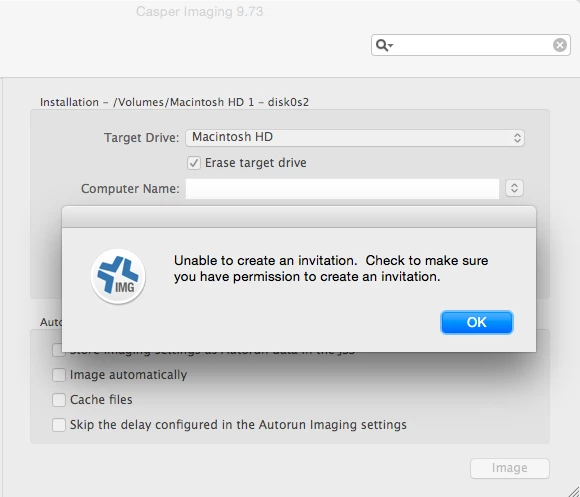
As we got JSS updated to 9.73, Casper Imaging stopped working. After choosing the Configuration and providing my JSS account credentials I get the error message:
"Unable to create the invitation. Check to make sure you have permission to create an invitation"
I have administrator-privilege account with everything checked on JSS User Accounts & Groups side.

Please help. Thanks!
Best answer by mhasman

Garrett Schmidt brings the idea: "Close down Casper Imaging completely and then re-open it while holding down the Option key. This will let us refresh the credentials for Imaging"
After that Casper Imaging is working in Target Mode as well.
Thanks, Garrett! Thanks, Darrin, Brian!

53 replies

dpertschi
Forum|alt.badge.img+19
  • Contributor
  • August 18, 2015

Check the privileges for the account you're logging in with. In JSS Objects, I think you need Create privs for Policies.


Forum|alt.badge.img+7
  • Contributor
  • August 18, 2015

@mhasman I had the same issue when I was imaging a machine that already existed in the JSS. I don't believe I got that error on a machine that was not in JSS. Like you, my ID has full admin privileges.

As a test, I turned off the setting "Restrict re-enrollment to authorized users only" in Global Management --> User-Initiated Enrollment. Even though, as an admin, this restriction should not apply to you, I have not had the error repeat on me.

Give that step a try and see if it helps.


mhasman
Forum|alt.badge.img+22
  • Author
  • Valued Contributor
  • August 18, 2015

@dpertschi Yes, as Administrator I have full privileges, and everything is checked in JSS Objects

@bkramps I checked, mac is not in the JSS. Checked with another mac which is 100% not in the JSS - the same error message...
Checked Global Management --> User-Initiated Enrollment, "Restrict re-enrollment to authorized users only" is off. Turned it on, tested, turned it off, tested - the same issue...

Thanks for helping! I wonder if there is anything else I may try to play with...


Forum|alt.badge.img+7
  • Contributor
  • August 18, 2015

@mhasman It looks from your screenshot that you are doing Netboot Imaging. Do you get the same error if you do Target Mode Imaging? I don't think I got the error doing TMI? Try a TMI and see if it repeats.

What tool, if any, did you use to create the NetInstall? I had previously been using Casper NetInstall Creator but stopped using it after going to 9.73 since I had so many issues. I created my own NetInstall but the AutoCasperNBI tool works well. If you used Casper NetInstall Creator, I would try making a NetInstall with AutoCasperNBI as a test.

It is possible that switching to my own NBI fixed my issue and not turning off the setting I mentioned in my last post. I did both at the same time.


mhasman
Forum|alt.badge.img+22
  • Author
  • Valued Contributor
  • August 18, 2015

@bkramps Sorry, I forgot to mention that issue comes from Target Mode Imaging. Yes, I got 10.10.5 NetBoot image built via AutoPkgr and AutoCasperNBI yesterday, but did not have a chance to try the imaging process yet.


mhasman
Forum|alt.badge.img+22
  • Author
  • Valued Contributor
  • Answer
  • August 18, 2015

Garrett Schmidt brings the idea: "Close down Casper Imaging completely and then re-open it while holding down the Option key. This will let us refresh the credentials for Imaging"
After that Casper Imaging is working in Target Mode as well.
Thanks, Garrett! Thanks, Darrin, Brian!


themacdweeb
Forum|alt.badge.img+7
  • Contributor
  • September 10, 2015

@mhasman Your solution doesn't work for us if we're netbooting the device in question. Full admin rights on Casper? No problem. Partial admin rights? Not so good. Despite granting full rights to Capser Imaging for one of our tech bench staff (who does not have full admin rights) he gets the same "Needs an invitation) error even after we option-launch Casper Imaging.

Our 10.10.4 netboot image was built -- like you -- with AutoCasperNBI.


Forum|alt.badge.img+7
  • Contributor
  • November 2, 2015

Was any one able to figure this out the above didn't work.


bentoms
Forum|alt.badge.img+35
  • Hall of Fame
  • November 5, 2015

@pgh I thought this was an issue with having full rights to computer objects but what @themacdweeb said has me doubting myself.

@themacdweeb Did the tech have full rights to computer objects within the JSS?


Forum|alt.badge.img+7
  • Contributor
  • November 5, 2015

@bentoms Thanks for the reply

@themacdweeb Where you able to figure it out?

The tech has Create Read Update. However delete is not checked. for computer objects. (Should i check it?)The user was able to image and then one day was not able to. The tech was in a group and he was the only one that was having the issue i took him out of the group and gave him custom privileges. The user is the following LDAP User, Full Access, Custom.

We also deleted and added the account back and added him back to the group however no success and like i said other users in that group are not having the issue just him.


Forum|alt.badge.img+14
  • Contributor
  • November 5, 2015

@erin.miska This KB article could use an update, "add hardware" doesn't appear to exist anymore: Imaging Computer Permission Requirements

From trial and error I wound up with these settings for techs to image (TDM and NetBoot) and use Casper Remote successfully with limited rights.....please note these are likely not exactly what are required, but they are working for me on 9.63:

JSS Objects
Computer Enrollment Invitations -CRUD (Create, Read, Update, Delete)
Computers - CRUD
Enrollment Profiles - CRUD
Policies - CR (I think Create was needed to use Casper Remote to push software...this really needs to be a separate permission)
Users - CR (I think this was for imaging too....not sure)
Some other settings - Read only to share information, I don't think any were required for functionality.

JSS Settings
All - Read only

JSS Actions
Eveything except change password and send emails to users

Recon -access to both
Add Computers Remotely
Create QuickAdd Packages (this was necessary for something....probably imaging? I don't actually want them creating quick add packages)

Casper Admin - none

Casper Remote - All

Casper Imaging - just not autorun data


Forum|alt.badge.img+7
  • Contributor
  • November 5, 2015

@themacdweeb

@Josh.Smith

@bentoms

OK the only thing that was not check was computer -> delete permissions, and JSS settings had to mark read.

I will have him try it and report back the status.


Forum|alt.badge.img+3
  • New Contributor
  • November 6, 2015

Maybe try changing the password?
We've seen a password with special characters cause this for a full admin, changed password and hey presto. The characters were not that special, either. It only manifested during imaging, same error.


mhasman
Forum|alt.badge.img+22
  • Author
  • Valued Contributor
  • November 6, 2015

Here is what I did to get for issue fixed (JSS 9.81):

  1. Boot up mac with Casper Imaging external drive

  2. Re-enroll with JSS

  3. Reboot


Forum|alt.badge.img+7
  • Contributor
  • November 9, 2015

Explain how to re-enroll with jss?

Thanks


themacdweeb
Forum|alt.badge.img+7
  • Contributor
  • November 9, 2015

we don't, as a general rule, provide edit or delete capabilities to ANY L1 or L2 helpdesk staff, so our solution looked differently than yours but i think you nailed it. we edited:

JSS Objects, JSS Settings, JSS Actions to allow more create/read rights and now our staff IS able to log into via netbooted image and run casper imaging on the local device.

note: we didn't give ANY recon rights.

thank you for the suggestions, everyone and, especially, @Josh.Smith


anickless
Forum|alt.badge.img+9
  • Contributor
  • April 3, 2018

So if anyone hit this in 10.3 Support says there is a error in JSS that special characters makes this error show. If you change the account password to just numbers and letters than the issue goes away.


Forum|alt.badge.img+17
  • Valued Contributor
  • April 3, 2018

We just encountered this like minutes ago. PI is PI-005660. This means also Jamf Admin LDAP users/groups with a period or any special characters on their UN/PW will not work. So you need to create a special user for Casper/JamfPro Imaging. But this affects JamfPro Imaging only. LDAP accounts still work on JamfPro Admin.


jclements
Forum|alt.badge.img+4
  • Contributor
  • April 4, 2018

Thank you, @Eigger. Changing my user password fixed the problem for me.


Forum|alt.badge.img+3
  • New Contributor
  • April 5, 2018

yep super simple un and pw fixed this. JAMF 10.3.0
no bueno.....


Forum|alt.badge.img+1
  • New Contributor
  • April 5, 2018

Yep. @Eigger 's fix worked for me as well:
Created a new local admin with no special characters in the password. Recon made the package.
Thanks!


Forum|alt.badge.img+13
  • Valued Contributor
  • April 9, 2018

What's even worse, I have special characters in my LDAP account (password policy requirement), and not only does it fail to image, it locks my LDAP account out as well!

I'll be making an enrollment-only account now.


Forum|alt.badge.img+4
  • Contributor
  • April 16, 2018

Changing my LDAP password fixed the issue here. I'm going to to have to create an enrollment only account.


Forum|alt.badge.img+15
  • Contributor
  • April 16, 2018

Unfortunately, changing passwords doesn't work in an environment like mine that enforces a minimum complexity for the passwords our provisioning technicians use. In my experience in the past, sometimes these issues can be triggered by new features that are added in an upgrade but not enabled by default, but that doesn't appear to be the case here either. Or, I can't find a smoking gun if there is one.


Forum|alt.badge.img+17
  • Valued Contributor
  • April 17, 2018

@bmarks So you have no permission yourself in your JamfPro to create a "Local User" non LDAP, with simple UN like Admin and simple Password like 4dm1n with Imaging and Enrollment only permission that your Provisioning Technicians can share?