Question

Casper Imaging - the script could not be found

  • December 15, 2015
  • 41 replies
  • 175 views

Forum|alt.badge.img+5

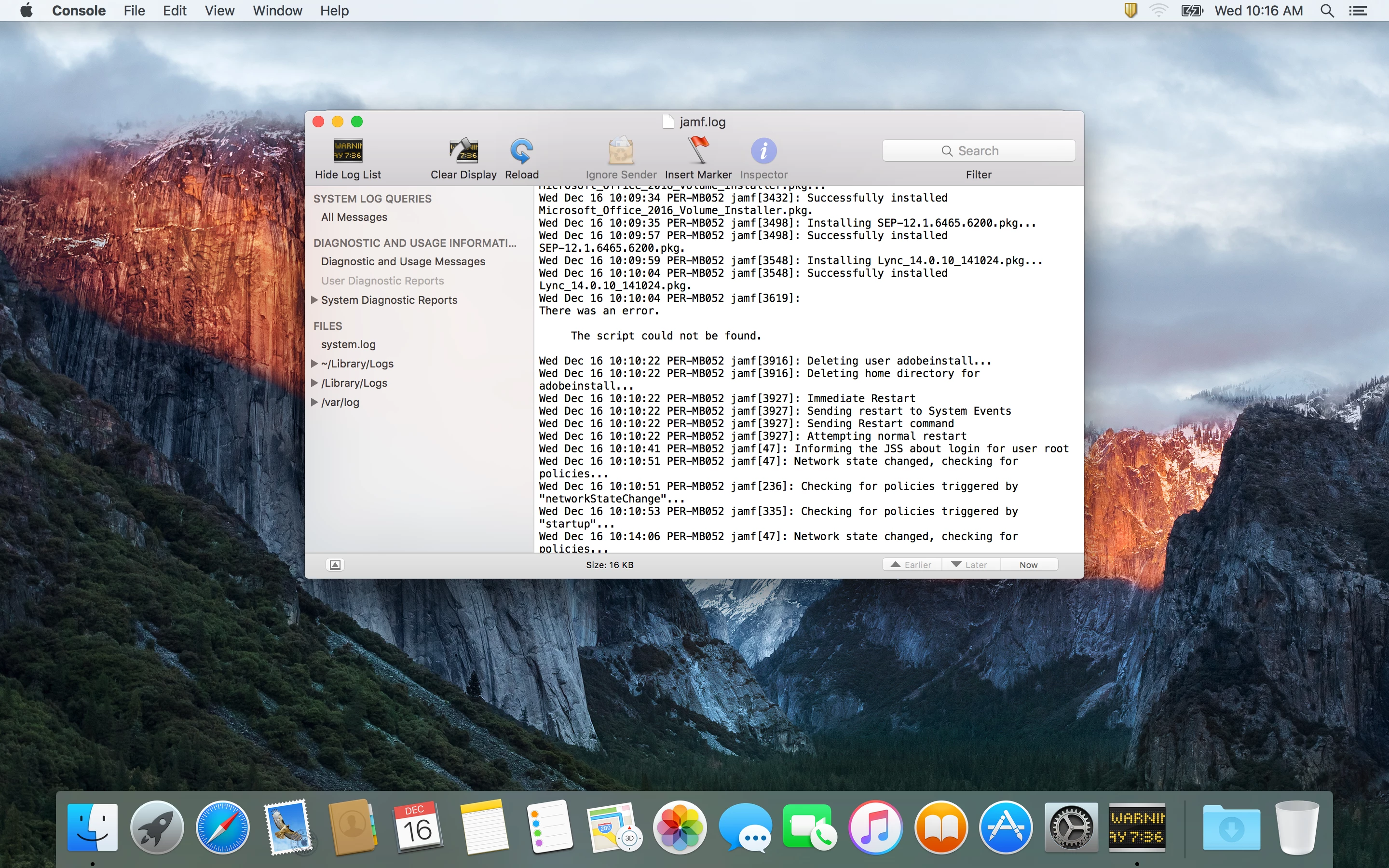
Hi all I am having an issue when imaging my macs, if I try a include a postflight script to call on other settings and software updates I get an error in my jamf.log saying

The script could not be found.

All other packages work fine and these scripts work fine if deployed via a policy or ran manually in the terminal.
the only information I found so far is https://jamfnation.jamfsoftware.com/article.html?id=151 which assumes theres an error with the script itself,
I'm running 9.81.
Any ideas?

41 replies

Forum|alt.badge.img+16
  • Valued Contributor
  • December 15, 2015

Are you setting the script to run After Restart? scripts run directly during imaging tend to behave a bit wonky, included in imaging but set to run After Restart tends to work pretty reliably.


Forum|alt.badge.img+5
  • Author
  • Contributor
  • December 16, 2015

Yep, At reboot, it seems the script(or any scripts) isnt making its way into FirstRun: /Library/Application support/JAMF/FirstRun with the packages to be installed. The scripts are definitely on the share as they run fine in a policy.
Could this be a permissions issue?


Forum|alt.badge.img+16
  • Valued Contributor
  • December 16, 2015

Are the scripts stored on the share or in the database.
We had the option to migrate them during one of the upgrades and did so without any issues. It seems to be better this way as they are always available even when the distribution points aren't.
We are on 9.81


Forum|alt.badge.img+5
  • Author
  • Contributor
  • December 16, 2015

Casper admin says stored in database for all scripts


Forum|alt.badge.img+16
  • Valued Contributor
  • December 16, 2015

Thats very odd, I frequently use scripts from the database set to run at reboot without issue.


Forum|alt.badge.img+5
  • Author
  • Contributor
  • December 16, 2015

trying again with one uploaded to the share with 777 permissions applied, seeing if theres any difference


Forum|alt.badge.img+16
  • Valued Contributor
  • December 16, 2015

You don't just create / paste them straight into the JSS through the web interface? I always do it that way, perhaps it makes a difference.


Forum|alt.badge.img+5
  • Author
  • Contributor
  • December 16, 2015

Yep i normally do, yet trying a different way

No go

still get the same error,

opened the jamf.log when it was installing all the First run packages, packages installed without an issue, then it reached the script and threw the same error again.


Forum|alt.badge.img+5
  • Author
  • Contributor
  • December 16, 2015


Forum|alt.badge.img+5
  • Author
  • Contributor
  • December 16, 2015

Ok, after a bit more testing I got it to find the script

had to keep just the script in first Run section with no packages in there,
it still failed though with the error
Could not connect to the JSS. Looking for cached policies...

So its a bit of a step in the right direction, yet still not working, it can connect to the JSS for other polices, any ideas?


Forum|alt.badge.img+16
  • Valued Contributor
  • December 16, 2015

Will think on it and if anything comes to mind will let you know, it's pretty odd it connects for somethings but not others!
One thing we have in our work flow just because it seemed to help and machines sometimes didn't in enroll is we have the QuickAdd set to run on reboot as well.


RobertHammen
Forum|alt.badge.img+29
  • Esteemed Contributor
  • August 24, 2016

Just ran into this same issue with Casper Imaging 9.93. 3 scripts set to run At Reboot. Configuration is Base OS, AD bind, 33 packages all set to be installed after imaging. Everything works up until it is supposed to run the 3 scripts, then "There was an error. The script could not be found." Scripts stored in DB/if I create a policy scoped to my freshly-imaged Macs, with the 3 scripts as part of it, they run successfully... seems like a bug or issue with Casper Imaging. Tomorrow I'll try re-imaging the Mac and checking the FirstRun directory and see if they are actually there...


Forum|alt.badge.img
  • New Contributor
  • December 7, 2016

Just ran exactly same issue and after doing some troubleshooting, I have found the '/' characters in the script name was causing the issue.

I have renamed my "Disable Apple iCloud / Diagnostics / Siri / TouchID Prompts" script to "Disable Apple iCloud - Diagnostics - Siri - TouchID Prompts" and it worked without any issues.


Forum|alt.badge.img+1
  • New Contributor
  • March 10, 2017

Hi Guys, this issue happens on our site after upgrading from 9.92 to 9.97, there are some scripts could not be copied to First Run folder during Casper Imaging version 9.97, if i check the log, it shows The script could not be found. or Could not download "the script" to the cache in Casper imaging log. I have tried changing script names , re-editing , or creating new script with same codes in , the issue still occurs. But the scripts in the policies work, has anyone solved this issue?


Forum|alt.badge.img+16
  • Honored Contributor
  • March 10, 2017

@dzhang

Are using 9.97.1488392992? if so reach out to jamf. I think it's a known issue.. I don't have the defect ID with me sorry.

I made a .dmg of the scripts without the .sh and then add that to my prestage.

It will also work if you don't have it set to auto run. : ) You have configure it to require you to log in to Casper imaging.

C


Forum|alt.badge.img+1
  • New Contributor
  • March 10, 2017

@gachowski

Yes, we are using 9.97.1488392992 now, we have this issue since the previous version 9.97.1482356336. After upgrading to 9.97.1488392992, the issue has not been solved. I have already reached out to Jamf support, hopefully they can help solve the issue.
I will try your method if needed, thanks for your help Chris.


neilmartin83
Forum|alt.badge.img+7
  • Contributor
  • March 10, 2017

Also noticing this only with autorun imaging, since upgrading to 9.97.1488392992 (was working in 9.97.1482356336). We have a first run script that runs at reboot. Have tried renaming the script, getting rid of spaces, replacing them with underscores etc to no avail.


Forum|alt.badge.img+17
  • Honored Contributor
  • March 10, 2017

Just as a data point, we didn't migrate in casper admin (I know, I know) so our scripts are outside our db... am not seeing this issue.


Forum|alt.badge.img+16
  • Honored Contributor
  • March 10, 2017

@dzhang

Here is the defect number PI-003666

@neil.martin83

Jamf support said the issue is in prestage and autotrun, I also see the issue with scripts added in a configuration.

It's an easy fix to just build a .dmg with the scripts and put them in the same location. I had to remove the .sh to get it working.

C


Forum|alt.badge.img+12
  • Valued Contributor
  • March 22, 2017

Ugh, we have several scripts that run at imaging. Now to go and package all of those scripts to fix this.

One question about having a defect number. Is this just to be able to have the information when contacting my TAM? Or is there a web site that I can search on that defect to see the status?


neilmartin83
Forum|alt.badge.img+7
  • Contributor
  • March 22, 2017

9.98 released but no mention of PI-003666 in the release notes. http://docs.jamf.com/9.98/casper-suite/release-notes/Bug_Fixes_and_Enhancements.html

Ho hum.


neilmartin83
Forum|alt.badge.img+7
  • Contributor
  • March 22, 2017

9.98 released but no mention of PI-003666 in the release notes. http://docs.jamf.com/9.98/casper-suite/release-notes/Bug_Fixes_and_Enhancements.html

Ho hum.


Forum|alt.badge.img+12
  • Valued Contributor
  • March 22, 2017

@gachowski, When you say to create a dmg of the scripts in the same location, what location is that? I am guessing you mean to just package those script files to some particular folder so that when the imaging process gets around to running them it can find them, but what location is it looking to find them in?


Forum|alt.badge.img+16
  • Honored Contributor
  • March 22, 2017

Double check my my work but it should be

/Library/Application Support/JAMF/FirstRun/PostIntall/Resources


Forum|alt.badge.img+12
  • Valued Contributor
  • March 22, 2017

Was just coming back to say that I just interrupted imaging a Mac here and looked through the scripts and found that same location that you found. I am in the process of packaging my scripts and adding it to my image configuration.