Question

Casper Imaging - the script could not be found

  • December 15, 2015
  • 41 replies
  • 175 views

Show first post

41 replies

Forum|alt.badge.img+12
  • Valued Contributor
  • March 23, 2017

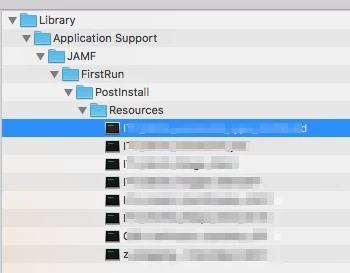
Ok, that worked. I downloaded all of the scripts from the webpage (we reference 6 in our image configurations) and removed the '.sh' that was added during the download. Then packaged all of these scripts in Composer, putting them in the /Library/Application Support/JAMF/FirstRun/PostIntall/Resources folder. I then uploaded this packaged DMG to the server using Casper Admin, and set it to Priority 5 (before anything else) and Install on Boot. The final step was to add this DMG to all imaging configurations. After doing this, imaging is now working properly again. Thankfully, none of these scripts change, so I shouldn't need to update this package before Jamf gets the issue fixed.

Thanks so much for the suggestion and the follow nudging into the right direction. This was going to be a pretty major issue for us if we hadn't had a workaround.


jmahlman
Forum|alt.badge.img+17
  • Valued Contributor
  • March 30, 2017

I just told my TAM that I'm also having this issue. I'm trying the DMG workaround now.

It really is bad that this wasn't listed in the known issues for 9.98, if we would have known this we would never have upgraded.


CypherCookie
Forum|alt.badge.img+7
  • Contributor
  • April 4, 2017

@jmahlman This one of several issues that were closed off in previous versions of the JSS, only to be reintroduced back in since (from what i can see) 9.97.1488. Currently I have 3 calls open for problems which had been previously fixed in previous JSS versions.


jmahlman
Forum|alt.badge.img+17
  • Valued Contributor
  • April 4, 2017

After reaching out to jamf I was sent this response:

We have noted that you are affected by this particular product issue. I did want to let you know that this issue is not planned to be fixed because it is related to a security hole that we fixed in our 9.97 hot fix. We are advising users to instead deploy scripts via a package after enrollment so that we can proceed with the automated imaging and not requiring authentication when Casper Imaging is opened up.

So this isn't a bug...it's a feature.

The workaround we went with was putting the script in a pkg as a postinstall script. Works fine for us, luckily we have only one script at image time.


Forum|alt.badge.img+5
  • Contributor
  • April 6, 2017
In regards to your questions, the Product Issue: PI-003666, was marked as Closed, with no fix. The reason why this happened is that this workflow creates a Security Risk, and for that reason it was closed with no fix. The workflows accepted for this are following: 1 Use Composer to deploy a script to a temp directory and then add a post install script to execute the script and then delete the script from the temp directory once complete. 2 Execute the scripts via a Package, Policy 3 Configure Prestage so that Account Information is not Passed Automatically, that will require the Technician to manually authenticate into Casper Imaging and start the process of imaging. This will not break then the download for the Scripts during Imaging [...] You are correct, but due to this being flagged as a Security Risk only since 9.97, after longer testing, and consideration for Security, it was decided to apply this since 9.97 only. About the option to use Scripts during Imaging, while having Autorun option enabled, I would assume it will be removed, or changed accordingly in a future release (can't estimate or give a sure answer on an ETA for this though).

According to this, I'd say all people who used "flushPolicyHistoryAtReboot" within their (re-)imaging Workflow have a problem now.

And if I remember right, you cant change autorundata by API?!


Forum|alt.badge.img+13
  • Valued Contributor
  • April 13, 2017

@jmahlman Thanks for sharing.
I was hit with this fairly early as we moved from 9.91 to 9.97.1488392992 very shortly after release. I thought it was just a bug and was told it was related to the security fixes they were trying to implement. My support person was just as puzzled as I and thought it would be fixed fairly quickly. Until that time, we reverted to 9.91, then went back up to 9.97.1428356336 which we had been testing. We only opted for the newer hotfix given the urgency jamf was pushing on it.

Then like others, I saw it was not addressed in 9.98 so I reached out and confirmed it was still an issue that hadn't been addressed.
However, this is the first I'm hearing it won't be fixed at all.
I understand they discovered the issue with scripts but jamf's communication on this specific issue has been horrendous.
This should have been front and center on the 9.98 notes after the decision was made not to fix it as it was now intended behavior.

I'm really displeased in how they have handled this situation and given us the (lack of) information we need to move forward with the 9.98 release in our environments.


Forum|alt.badge.img+7
  • Contributor
  • May 8, 2017

I normally don't come on here to whinge... but...

What the hell JAMF?????!!!!!

way to comunicate!

Can someone please confirm that the scripts now need to be in /Library/Application support/JAMF/FirstRun as an .sh file? (deployed by DMG at imaging I expect). This is what I have gathered from the rest of this post. I'll be testing it this afternoon if I can't get around it any other way first!

Thanks!


Forum|alt.badge.img+17
  • Honored Contributor
  • May 8, 2017

Maybe jamf should provide a button to 'unmigrate' scripts out of the database to avoid this "working as designed" behavior. I assume that's why I'm not seeing this - haven't clicked the migrate button yet. Scripts are copied down as part of imaging and ran locally versus getting them out of the db.


Forum|alt.badge.img+9
  • Valued Contributor
  • May 8, 2017

@CasperSally That shouldn't be an option, that should be a REQUIREMENT. Since they see this as a security issue, the scripts should be copied down by Imaging.

Telling us to "Use Composer to deploy scripts" is a crapshoot hack, since it implies that our scripts never change. Mine change regularly. Though I have not been bit by this particular defect yet, I would love an option to pull my scripts out of the db so that I can actually do change management on them.


Forum|alt.badge.img+12
  • Contributor
  • May 25, 2017

I just followed @musat 's advice and it worked a treat.
created script files of all the required scripts.
Added them to a package in composer like so
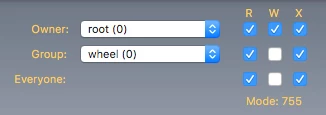
Made sure the permissions were set like so

Saved as a dmg
Load into jamf and set to install after reboot and priority 1

added that into the configuration and off you go.


Forum|alt.badge.img+8
  • Contributor
  • June 28, 2017

I love finding this sort of stuff just before we start imaging labs for the Summer.

So fun.


Forum|alt.badge.img+13
  • Valued Contributor
  • June 28, 2017

@snovak Hey, at least you did find it BEFORE imaging.
It's worth it to delay a week and get it right then realize you have to go back and do it all again!
Good luck


Forum|alt.badge.img+8
  • Valued Contributor
  • July 21, 2017

@jmahlman Glad I read this and was pointed to it by another JAMF user. I've never built a script package and post install, how would I go about doing that? I have 8 scripts to run. Do you have a post somewhere describing that.

Thank you for your assistance, have a great day today!


Forum|alt.badge.img+16
  • Honored Contributor
  • July 21, 2017

This might help

https://soundmacguy.wordpress.com/2017/04/05/casper-imaging-wot-no-scripts-after-autorun/


Forum|alt.badge.img+8
  • Valued Contributor
  • July 21, 2017

@gachowski Thank you I'll look into this. Have a great day today!


Forum|alt.badge.img+1
  • New Contributor
  • January 15, 2019

late post, but
you could create a package that runs a script that connects to a server share with your scripts that runs all scripts in the folder.
that way you can still manage without having to build packages every time you need to edit something,

I actually had a system that did just this. then we bought JAMF.
now I have to go back to the system I had written years ago.
security is a slide rule with utility on the other end. too much security, and your app can be rendered useless.