Solved

Casper Managed Prefrence Desktop Picture

  • February 3, 2017
  • 4 replies
  • 30 views

Forum|alt.badge.img+8

Good morning everyone,

This is not a ground breaking thing but I cannot get the Managed Preferences to display a picture that I choose to show on the Desktop no matter what I do.

Funny because I can set the Wifi, Bluetooth and other items to turn off, but not the Desktop Picture of my choosing to display.

We do a lot of Adobe CC for training and college production and the teachers and designers want the gray Desktop to be present when logged in. And I am at a lose.

Again not an earth shattering thing but I am at a lose.

Everyone have a very great day today!
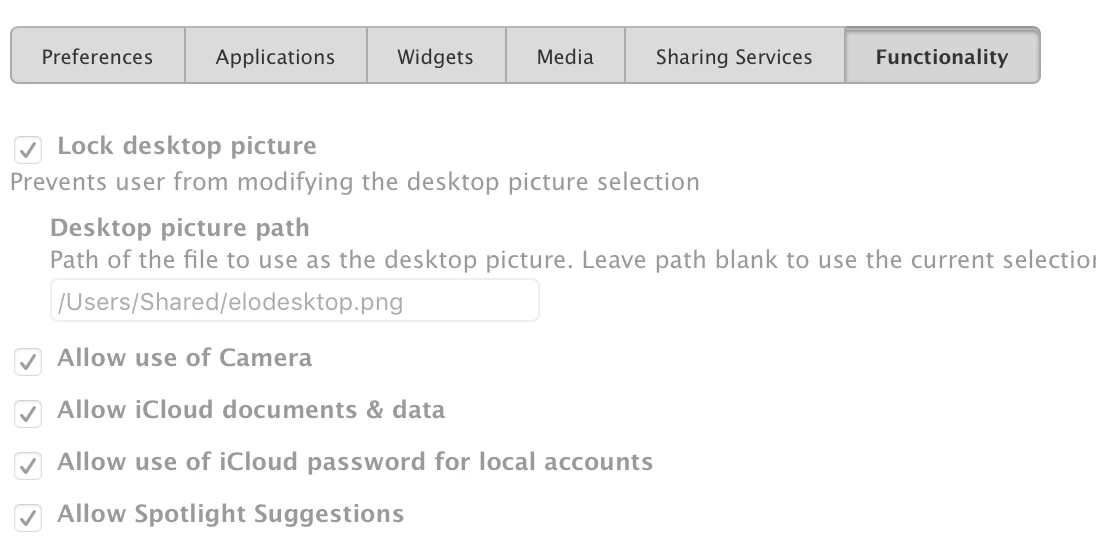
Best answer by tdclark

I do this through a config profile. It is under the functionality tab in the restrictions payload.

4 replies

tdclark
Forum|alt.badge.img+21
  • Contributor
  • Answer
  • February 3, 2017

I do this through a config profile. It is under the functionality tab in the restrictions payload.


Forum|alt.badge.img+8
  • Author
  • Valued Contributor
  • February 3, 2017

@tdclark, Thank you so much, that did it! I appreciate that. You have helped me over hurdle.

Have a great day my friend. If I can repay the kindness in the future I surely will.


tdclark
Forum|alt.badge.img+21
  • Contributor
  • February 7, 2017

Feel free to mark the question as answered! Enjoy your day!


Forum|alt.badge.img+8
  • Author
  • Valued Contributor
  • February 7, 2017

@tdclark Thank you my friend!

Have a great day!