Question

Catalina Single Sign On

  • September 23, 2019
  • 123 replies
  • 678 views

Forum|alt.badge.img+4

Has anyone setup Single Sign on with Catalina OS? I heard about it in during their last event. I am up to date with the Catalina Beta but cannot find anything to set it up. https://developer.apple.com/videos/play/wwdc2019/303/ towards the end of this video is where it is mentioned. We want to have the Mac users login to their computers the same way our PC (All PCs are joined to Azure) users do by using their email address and password. Any recommendations?

123 replies

Forum|alt.badge.img+16
  • Honored Contributor
  • September 23, 2019

Brent,

The Apple directions/test plan are in the Apple seed for IT program.

C


Forum|alt.badge.img+14
  • Honored Contributor
  • September 23, 2019

I’ve set it up. Works good. Some features are missing when compared to Enterprise Connect, but otherwise it works good and suits our needs.


Forum|alt.badge.img+18
  • Contributor
  • September 23, 2019

Just to be clear, the Single Sign-On extension doesn't allow for logging in with email addresses, does it? That's a whole other thing we can't talk about yet, or at least I thought. SSO extension is basically just EC built in.


Forum|alt.badge.img+4
  • Author
  • Contributor
  • September 24, 2019

@ooshnoo So you are able to login to your Macs using email address and password? You dont happen to have a walk through of the setup or a link to the setup that you did, do you?


Forum|alt.badge.img+9
  • New Contributor
  • September 24, 2019

It is using AD, not Azure AD. So email address is not used to login.

@bmichael Setup info is not public yet. You need to use AppleSeed to get access to the config profile to test it.


Forum|alt.badge.img+7
  • New Contributor
  • September 25, 2019

@patgmac If possible and willing, can you share your SSO config that you're using to test??

Thanks in advance ::sp


Forum|alt.badge.img+7
  • Contributor
  • September 25, 2019

@smpotter @bmichael You can piece together what you need to create the profile from the ExtensibleSingleSignOnKerberos developer documentation. Alternatively update to Jamf Pro 10.15 as they have added the Single Sign-On Extensions payload.


Forum|alt.badge.img+7
  • New Contributor
  • September 26, 2019

I have it working but was curious about it displaying how many days left till password expires. Per the doc it states to configure "pwExpirationDays" which I did but on the device its still showing "Password doesn't expire"...


Forum|alt.badge.img+14
  • Honored Contributor
  • September 26, 2019

@smpotter I'm not using that key, and it shows a countdown of days until expiration by default. Plus I don't even see that key listed in the doc. Are you sure you're not referring to: passwordNotificationDays

https://developer.apple.com/documentation/devicemanagement/extensiblesinglesignonkerberos/extensiondata


Forum|alt.badge.img+5
  • Contributor
  • October 15, 2019

Is it similar to Enterprise Connect PKI? I mean: does it support login/SSO via SmartCards?


Forum|alt.badge.img+10
  • Contributor
  • October 15, 2019

Anyone know is SAP can work with this new single sign on mode - we are running nomad and no AD


Forum|alt.badge.img+6
  • Contributor
  • October 15, 2019

@ooshnoo to clarify you have local users able to SSO into web applications for example? What IDP are you using? Have you got any instructions?


boberito
Forum|alt.badge.img+22
  • Jamf Heroes
  • October 15, 2019

@jlattke it basically replaces Enterprise Connect. It can do SSO with smartcards. Super simple set up as long as you're using AD not AzureAD.


nvandam
Forum|alt.badge.img+9
  • Valued Contributor
  • October 15, 2019

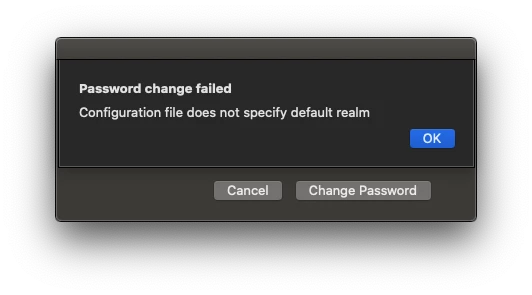
I have it mostly working, but get this error when I try to change the password.


Forum|alt.badge.img+6
  • Contributor
  • October 15, 2019

@nvandam can you roughly describe how you set it up and what IDP you're using?


nvandam
Forum|alt.badge.img+9
  • Valued Contributor
  • October 15, 2019

@petestanley , Here's the example .mobileconfig Apple has. Just change "example.com" to your domain. The upload that to Jamf and push to a 10.15 Mac. We are using AD.

<?xml version="1.0" encoding="UTF-8"?>
<!DOCTYPE plist PUBLIC "-//Apple//DTD PLIST 1.0//EN" "http://www.apple.com/DTDs/PropertyList-1.0.dtd">
<plist version="1.0">
<dict>
    <key>PayloadContent</key>
    <array>
        <dict>
            <key>ExtensionData</key>
            <dict>
                <key>allowAutomaticLogin</key>
                <true/>
                <key>isDefaultRealm</key>
                <false/>
                <key>pwNotificationDays</key>
                <integer>15</integer>
                <key>requireUserPresence</key>
                <false/>
                <key>syncLocalPassword</key>
                <true/>
                <key>useSiteAutoDiscovery</key>
                <true/>
            </dict>
            <key>ExtensionIdentifier</key>
            <string>com.apple.AppSSOKerberos.KerberosExtension</string>
            <key>Hosts</key>
            <array>
                <string>.example.com</string>
            </array>
            <key>PayloadDisplayName</key>
            <string>Single Sign-on Extensions</string>
            <key>PayloadEnabled</key>
            <true/>
            <key>PayloadIdentifier</key>
            <string>com.apple.mdm.test.local.af517dc0-7353-0137-3524-3a008d11ab01.alacarte.single-sign-on-extension.79757090-7354-0137-3525-3a008d11ab01</string>
            <key>PayloadType</key>
            <string>com.apple.extensiblesso</string>
            <key>PayloadUUID</key>
            <string>79757090-7354-0137-3525-3a008d11ab01</string>
            <key>PayloadVersion</key>
            <integer>1</integer>
            <key>Realm</key>
            <string>EXAMPLE.COM</string>
            <key>TeamIdentifier</key>
            <string>apple</string>
            <key>Type</key>
            <string>Credential</string>
        </dict>
    </array>
    <key>PayloadDisplayName</key>
    <string>Kerberos SSO</string>
    <key>PayloadIdentifier</key>
    <string>com.apple.mdm.RJLmpb.local.af517dc0-7353-0137-3524-3a008d11ab01.alacarte</string>
    <key>PayloadOrganization</key>
    <string>Apple</string>
    <key>PayloadRemovalDisallowed</key>
    <false/>
    <key>PayloadScope</key>
    <string>System</string>
    <key>PayloadType</key>
    <string>Configuration</string>
    <key>PayloadUUID</key>
    <string>af517dc0-7353-0137-3524-3a008d11ab01</string>
    <key>PayloadVersion</key>
    <integer>1</integer>
</dict>
</plist>

Forum|alt.badge.img+6
  • Contributor
  • October 15, 2019

Thanks @nvandam!


Forum|alt.badge.img+4
  • Contributor
  • October 17, 2019

@nvandam Thanks a lot for this, extremely useful.

I'm trying to establish whether we'd be able to use the Single Sign On Extensions in our lab environment and remove the bind to AD altogether. I'm assuming a user account would need to be created on the system first, and then the system would prompt to sync up the login and AD passwords once logged in?

Also, in my testing folks aren't prompted to enter their AD credentials until they open up Safari which has a company home page based on SSO. How can I get the user to be prompted without opening up a web browser?


Forum|alt.badge.img+16
  • Contributor
  • October 17, 2019

@jazminepena While it's certainly not impossible I think something like NoMAD LoginAD or Jamf Connect would be more beneficial in a lab environment if you're wanting/working toward a no-bind setup. With the SSO extension you would need a local account logged into the machine from the get go.

The SSO extension should be prompting you as soon as the config profile is installed on the machine. At least that has been my experience with it thus far. Are you using the mobileconfig shown above or the provided payload in jamf Pro?


Forum|alt.badge.img+4
  • Contributor
  • October 17, 2019

@mainelysteve Thanks. After some further testing, it does indeed seem to prompt after logging in.

I'm using the mobileconfig from earlier in the thread.


Forum|alt.badge.img+15
  • Esteemed Contributor
  • October 17, 2019

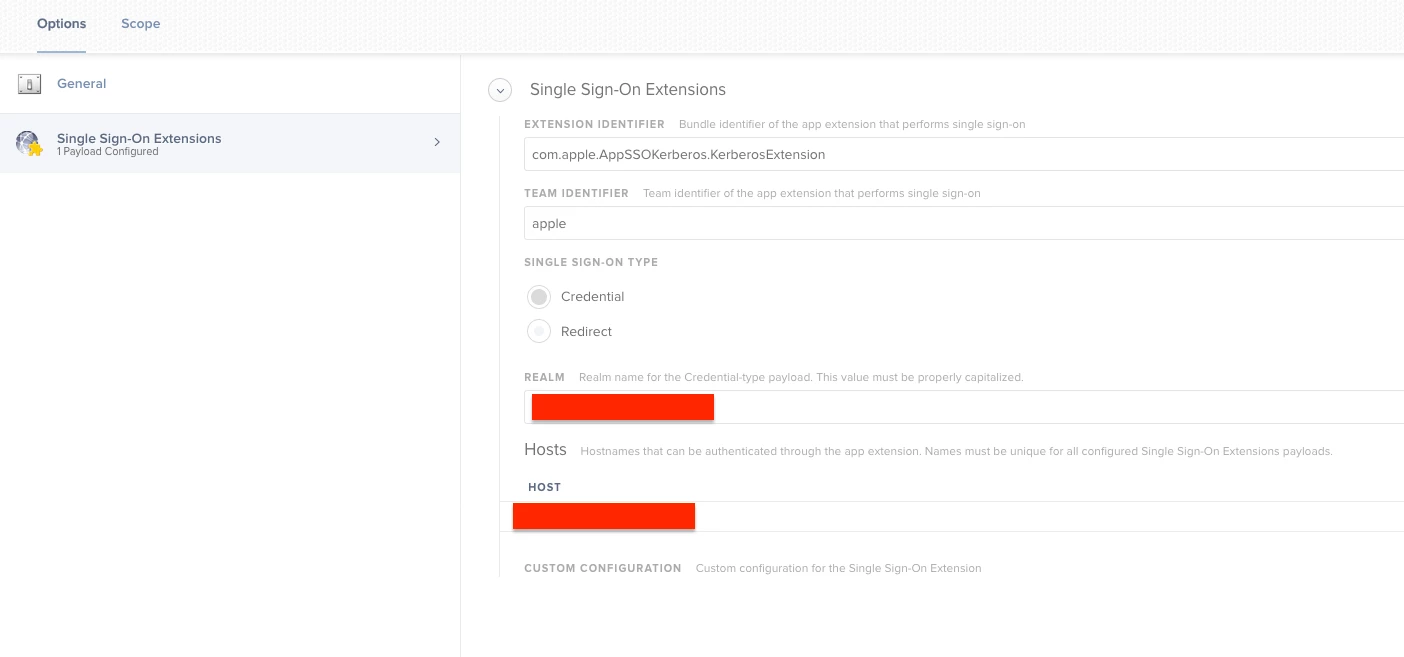
Has anyone figured out a way to pass your account credentials to the SSO extension when you're logged in with an AD mobile account? Screen shot attached of my current SSO profile.


Forum|alt.badge.img+4
  • Contributor
  • October 18, 2019

And does anyone know how I can set the option 'Sign-In Automatically' by default in the config profile?


Forum|alt.badge.img+10

@nvandam Did you figure out what was up with the "Configuration file does not specify default realm" error? I am also seeing that.


nvandam
Forum|alt.badge.img+9
  • Valued Contributor
  • October 21, 2019

@UbiquitousChris , I have not. :(


Forum|alt.badge.img+13
  • Contributor
  • October 21, 2019

@nvandam We have the exact same issue in our environment. It wasn't happening in during the beta cycles, we were always able to change our passwords when we tried... but it started popping up around the GA release of 19A602.

Have you opened a FB or support ticket with Apple, have they given you any details?