Question

Catalina Single Sign On

  • September 23, 2019
  • 123 replies
  • 679 views

Show first post

123 replies

Forum|alt.badge.img+10
  • Contributor
  • October 21, 2019

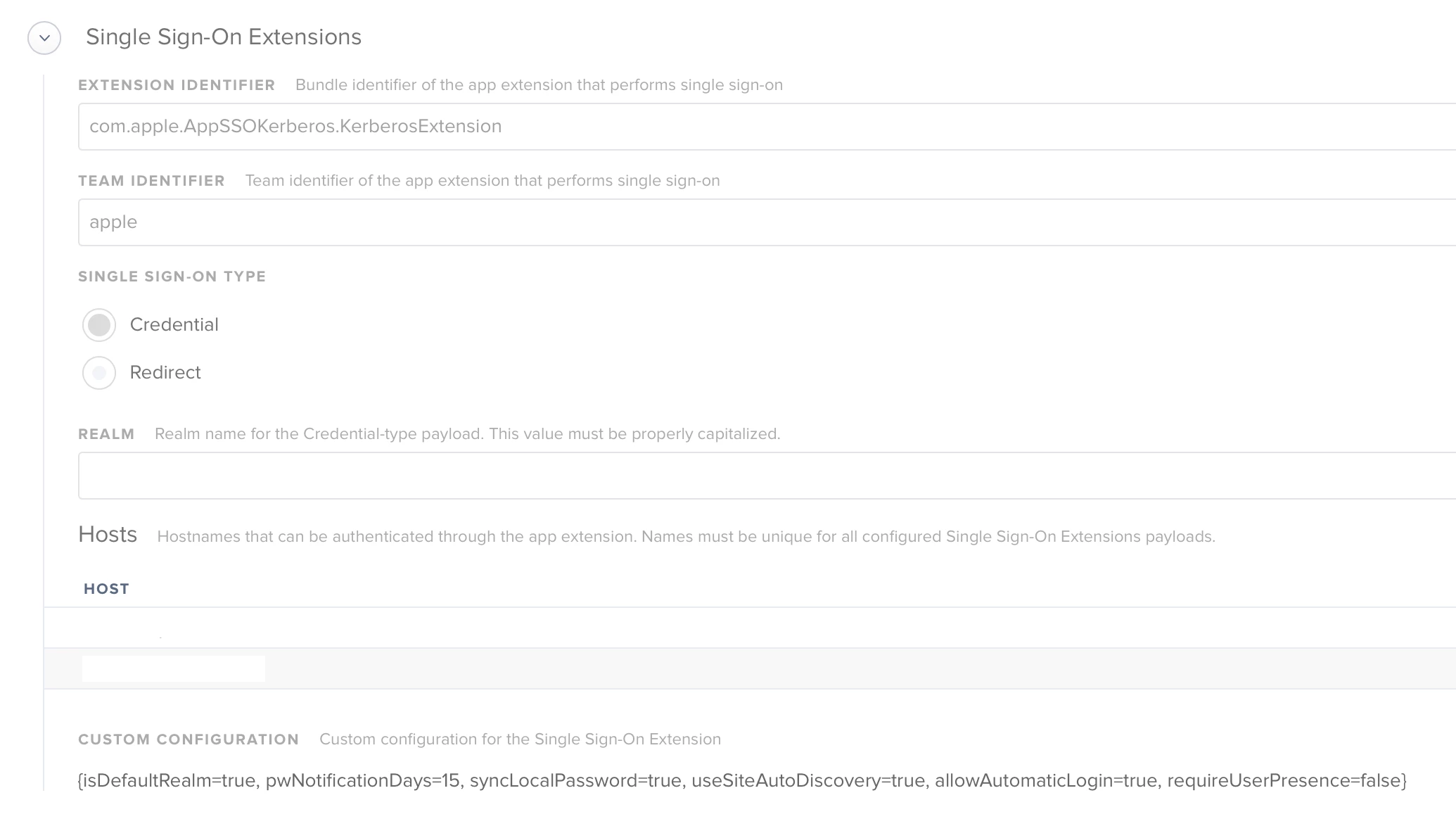
@nvandam @UbiquitousChris Have you tried changing it to True

 <key>isDefaultRealm</key>
 <true/>

nvandam
Forum|alt.badge.img+9
  • Valued Contributor
  • October 21, 2019

@jmariani , I hadn't played with it during the betas, so I can't confirm it ever worked for us. I do not have a ticket open for that right now, no. But I can.

@ammonsc , I have tried changing that and rebooted and still nothing. I wasn't sure if I had it setup incorrectly because it says that capitalization matters, which I think I have it right, but honestly it may be wrong.


Forum|alt.badge.img+10

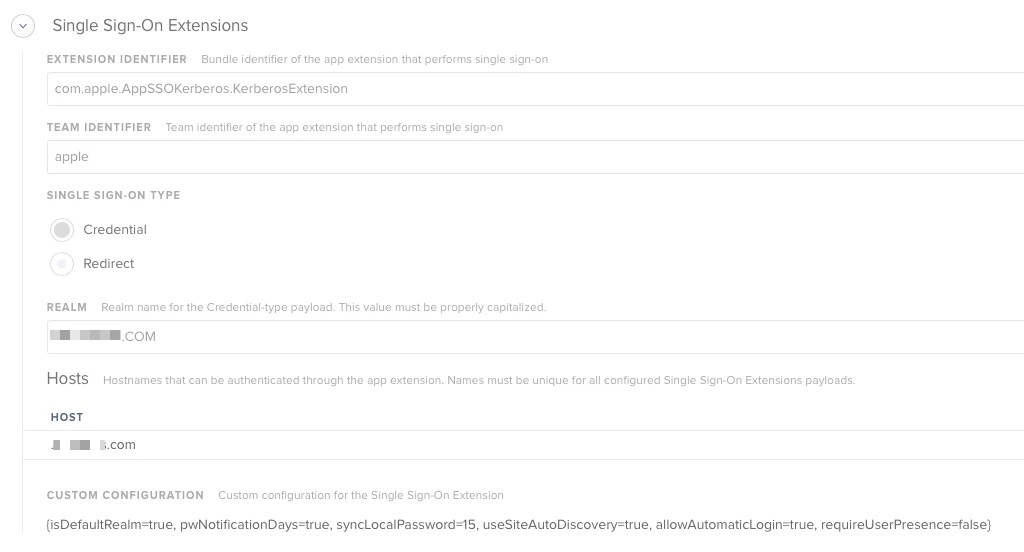
@ammonsc Yup. Heres a screenshot of our config.


Forum|alt.badge.img+20
  • Honored Contributor
  • October 22, 2019

Just checking if others have this working properly? I am using the posted sample PLIST and changing the domain and realm. I can log in to an AD account fine, but (1) the extension is showing my password never expires, which is not true and (2) it is not sync my password with my local account. If I log out, I have to use my original local password and not my AD password to log back in.


Forum|alt.badge.img+4
  • New Contributor
  • October 22, 2019

Which JAMF-PRO version are you using to view the Signal sign-on Extensions?


wmehilos
Forum|alt.badge.img+11
  • Valued Contributor
  • October 22, 2019

@Vanegas , I believe it was introduced in 10.15.0. The payload settings are at like the bottom of the list in config profile creation view.


Forum|alt.badge.img+11
  • New Contributor
  • October 22, 2019

I'm guessing one of the options missing with this is the password-sync feature, checking if AD and local account passwords are different.


Forum|alt.badge.img+8
  • Valued Contributor
  • October 22, 2019

After looking at the configuration profile this seems very familiar to Apple Enterprise Connect. Am I correct to assume that there is not yet a way to use this with an off premise provider like okta?


mark_mahabir
Forum|alt.badge.img+16
  • Jamf Heroes
  • October 23, 2019

@sdamiano I think that is where Jamf Connect comes in.


Forum|alt.badge.img+10

@nvandam I figured something out. If you add the following lines to /etc/krb5.conf, the extension will function again.

[libdefaults]
default_realm = YOUR.REALM.HERE

Forum|alt.badge.img+6
  • Contributor
  • October 24, 2019

I have the same issue.. I;m working with my local apple tech team, but haven't figured out anything...


Forum|alt.badge.img+6
  • Contributor
  • October 24, 2019

@UbiquitousChris I looked for that /etc/krb5.conf I actually dont have that file... I have a krb5.keytab and that's it in that location


Forum|alt.badge.img+10

@jimderlatka I didn't have it either. I had to create it manually.


Forum|alt.badge.img+6
  • Contributor
  • October 24, 2019

@UbiquitousChris wow that worked 100% working now.. thanks


Forum|alt.badge.img+6
  • Contributor
  • November 12, 2019

What is the value for host? Is that suppose an alias for the realm


Forum|alt.badge.img+1
  • New Contributor
  • November 28, 2019

Have tried SSO see screenshot, still can't get it to auto load and fill in their AD credentials automatically. Have tried adding the etc/krb5.conf and no joy. Wondered what other people have done on here to get it to work.


maxhewett
Forum|alt.badge.img+7
  • New Contributor
  • December 3, 2019

@VladCabrera Hosts are the hosts that you want the extension to perform authentication for.

i.e. kerberos-site.mycompany.com


boberito
Forum|alt.badge.img+22
  • Jamf Heroes
  • December 3, 2019

Most likely you want your hosts to be ".company.com", notice the period. That way it covers all addresses under company.com.


Forum|alt.badge.img+1
  • New Contributor
  • December 11, 2019

Hi @nvandam,
I've exactly the same problem, have you find a solution?

Thanks.


jr139
Forum|alt.badge.img+6
  • New Contributor
  • December 11, 2019

@bmichael thanks for creating this thread! I've combed through it and found some helpful information (kudos to @nvandam ) and got this up and running in our test environment. We mainly wanted it for syncing AD passwords with local accounts. Hoping to roll it out to about 650 MacBook Air users after a little more testing.


Forum|alt.badge.img+7
  • New Contributor
  • December 11, 2019

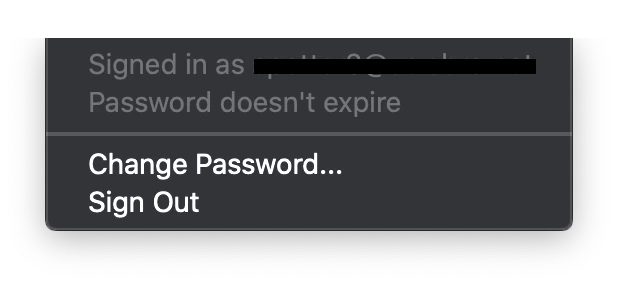
The only issue I'm seeing with the SSO is the fact that it states my password doesn't expire. Is anyone else seeing this behavior?


Forum|alt.badge.img+9
  • Contributor
  • December 11, 2019

When I would first deploy it it would report that my password never expires. Once I logged out and back in it would report accuratly.


noahdowd
Forum|alt.badge.img+11
  • Contributor
  • December 16, 2019

I'm consistently getting "Password doesn't expire" plus when I navigate to internal sites that use SSO Safari just hangs on a blank screen. If I take out the leading "." in hosts, the menubar icon just says "Updating Updating" and Safari forwards to my company's SSO host (I'm assuming this is basically just what would happen without the plugin). Enterprise Connect with as many matching flags as are supported works great. I wondering if maybe I need a redirect style profile that points to some URL like https://sso.mycompany.com/somethingsomething.
A little bit more documentation on this would be lovely.


Forum|alt.badge.img+7
  • Contributor
  • December 18, 2019

I added the krb5.conf file, and now, when I run a kinit, it's actually prompting for my domain password, and giving me Kerberos ticket. I ran a kdestroy and have been authenticating through some internal sites, but it will not give me a new Kerberos ticket. I used the plist by @petestanley above and only changed the host and realm. Any suggestions?


Forum|alt.badge.img+7
  • Contributor
  • December 23, 2019

Hello everyone, I'm trying to manually install the SSO mobileconfig file posted by nvandam above, but I keep getting the following message: "The “Single Sign On Extension” payload can only be installed from a user-approved MDM server."

BTW, I'm using Profile Manager.

Any ideas?